Choosing accounting software blindly can waste weeks.
And honestly?
Nobody has spare weeks lying around.
A good accounting software free trial lets you test real work before you pay.
Not just click around a pretty dashboard and think, “Nice.”
Nice is not enough.
You need to test invoices, bank feeds, reconciliation, expenses, bills, reports, tax or VAT settings, ecommerce integrations, ease of use, support quality, and accountant access.
Yes, that sounds like a lot.
Because accounting software touches a lot.
This guide compares the best accounting software with free trial options in 2026 for small business owners, freelancers, ecommerce sellers, and growing teams.
My preferred order is simple:
- Xero
- FreshBooks
- Xendoo
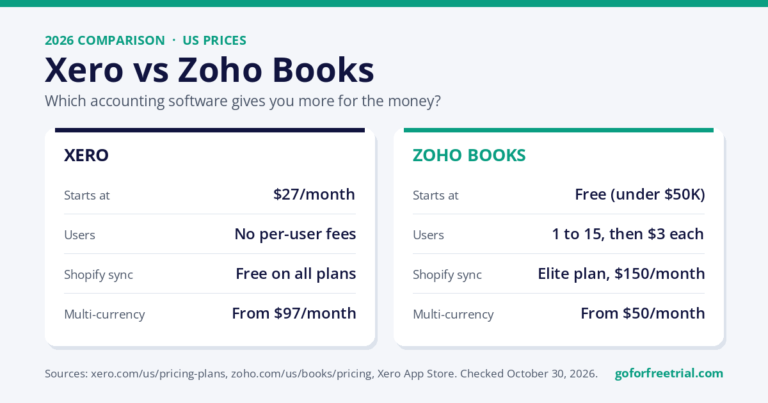
- Zoho Books
After that, compare QuickBooks, Sage, Wave, and other tools depending on your country, accountant, budget, and workflow.
Affiliate Disclosure
GoForFreeTrial may earn a commission when you use some links on this page.
Pricing, free trial availability, discounts, and country-specific features may change without notice.
Always confirm details on the official pricing or signup page before subscribing.
If you want to compare current accounting software offers, free trials, and pricing in one place, you can check the comparison sheet here.
Quick Answer: Best Accounting Software Free Trials in 2026
If you want the short version, start here.
Xero is the best overall accounting software free trial for many small businesses, ecommerce sellers, agencies, and growing teams.
FreshBooks is best for freelancers, consultants, agencies, coaches, and service businesses that mainly invoice clients.
Xendoo is best if you want bookkeeping help instead of doing everything yourself.
Zoho Books is best for value-focused small businesses, startups, and teams already using Zoho apps.
QuickBooks Online is best for US businesses that need accountant familiarity, tax workflows, payroll, and strong reporting.
Sage Accounting is best for UK and compliance-focused businesses that want an established accounting brand.
Wave is best for very small businesses that need a basic free bookkeeping starting point.
My practical recommendation?
Shortlist two tools.
Start one trial at a time.
Test the same tasks in each platform.
Create an invoice.
Enter an expense.
Check reports.
Review bank-feed setup.
Ask your accountant which export or collaboration workflow they prefer.
Do not start six trials at once.
That is how chaos gets a login.
Best Accounting Software With Free Trial: Quick Comparison Table
| Rank | Software | Free trial / free option | Best for | Key features | Pricing notes | Best use case | CTA |
|---|---|---|---|---|---|---|---|
| 1 | Xero | Trial or promotional offer may vary by country/time | Small businesses, ecommerce sellers, and growing teams | Invoicing, bills, reconciliation, reports, integrations, multi-currency on higher plans | Plan prices and discounts change; check live page | Growing businesses that want clean cloud accounting | Compare Xero offer |
| 2 | FreshBooks | Trial availability may vary | Freelancers and service businesses | Invoices, estimates, expenses, time tracking, client workflows | Plan limits and introductory offers can change | Client billing and simple service-business accounting | Compare options |
| 3 | Xendoo | Demo or consultation-style offer may vary | Business owners who want bookkeeping help | Bookkeeping support, monthly reports, catch-up bookkeeping, integrations depending on workflow | Pricing depends on bookkeeping package and business needs | Owners who want help instead of DIY bookkeeping | Compare options |
| 4 | Zoho Books | Free plan or trial may vary by region/eligibility | Value-focused small businesses | Invoicing, banking, automation, reports, client portal, Zoho ecosystem | Check local pricing and tax feature availability | Budget-conscious businesses that like automation | Try Zoho Books |
| 5 | QuickBooks Online | Trial or promotional offer may vary | US businesses and tax workflows | Invoices, expenses, reports, payroll ecosystem, accountant network | Pricing can rise after trial or promotion | Businesses that want strong US accountant support | Compare options |
| 6 | Sage Accounting | Trial availability varies by country | UK and compliance-focused businesses | Invoicing, cash flow, bank connections, VAT support where available | Country pages differ; verify local terms | Owners who want an established accounting brand | Compare options |
| 7 | Wave | Free accounting option where available | Very small businesses | Simple bookkeeping, invoicing, payment add-ons, paid Pro features | Advanced features and payments may cost extra | Microbusinesses that need basic books first | Compare options |
This comparison helps small business owners compare free trials, pricing, and best-use cases before choosing accounting software.
What Is an Accounting Software Free Trial?
An accounting software free trial gives you temporary access to a paid bookkeeping or accounting platform before you subscribe.
It lets you test the product with real workflows instead of trusting marketing pages.
Some trials unlock most paid features.
Some ask for a card before you start.
Some companies offer a discount instead of a standard trial.
Some tools, like Wave or certain Zoho Books plans, may offer a free plan with limits instead of only a short trial.
The important thing is not the word “free.”
The important thing is whether the trial helps you decide if the software fits your business before you move real financial data.
Official Xero pricing screenshot. Pricing, discounts, and trial availability may change by country and time.
Why You Should Try Accounting Software Before Buying
Accounting software touches invoices, receipts, bank feeds, taxes, customer balances, vendor bills, and financial reports.
If you choose the wrong platform, switching later can be painful.
Painful like “why did I import 3,000 transactions into the wrong software?” painful.
During a trial, test one realistic month of activity.
Create a sample invoice.
Record a bill.
Upload a receipt.
Check a profit and loss report.
See whether bank reconciliation makes sense.
If you sell online, check whether Shopify, Amazon, Stripe, PayPal, or marketplace data can sync cleanly.
For a broader shortlist, compare this guide with our best accounting software for small business article.
If you sell online, our accounting software for ecommerce guide goes deeper into payout reconciliation and inventory workflows.
How We Chose the Best Accounting Software Free Trials
We reviewed public product information, pricing pages, free trial details, screenshots, and practical use cases for small businesses.
We focused on what a buyer can verify before paying.
The main criteria included:
- Free trial or free plan availability
- Ease of setup
- Invoicing
- Bank feeds and reconciliation
- Expense tracking
- Reports
- Integrations
- Pricing transparency
- Small-business fit
- Support options
- Mobile app usefulness
- Scalability
- Country-specific tax features
We do not pretend every tool was tested inside a live paid account with real business data.
Instead, this guide combines official-source review with practical accounting workflow judgment.
Basically:
What should a freelancer, ecommerce seller, or small business owner test before committing?
That is the real question.
1. Xero Free Trial
Xero is my top overall free-trial candidate for many small businesses.
It balances everyday bookkeeping with room to grow.
It handles invoices, quotes, bills, bank feeds, bank reconciliation, contacts, reports, and a large app ecosystem.
Xero is best for small businesses, ecommerce sellers, agencies, accountants, and growing teams that want clean cloud accounting.
Official Xero product page screenshot showing the accounting software dashboard context.
Why Xero Is My First Pick
The value of a Xero free trial is in testing the daily rhythm.
Can you create an invoice quickly?
Does the bank reconciliation screen make sense?
Can your accountant or bookkeeper collaborate without friction?
Can ecommerce or payment tools connect cleanly?
These are the things that matter after the excitement of signing up wears off.
And it will wear off.
Accounting software excitement has a short shelf life.
Xero pricing and promotions vary by country and time.
Xero commonly shows a free trial or promotional offer for new users, but you should confirm the live terms before subscribing.
Xero Pros
- Strong bank reconciliation workflow
- Clean cloud accounting experience
- Good app ecosystem for ecommerce and operations
- Scales well for growing businesses
- Useful for accountant collaboration
- Good reporting
- Strong fit for small businesses that want to grow
Xero Cons
- Pricing and discounts vary by country
- Some features depend on plan
- Beginners may need setup help
- Payroll availability varies by region
- Ecommerce sellers may need extra connector tools
What to Test During the Xero Trial
In a Xero trial, start with reconciliation.
Xero’s reputation is strongest when transactions are flowing cleanly through bank feeds and rules.
Add a few sample transactions and see whether matching feels natural.
Next, test invoices and bills.
Early-stage users often focus on invoices because invoices feel closer to revenue.
Bills matter just as much because they decide whether profit and cash-flow reports are trustworthy.
Check plan limits too.
Xero’s lower plans may limit invoices, bills, or advanced features depending on the country and current product structure.
If you already know you need multi-currency, projects, or expenses, do not judge Xero only from the cheapest plan.
For ecommerce sellers, test Xero with the connector you expect to use.
A Xero trial without ecommerce data may feel simple.
Real online selling brings fees, refunds, discounts, taxes, shipping, and payment timing into the room.
And they do not arrive quietly.
Next Step for Xero
If Xero is on your shortlist, test invoicing, reconciliation, reports, and integrations before the trial or discount period ends.
Compare current Xero free trial and pricing
Helpful internal reading: Xero review, Xero pricing guide, Xero promo code, and Xero vs QuickBooks comparison.
Official source: Xero pricing page.
2. FreshBooks Free Trial
FreshBooks is my second pick because it is one of the easiest tools for freelancers and service businesses.
It is built around a simple service-business workflow:
Send invoices.
Track time.
Manage expenses.
Create estimates.
Keep client billing organized.
If you do not want a heavy accounting system, FreshBooks can feel easier than larger platforms.
Very refreshing.
Like opening a window in a room full of spreadsheets.
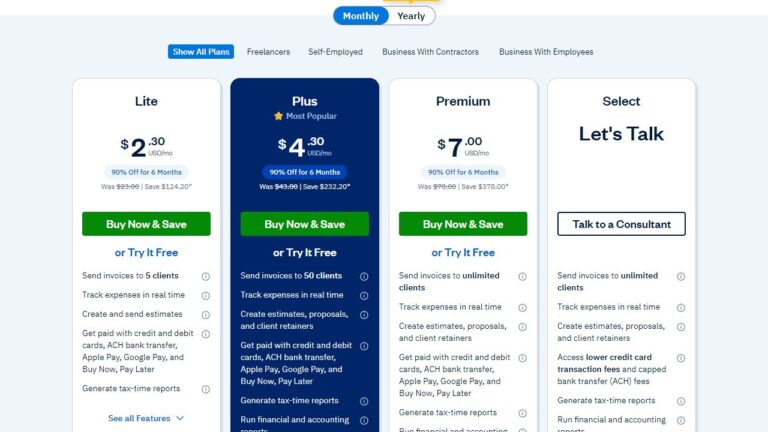
Official FreshBooks pricing screenshot. Trial and offer details may change.
Why FreshBooks Is Best for Client Work
FreshBooks is best for freelancers, consultants, designers, writers, coaches, agencies, and service businesses that bill clients.
The free trial is most useful for testing:
- Invoice design
- Client limits
- Payment options
- Estimates
- Recurring invoices
- Time tracking
- Client-facing experience
For freelancers, those details matter more than advanced inventory or complex tax workflows.
A beautiful balance sheet is nice.
But if sending invoices is slow, your daily workflow suffers.
FreshBooks Pros
- Easy to use
- Strong invoicing and estimates
- Helpful time tracking
- Good client-service workflow
- Friendly interface
- Good for simple service businesses
FreshBooks Cons
- Not ideal for complex inventory
- Some accounting depth may trail Xero or QuickBooks
- Pricing can depend on clients, plan, and region
- Not the best fit for ecommerce payout reconciliation
- Less ideal for businesses needing advanced accounting controls
What to Test During the FreshBooks Trial
FreshBooks should be tested like a client-service workflow.
Create a project.
Track time.
Turn time into an invoice.
Send or preview the invoice.
Review how the client experience looks.
Freelancers should check whether the client limit on the selected plan fits real work.
A cheap plan becomes less attractive if client limits are too tight.
Agencies and consultants should test estimates, retainers, proposals, and recurring billing where relevant.
The trial should prove that FreshBooks saves time on the client side of the business, not only the accounting side.
Next Step for FreshBooks
Try FreshBooks if your biggest pain is invoicing clients, tracking time, and getting paid faster.
Compare FreshBooks free trial options
Official source: FreshBooks pricing and trial page.
For broader options, see our best accounting software 2026 guide.
3. Xendoo Free Trial or Bookkeeping Consultation
Xendoo is my third pick because it solves a different problem.
It is not just accounting software.
It is bookkeeping help.
And some business owners need that more than another dashboard.
Honestly?
Fair.
Not everyone wants to spend evenings categorizing expenses and reconciling bank transactions.
Some people want to run the business.
Wild idea, I know.
Why Xendoo Is Different
Xendoo is best for business owners who want bookkeeping support instead of doing everything themselves.
It may be a good fit for small businesses, ecommerce sellers, service businesses, and owners who are behind on their books.
A free trial for accounting software helps you test a tool.
Xendoo is more about testing whether a bookkeeping service fits your workflow.
That means you should compare:
- What services are included
- Whether catch-up bookkeeping costs extra
- How monthly reports are delivered
- Which accounting software they use or support
- Whether ecommerce channels are supported
- Whether your business type fits their process
- How communication works
Do not assume every bookkeeping service handles every business perfectly.
That is how disappointment gets a calendar invite.
Xendoo Pros
- More hands-off than DIY software
- Useful for busy business owners
- Helpful if your books are behind
- Can save bookkeeping time
- Provides monthly financial reporting support
- Good for people who do not want to manage everything alone
Xendoo Cons
- Not pure accounting software
- Usually costs more than DIY tools
- Scope depends on package and business needs
- You still need to confirm tax, payroll, and local workflow support
- Not ideal if you want full control over every transaction
What to Test Before Choosing Xendoo
With Xendoo, the test is not “Can I click around the dashboard?”
The test is:
Can this service actually make my bookkeeping easier?
Ask what reports you receive each month.
Ask how transactions get categorized.
Ask how they handle missing documents.
Ask whether they support your ecommerce store, payment processor, payroll tool, or existing accounting platform.
Ask how catch-up bookkeeping works if you are behind.
Ask whether your accountant can use the reports at tax time.
These questions matter.
A bookkeeping service should reduce stress.
Not create a new mystery.
Next Step for Xendoo
Compare Xendoo if you want bookkeeping help instead of another DIY software login.
Compare Xendoo options
Helpful internal reading: best accounting software 2026 guide, ecommerce accounting software guide, and free bookkeeping software guide.
Official source: Xendoo pricing or product page.
4. Zoho Books Free Trial
Zoho Books is my fourth pick.
Not because it is weak.
It is actually a strong value option.
But in my preferred order, I would compare Xero first, FreshBooks second, Xendoo third, and Zoho Books fourth.
Zoho Books is best for budget-conscious small businesses, startups, and teams already using Zoho CRM or other Zoho apps.
Official Zoho Books product page screenshot showing dashboard-style accounting workflows.
Official Zoho Books pricing screenshot showing free and paid plan tiers.
Why Zoho Books Is the Value Pick
Zoho Books combines accounting features with the wider Zoho ecosystem.
It can handle invoicing, expenses, banking, automation, reports, client portals, and workflows that connect naturally with other Zoho products.
If you already use Zoho CRM, Zoho Inventory, Zoho Projects, or Zoho Desk, the trial should focus on how well the ecosystem works together.
That is where Zoho becomes interesting.
Everything under one roof.
Very tidy.
Potentially.
Zoho’s free plan or trial availability can depend on region, eligibility, and current terms.
Check the live pricing page before assuming a specific free option applies to your country.
Zoho Books Pros
- Strong value
- Good automation options
- Works well with Zoho apps
- Useful for small businesses and startups
- Free plan may be available in some regions
- Good upgrade path
Zoho Books Cons
- Interface may take time to learn
- Best value if you like the Zoho ecosystem
- Country-specific tax features vary
- Plan limits can be confusing
- Accountant familiarity may vary by country
What to Test During the Zoho Books Trial
Create an invoice.
Review automation rules.
Check banking features.
Run reports.
If you expect to scale, look at which features move to higher plans.
Tax features and free plan availability may vary by country.
This is especially important for businesses outside the US or UK.
Always use your local Zoho Books pricing page before making a final decision.
Next Step for Zoho Books
Try Zoho Books if you want strong value, automation, and a low-cost accounting path.
Try Zoho Books
Official source: Zoho Books pricing and Zoho Books product page.
Related reading: free bookkeeping software.
5. QuickBooks Free Trial
QuickBooks Online is hard to ignore, especially in the US market.
Many accountants know it well.
Many integrations support it.
Its payroll and tax ecosystem is broad.
That matters.
A lot.
QuickBooks is best for US small businesses, tax workflows, payroll needs, and businesses that want strong accountant support.
Official QuickBooks Online pricing screenshot. Promotions and plan prices can change.
Why QuickBooks Is Still a Major Option
A QuickBooks free trial is most useful if you need to test reports, tax workflows, expense categorization, bank connections, and whether your accountant prefers the interface.
QuickBooks can feel powerful.
It can also feel busy for beginners.
That is the trade-off.
It gives you a lot.
Sometimes it gives you a lot loudly.
When you compare QuickBooks with Xero, look beyond the first-month price.
Check the regular price after a promotion, included users, payroll add-ons, inventory needs, accountant access, and whether your reports are easy to understand.
QuickBooks Pros
- Strong reporting and accountant familiarity
- Good US tax and payroll ecosystem
- Large app marketplace
- Good fit for many service businesses
- Strong inventory and reporting on higher plans
QuickBooks Cons
- Can feel complex for new users
- Pricing may rise after trial or promotion
- Some features require higher plans
- Country availability and features differ
- User limits may matter as the team grows
What to Test During the QuickBooks Trial
In a QuickBooks trial, start with reports and tax categories.
QuickBooks is often chosen because accountants know it and because US tax and payroll workflows are familiar inside the Intuit ecosystem.
Test invoices, expenses, and bank connections.
Check whether the interface feels understandable to the person who will use it every week.
Powerful software is only useful if the owner or bookkeeper can maintain it consistently.
Pay attention to plan levels.
If inventory, project profitability, or more users matter, make sure those features are included in the plan you are testing.
If payroll is important, review payroll add-on pricing separately.
Payroll is usually not just a small accounting feature.
It can become one of the largest recurring costs in the finance stack.
Next Step for QuickBooks
Use the trial to test reports, tax categories, invoices, and accountant access before you commit.
Compare QuickBooks with current offers
Related guide: Xero vs QuickBooks comparison.
Official sources: QuickBooks pricing and QuickBooks accounting software.
6. Sage Accounting Free Trial
Sage is a sensible trial candidate for businesses that value brand history, compliance workflows, and accountant familiarity.
It is best for UK businesses, VAT-registered businesses, and compliance-focused owners who want an established accounting brand.
Why Sage Is Worth Comparing
Sage has long-standing brand trust in accounting.
Sage Accounting can be useful for invoicing, expenses, cash flow, bank connections, reporting, and VAT-related workflows where available.
Sage plans, trials, and country pages vary significantly.
For that reason, I would not make a blanket claim about a specific trial length or price.
Check your local Sage Accounting page before signing up.
Sage Pros
- Established accounting brand
- Good compliance angle for UK users
- Useful invoicing and cash-flow tools
- Familiar to many accountants
- Good fit for certain local workflows
Sage Cons
- Pricing and features vary by country
- App ecosystem may not fit every workflow
- Plan comparison needs careful checking
- Product lineup can feel confusing
What to Test During the Sage Trial
During a Sage trial, create a sales invoice, review VAT settings where applicable, check cash-flow tools, connect or simulate bank activity, and run core reports.
Because Sage country pages and product names can vary, do not rely on a generic global description.
Choose the Sage Accounting product page for your country and verify the exact trial, pricing, and support terms.
Next Step for Sage
Check Sage if your business is UK-based or compliance-focused, then compare its trial and pricing against Xero and QuickBooks.
Compare Sage with other trials
Official source: Sage Accounting product page.
7. Wave Accounting
Wave is different because the main appeal is a free accounting starting point rather than a traditional paid software trial.
That makes it a useful benchmark when comparing free accounting software against paid free trials.
Wave is best for very small businesses, solo owners, and users who need simple invoicing and basic bookkeeping.
Official Wave pricing screenshot showing free Starter and paid Pro plan differences.
Why Wave Is Useful
Wave can work well for simple invoicing and basic bookkeeping.
It is less suitable when you need advanced reporting, complex inventory, deep accountant workflows, or a bigger app ecosystem.
Wave is not my first pick for growing businesses.
But for very small businesses?
It can be enough.
And enough is underrated.
Wave Pros
- Free basic accounting option where available
- Simple invoicing
- Good for very small businesses
- Easy starting point
- Useful for basic records
Wave Cons
- Not as advanced as Xero, QuickBooks, or Zoho Books
- Support and advanced features may be limited
- Paid add-ons may apply
- Availability can vary by region
- Not ideal for complex ecommerce or inventory
What to Test in Wave
Create invoices.
Add customers.
Enter expenses.
Review reports.
Check payment processing terms.
If you need bank imports, receipt capture, or advanced support, check which features require a paid plan.
Wave can be excellent for very small businesses.
It is not always the best path for businesses that need deep reporting, accountant collaboration, inventory, payroll, or ecommerce integrations.
Next Step for Wave
Use Wave if your books are simple and you need a free starting point before upgrading to a fuller accounting system.
Compare Wave with paid trials
Official source: Wave pricing.
Related reading: best free bookkeeping software.
Best Accounting Software Free Trial by Business Type
| Business type | Best choice | Why |
|---|---|---|
| Small business | Xero | Balanced accounting features and scalability |
| Freelancer | FreshBooks | Simple invoicing and time tracking |
| Business owner who wants help | Xendoo | Bookkeeping support instead of DIY software |
| Ecommerce seller | Xero | Integrations, reporting, and reconciliation |
| Budget user | Zoho Books | Strong value and automation |
| US business | QuickBooks | Accountant familiarity, tax workflows, and payroll ecosystem |
| UK business | Sage or Xero | VAT/compliance support and accounting features |
| Very small business | Wave | Basic free accounting option |
| Growing company | Xero | Reports, integrations, and scalability |
For ecommerce sellers, pair this article with our ecommerce accounting software costs guide and our ecommerce accounting software statistics article.
Free Trial vs Free Plan vs Discount: What Is the Difference?
A free trial gives temporary access to paid software.
It is best when you want to test features before paying.
A free plan gives ongoing access with limits.
It is best for very small businesses that do not need advanced features yet.
A discount or promo offer lowers the subscription price for a period.
It is useful when you already know which tool you want and want to save money.
A partner offer may use a commercial affiliate link, and terms can change.
Always check the final checkout or vendor page before entering payment details.
Tiny boring step.
Big future benefit.
Accounting Software Free Trial No Credit Card: What to Check
Many people search for accounting software free trial no credit card.
Totally fair.
Nobody wants surprise charges from a trial they forgot about.
But requirements change often.
Do not assume a provider has a no-card trial just because an old review said so.
Check:
- Signup page
- Trial terms
- Cancellation policy
- Country-specific pricing page
- Whether payment details are required before the trial starts
If no-card access matters to you, verify it on the vendor’s current page before creating the account.
How to Choose the Right Accounting Software Free Trial
Use this checklist during a free trial so you test real accounting workflows before paying.
- Decide whether you are a freelancer, service business, ecommerce seller, or growing company.
- Check if you need simple invoicing or full accounting.
- Test bank reconciliation with sample transactions.
- Create one sample invoice and preview the customer experience.
- Upload one receipt or expense.
- Run a profit and loss report.
- Check tax, VAT, or GST settings for your country.
- Review integrations for ecommerce, payroll, payments, and reporting.
- Invite your accountant or bookkeeper.
- Compare pricing after the trial or discount ends.
- Choose based on daily usability, not only the discount.
You can also use the comparison sheet to compare current free trials, pricing, and offers before starting multiple accounts.
Common Mistakes to Avoid During a Free Trial
The first mistake is only looking at the dashboard design.
A clean dashboard is nice.
But a clean dashboard does not mean clean books.
Other mistakes include:
- Not testing real invoices, bills, and reports
- Ignoring pricing after the trial ends
- Not checking plan limits
- Skipping bank feeds and reconciliation
- Not testing accountant access
- Forgetting tax support for your country
- Choosing software only because of a discount
- Forgetting to cancel unused trials
The discount is not the decision.
The workflow is the decision.
Put that on a sticky note if needed.
My Honest Recommendation
Choose Xero if you want the best all-round accounting software for small business, ecommerce, and growing teams.
Choose FreshBooks if you are a freelancer or service provider.
Choose Xendoo if you want bookkeeping help instead of doing everything yourself.
Choose Zoho Books if you want good value and automation.
Choose QuickBooks if you are US-based and want strong tax, payroll, and accountant support.
Choose Sage if you are UK-based or need compliance-focused accounting.
Choose Wave if you need basic free accounting.
My top pick for most small businesses is Xero because it gives a strong balance of invoicing, reconciliation, reports, integrations, and scalability.
But the best choice depends on your country, budget, accountant, and workflow.
You can compare current free trials, pricing, and offers here.
What to Test in the First 30 Minutes of an Accounting Software Trial
The first half hour of a trial should not be spent wandering through menus.
Use it to answer one question:
Can this software handle the money flow in your business without creating more work?
Start with the dashboard.
A good accounting dashboard should help you understand cash, receivables, payables, bank balances, and overdue work without needing a finance degree.
If the dashboard looks attractive but does not help you answer basic questions, keep testing.
Next, create a customer and send a sample invoice.
Look at the invoice template, tax settings, payment options, reminder settings, and customer-facing view.
If you bill clients often, this workflow matters more than almost anything else.
Then enter a bill or expense.
A real business does not only send invoices.
It also pays suppliers, contractors, apps, rent, insurance, and taxes.
Check whether the bill entry screen feels clean and whether receipts can be attached easily.
Finally, open the reports area.
Run a profit and loss report, balance sheet, accounts receivable report, and accounts payable report if available.
You do not need perfect data during the trial.
But you do need to know whether the reports are easy to find and understand.
What to Test in the First Week
The first week is where the trial becomes useful.
If possible, add a small sample of real transactions.
Do not import your entire financial history yet.
Use enough data to see whether the software matches your workflow.
Connect or simulate a bank feed.
Bank reconciliation is the daily engine of accounting software.
If the matching process is confusing, slow, or unreliable, you will feel that pain every month.
Invite your accountant or bookkeeper.
A tool that looks good to the owner can still frustrate the person closing the books.
Ask your accountant whether the chart of accounts, reports, exports, and audit trail meet their needs.
Check integrations.
If you use Shopify, Amazon, Stripe, PayPal, Square, Gusto, payroll software, inventory tools, or CRM software, the trial should confirm whether the connection exists and whether it syncs the right data.
Test support resources.
Search the help center for a real question.
Check onboarding materials.
If the only answer is a vague sales article, that is useful information too.
Free Trial Testing Scorecard
| Test area | What good looks like | Warning sign |
|---|---|---|
| Invoice workflow | You can create, preview, send, and track invoices quickly | Tax, payment, or template settings are hard to find |
| Bank reconciliation | Transactions are easy to match, categorize, and explain | You need spreadsheets to understand what happened |
| Reports | Profit and loss, receivables, payables, and cash reports are clear | Reports are hidden, confusing, or too limited on the plan |
| Expenses | Receipts and bills are easy to capture and review | You cannot attach support documents cleanly |
| Integrations | Your key sales, payment, payroll, or ecommerce apps connect | The integration exists but does not sync the data you need |
| Accountant access | Your accountant can access the file and review reports | Collaboration is expensive or awkward |
| Post-trial price | The regular monthly cost still fits your budget | The trial hides a higher renewal price or plan limitation |
How Free Trials Differ by Business Model
Freelancers and Consultants
Freelancers should test invoicing, time tracking, estimates, client communication, and payment collection first.
A beautiful general ledger matters less if the tool makes client billing slow.
FreshBooks often feels natural for this workflow because it is built around client service work.
Xero can also work well, especially if the freelancer expects to grow into a bigger business with more reporting needs.
Local Service Businesses
Local service businesses should test invoices, estimates, recurring expenses, bank reconciliation, sales tax, and payroll integrations.
If a business has employees or regular contractors, payroll and tax workflows can matter as much as the accounting dashboard.
FreshBooks is good for service work.
Xero is stronger if collaboration, reporting, and accounting structure matter more.
QuickBooks is often popular in the US if payroll and accountant support are central.
Ecommerce Sellers
Ecommerce sellers should not judge accounting software by normal invoicing alone.
The real test is payouts, fees, refunds, chargebacks, marketplace tax, inventory movement, and channel-level profitability.
If you sell through Shopify, Amazon, Etsy, eBay, Walmart, Stripe, PayPal, or TikTok Shop, test integrations before the trial ends.
You may need Xero plus a connector tool.
Our ecommerce accounting software costs guide explains why the accounting subscription is only part of the budget.
Business Owners Who Want Help
If you are behind on bookkeeping or simply do not want to do it yourself, test a service like Xendoo.
The question is different here.
You are not just asking, “Is the software easy?”
You are asking, “Will this process actually get my books done every month?”
That is a very different kind of trial.
Startups and Budget-Conscious Businesses
Budget users should test Zoho Books and Wave carefully.
Zoho Books can offer strong value and automation, especially for businesses already using Zoho apps.
Wave can be enough for very simple bookkeeping.
The risk with free or low-cost software is not always missing features on day one.
The risk is outgrowing it after data, invoices, and habits are already inside the tool.
UK and Compliance-Focused Businesses
UK businesses should pay close attention to VAT workflows, bank feeds, invoice rules, accountant familiarity, and local support.
Sage and Xero are often part of that conversation.
The right choice depends on the current country-specific plan and your accountant’s preference.
Pricing After the Trial: The Number Buyers Forget
The trial price is not the real long-term cost.
The real cost is:
- Regular monthly plan
- Taxes
- Payment fees
- Payroll
- Add-ons
- Integrations
- Setup help
- Accountant time
Before you start any trial, write down the expected regular monthly price after the trial or discount.
If you are testing Xero, FreshBooks, Xendoo, Zoho Books, QuickBooks, Sage, and Wave, compare the regular cost in the same currency and country.
Also compare seat limits, client limits, invoice limits, bill limits, storage limits, payment fees, and feature restrictions.
Two plans with similar monthly prices can create very different real-world costs.
Tiny plan details.
Big invoice later.
How to Avoid Trial Overload
Do not start six trials on the same day.
You will forget what you tested, lose track of cancellation dates, and compare dashboards instead of workflows.
Start with your top two choices.
For most small businesses, that might be Xero and FreshBooks.
For freelancers, FreshBooks and Xero may be the best pair.
For owners who need help, compare Xero and Xendoo.
For budget users, Zoho Books and Wave make sense.
Use the same test data in each system.
Create the same invoice, same expense, same customer, same bank transaction, and same report.
That creates a fair comparison.
Fair comparisons are less exciting.
They are also less stupid.
Questions to Ask Before Choosing
Ask these before paying:
- Will my accountant work inside this software?
- Does it support my country, currency, tax, VAT, or GST needs?
- Can I connect my bank and payment tools?
- Can I send professional invoices quickly?
- Can I track bills and expenses without spreadsheets?
- Do reports make sense to a non-accountant?
- Can I export my data if I leave?
- What happens when the free trial or discount ends?
- Does the mobile app help me capture receipts or invoice quickly?
- Will this still work if my business doubles in transaction volume?
Final Buying Framework
If you want the safest overall small-business accounting trial, start with Xero.
If client billing is the main workflow, test FreshBooks.
If you want bookkeeping help, compare Xendoo.
If budget and automation matter most, test Zoho Books.
If your accountant is QuickBooks-first or US payroll and tax workflows matter most, test QuickBooks.
If UK compliance is central, include Sage.
If you only need basic free bookkeeping, try Wave.
The best choice is not the software with the longest feature list.
It is the software you can use consistently, your accountant can support, and your business can afford after the trial ends.
Mini Tutorial: How to Run a Fair Accounting Software Trial
A fair trial uses the same tasks in each platform.
If you test Xero with real invoices but only glance at FreshBooks, your comparison will be biased.
Create a small trial file for each product.
Use the same customer name, same invoice amount, same expense category, same receipt, same bank transaction, and same report date.
You are not trying to build perfect books.
You are trying to compare friction.
Step 1: Create a Customer and Invoice
Create a customer named “Sample Client” and send or preview one invoice.
Add a due date, tax line, payment option, and short description.
Check whether the invoice looks professional and whether the settings are easy to understand.
Step 2: Add a Vendor Bill
Add a sample supplier bill.
Attach a receipt if the software supports it.
Then check whether the bill appears in accounts payable or an unpaid bills report.
Step 3: Reconcile a Bank Transaction
Add or simulate one bank transaction and match it to the invoice or expense.
Reconciliation is where good accounting software saves time.
If this workflow feels confusing in the trial, it may feel worse after six months of real data.
Step 4: Run Reports
Run profit and loss, balance sheet, accounts receivable, and accounts payable reports.
Even if the sample numbers are tiny, the report layout tells you whether the software will help you make decisions.
Step 5: Invite Your Accountant
If you work with an accountant or bookkeeper, invite them during the trial.
Ask whether they can review the file easily, export what they need, and support the platform during tax season.
Trial Scorecard: Xero vs FreshBooks vs Xendoo vs Zoho Books vs QuickBooks vs Sage vs Wave
| Software | Setup ease | Invoice test | Reconciliation test | Reports test | Best trial signal |
|---|---|---|---|---|---|
| Xero | Good after setup | Strong | Very strong | Strong | Bank reconciliation feels clean and repeatable |
| FreshBooks | Very approachable | Very strong | Good for simple work | Good | Client billing and time tracking save time |
| Xendoo | Depends on onboarding | Service-dependent | Service-dependent | Monthly reporting support | Bookkeeping process feels clear and low-stress |
| Zoho Books | Good if you like Zoho apps | Strong | Good | Good | Automation and value fit your business |
| QuickBooks | Moderate for beginners | Strong | Strong | Very strong | Reports and accountant workflow match your needs |
| Sage | Depends on region/product | Good | Good | Good | Local compliance workflow feels reliable |
| Wave | Simple | Good | Basic | Basic | Free plan is enough for your current books |
What Beginners Usually Miss During a Trial
Beginners often judge accounting software by dashboard design.
A clean dashboard is helpful.
But it is not enough.
The real test is whether the software produces clean books after a normal month of messy activity.
Another common mistake is ignoring the chart of accounts.
If categories are poorly set up, reports become confusing no matter how good the software is.
Ask your accountant to review setup before importing months of transactions.
Beginners also forget data export.
Before you commit, check whether you can export invoices, contacts, reports, and transaction data.
Good software should not make you feel trapped.
Finally, beginners often ignore support quality until something breaks.
During the trial, search the help center for a real setup issue.
If the answer is clear, that is a good sign.
What Accountants Care About During a Trial
Accountants care less about a pretty interface and more about audit trail, reports, reconciliation, tax settings, and consistent categorization.
A platform that feels easy to the owner but creates messy reports is not a good long-term choice.
Ask your accountant whether the software supports the reporting they need for tax, year-end accounts, sales tax, VAT, payroll entries, and management reporting.
If they already support Xero, that may reduce training and cleanup cost.
If they prefer QuickBooks, that matters too.
For ecommerce sellers, accountants care about payout reconciliation.
A Shopify or Amazon deposit is not the same as clean revenue.
It can include product sales, shipping, discounts, refunds, gift cards, marketplace fees, payment fees, and taxes.
Test whether the platform and integrations can separate those amounts correctly.
For service businesses, accountants care about receivables, bill tracking, payroll journals, contractor payments, and owner draws.
During the trial, create sample transactions that represent those realities.
Migration: Do Not Move Everything Until the Trial Passes
Moving accounting systems is serious.
Do not import years of data just because a trial dashboard looks nice.
Start with a controlled sample first.
If you are switching from spreadsheets, decide whether you need historical transaction detail or only opening balances.
Many small businesses overcomplicate migration by importing messy history that will never be used.
If you are switching from QuickBooks to Xero or Xero to QuickBooks, export core reports first:
- Profit and loss
- Balance sheet
- Trial balance
- Accounts receivable
- Accounts payable
- Customer list
- Supplier list
- Tax reports
Keep a backup before making changes.
If you use ecommerce tools, migration can be harder because sales channels and payment processors may sync old data.
Be careful not to duplicate revenue.
Test integrations in a trial file before connecting the live company file.
Free Trial Red Flags
Watch for these:
- The signup page hides regular pricing after the trial.
- The trial does not let you test the feature you actually need.
- The product forces you into a higher plan for basic workflows.
- Reports are difficult to understand.
- Bank reconciliation feels manual or confusing.
- Support articles are outdated or too generic.
- Your accountant says cleanup will be expensive.
- Exports are limited or hard to find.
- The mobile app cannot capture the documents you need.
- The software depends on add-ons that make the real cost much higher.
If you see several red flags, pause.
Pausing is free.
Cleanup is not.
Country-Specific Trial Checks
Accounting software is not the same in every country.
Xero, FreshBooks, Xendoo, Zoho Books, QuickBooks, Sage, and Wave may show different pricing, tax features, payroll options, and trial terms depending on where you live.
US businesses should check sales tax, 1099 support, payroll integrations, accountant familiarity, and state-specific needs.
UK businesses should check VAT, Making Tax Digital workflows where relevant, accountant support, bank feeds, and local Sage/Xero/QuickBooks availability.
Canadian, Australian, New Zealand, Indian, and international users should check local tax rules, currency, and regional product pages.
Never assume a US pricing screenshot applies globally.
That screenshot may be lying by geography.
Mobile App Trial Checklist
Many owners use accounting software on desktop but capture receipts and check invoices from a phone.
Test the mobile app before you subscribe.
Ask:
- Can you photograph a receipt and attach it to an expense?
- Can you send an invoice from your phone?
- Can you see overdue invoices quickly?
- Can you check bank balances or transaction status?
- Can you approve bills or expenses if your workflow needs that?
- Does the app feel fast enough for real use?
If mobile capture is poor, documents may disappear into email, camera rolls, and desk drawers.
That creates bookkeeping cleanup later.
The drawer always wins if you let it.
Security and Access During a Trial
Accounting software contains sensitive data.
During a trial, check user roles, permissions, two-factor authentication, accountant access, and how the platform handles login security.
Do not share one login with your accountant or staff.
Invite people properly so actions are traceable.
If you stop using a trial, remove any connected bank feeds, apps, or invited users.
For growing teams, permissions matter.
The person who creates invoices may not need access to all reports.
The person who uploads receipts may not need owner-level settings.
Simple access control now prevents weird problems later.
How to Compare Discounts Without Getting Distracted
Discounts are attractive.
Of course they are.
A 70% discount looks like it deserves applause.
But a discount can distort the decision.
A 70% discount on software that does not fit your workflow is still a poor purchase.
Compare the regular monthly price, not only the first few months.
Then add payroll, payment fees, ecommerce connectors, inventory tools, tax software, and accountant setup costs.
If two tools are close, choose the one that saves time every month.
A cheaper plan that creates bookkeeping friction can cost more in cleanup hours.
The discount is temporary.
The messy workflow can be forever.
Okay, not forever.
But it can feel that way.
Best Trial Pairings by Situation
| Situation | Start with | Compare against | Why |
|---|---|---|---|
| Typical small business | Xero | FreshBooks | Xero covers broader accounting; FreshBooks is simpler for client work |
| Freelancer or consultant | FreshBooks | Xero | FreshBooks is simpler for client billing; Xero is better for broader accounting |
| Business owner behind on books | Xendoo | Xero | Xendoo offers help; Xero gives you a strong DIY software path |
| Ecommerce seller | Xero | QuickBooks | Both can work with connectors; reconciliation quality matters most |
| Budget startup | Zoho Books | Wave | Zoho gives automation and growth path; Wave gives a free starting point |
| UK business | Sage | Xero | Both may fit UK workflows depending on accountant and VAT needs |
| Very simple business | Wave | Zoho Books | Compare free simplicity against a more complete low-cost platform |
How Long Should You Spend Testing?
For a very small business, one focused hour may be enough to reject a bad fit.
For a business with payroll, ecommerce, inventory, multiple users, or accountant collaboration, spend several days testing.
The best trial period includes at least one mini month-end close.
Enter income, bills, expenses, and bank activity.
Then run reports and ask whether the numbers make sense.
If the trial is short, schedule testing time before you start.
A free trial is not useful if it expires while you are busy with normal work.
This happens more often than people admit.
When a Free Plan Is Better Than a Free Trial
A free plan can be better than a free trial if your business is genuinely simple.
For example, a solo owner with a few invoices, no employees, no inventory, and basic expenses may not need a paid system yet.
Wave is the clearest example in this guide.
Zoho Books may also offer a free path depending on region and eligibility.
These options can be enough while your business is small.
But free plans have limits.
If you need advanced reports, automation, multi-user workflows, payroll, inventory, ecommerce integrations, or accountant collaboration, a paid platform may save more time than it costs.
Free is good.
Free and frustrating is not.
When a Discount Is Better Than a Free Trial
A discount is better than a free trial when you already know which tool you want.
For example, if your accountant has confirmed Xero is the right fit and you have tested it before, a promotional offer may be more valuable than another trial.
Discounts are also useful when you need time to migrate.
A reduced first few months can help offset setup work, training, and cleanup.
Still, never choose a platform only because of a discount.
The software has to fit after the discount ends.
That is the real test.
Final Trial Checklist Before You Pay
Before subscribing, confirm:
- I tested invoices and customer-facing payment options.
- I tested bills, expenses, and receipt capture.
- I checked bank-feed or reconciliation workflow.
- I ran profit and loss, balance sheet, receivables, and payables reports.
- I confirmed the regular monthly price after trial or discount.
- I checked taxes, VAT, GST, or sales tax settings for my country.
- I checked accountant access and user roles.
- I reviewed the mobile app.
- I confirmed must-have integrations.
- I know how to export data if I leave.
If you cannot check most of these boxes, keep testing before subscribing.
Hidden Costs to Watch Before the Trial Ends
The subscription price is only the first number.
Accounting software can become more expensive once you add:
- Payment processing
- Payroll
- Ecommerce connectors
- Inventory apps
- Advanced reporting
- Extra users
- Migration help
- Accountant setup time
Payment fees matter if you collect invoices by card, ACH, direct debit, or other online payment methods.
Those fees usually sit outside the accounting subscription.
Payroll is another common surprise.
A business may choose accounting software for $30 to $90 per month, then add payroll that costs more than the accounting plan itself.
Ecommerce sellers should pay special attention to connector costs.
Xero or QuickBooks may be the accounting ledger, but tools such as A2X, Webgility, Link My Books, or similar connectors may be needed to keep marketplace payouts clean.
Setup time also has a cost.
If you pay a bookkeeper to clean old data, create a chart of accounts, migrate from another system, or configure sales tax, that work should be part of the buying decision.
Choose Xero If…
Choose Xero if:
- You want a strong all-round cloud accounting system.
- You value bank reconciliation and clean collaboration.
- You expect to invite an accountant, bookkeeper, or team members.
- You run an ecommerce business and plan to use integrations.
- You may need multi-currency, projects, or advanced reporting on higher plans.
Skip or delay Xero if your business is extremely simple and a free bookkeeping app is enough, or if your accountant strongly prefers another platform and switching support would create more cost than benefit.
Choose FreshBooks If…
Choose FreshBooks if:
- You are a freelancer, consultant, coach, designer, writer, or agency owner.
- You care most about invoices, estimates, time tracking, and client billing.
- You want accounting software that feels simple rather than heavy.
- You do not need complex inventory or deep ecommerce accounting.
Skip or delay FreshBooks if your business needs advanced accounting depth, complex inventory, or a platform your accountant prefers for tax and month-end work.
Choose Xendoo If…
Choose Xendoo if:
- You want bookkeeping help instead of DIY software.
- You are behind on your books.
- You want monthly financial reports.
- You do not want to reconcile transactions yourself.
- You are willing to pay for support instead of spending your own time.
Skip or delay Xendoo if you need a specific local accounting workflow, want full control of every entry, or prefer to keep bookkeeping completely in-house.
Choose Zoho Books If…
Choose Zoho Books if:
- You want strong value and automation.
- You already use Zoho CRM, Zoho Inventory, or other Zoho products.
- You want a low-cost growth path with more structure than a simple free tool.
- You are comfortable checking country-specific plan and tax details.
Skip or delay Zoho Books if your accountant does not support it, if your local tax needs are not covered, or if you do not want to work inside the Zoho ecosystem.
Choose QuickBooks If…
Choose QuickBooks if:
- You are US-based and want strong accountant familiarity.
- Payroll, tax workflows, and reports are important.
- Your bookkeeper already works inside QuickBooks.
- You need a broad app marketplace and familiar small-business workflows.
Skip or delay QuickBooks if the interface feels too complex during the trial, if the post-promotion price is too high, or if you want a cleaner collaboration model with fewer user-cost concerns.
Choose Sage If…
Choose Sage if:
- You are UK-based or compliance-focused.
- You want a long-established accounting brand.
- Your accountant recommends Sage for your workflow.
- VAT, cash flow, invoicing, and local accounting expectations are central to your decision.
Skip or delay Sage if the local product page does not clearly match your needs, if integrations are more important than compliance comfort, or if Xero has stronger accountant support in your specific market.
Choose Wave If…
Choose Wave if:
- You have a very small business with simple bookkeeping.
- You want free accounting basics before paying for software.
- You mainly need invoices, expense tracking, and simple reports.
- You do not need advanced inventory, payroll complexity, or deep integrations.
Skip or delay Wave if you already know you need richer reporting, accountant collaboration, ecommerce reconciliation, inventory tracking, or more automation.
Trial Worksheet: Questions to Answer Before Subscribing
| Question | Your answer | Why it matters |
|---|---|---|
| What is my regular monthly transaction volume? | Invoices, bills, expenses, deposits | Plan limits can make a cheap plan impractical |
| Who will use the software every week? | Owner, staff, bookkeeper, accountant | User roles and collaboration affect cost and workflow |
| Which reports do I need monthly? | P&L, balance sheet, AR, AP, cash flow | If reports are weak, decisions become harder |
| Which integrations are non-negotiable? | Bank, payroll, ecommerce, payments | Missing integrations create manual work |
| What is the regular price after the trial? | Monthly subscription plus extras | The first month is not the full cost |
| Can I export my data? | Reports, contacts, transactions | Exit options reduce lock-in risk |
How to Talk to Your Accountant About Free Trials
Do not ask only, “Which software do you like?”
A better question is:
“Which software will let us close the books cleanly every month with the least cleanup?”
Ask whether your accountant can support the platform, whether they charge extra for unfamiliar systems, and whether they prefer a specific chart of accounts setup.
If you are considering Xero, ask whether your accountant is comfortable with Xero bank reconciliation and reports.
If you are considering FreshBooks, ask whether it gives enough reports for tax and year-end work.
If you are considering Xendoo, ask how the reports will connect to your tax process.
If you are considering Zoho Books or Wave, ask whether the accountant can efficiently prepare tax work from those records.
An accountant’s answer can save money.
A cheaper tool that creates messy records can become more expensive during year-end cleanup.
This is a very boring way to lose money.
Avoid it.
Trial Cancellation and Renewal Checklist
Before you start any trial, note:
- Start date
- End date
- Cancellation policy
- Whether a card was required
- Regular price after trial
- Discount end date, if any
Put a reminder in your calendar several days before the trial ends.
If you choose the software, confirm the plan, price, billing cycle, and included features before the first charge.
If you do not choose it, export any useful test data and disconnect bank feeds or integrations.
For discounted offers, write down when the discount ends.
A three-month discount can be helpful.
But the regular price is the number you will live with for the rest of the year.
What Makes a Trial Worth Paying For?
A trial is worth converting when the software makes bookkeeping faster, reports clearer, and financial decisions easier.
It should reduce confusion.
Not simply move confusion into a nicer dashboard.
Good accounting software helps you know:
- Who owes you money
- What bills are due
- How much cash you have
- Whether you are profitable
- What your accountant needs from you
If the software passes those tests, the subscription can be a smart business expense.
If it does not, keep testing before committing.
That small pause can save hours of cleanup later.
Final Shortlist Examples
If You Run a One-Person Service Business
Start with FreshBooks if your main work is billing clients, tracking time, and keeping simple expenses organized.
Compare it with Xero if you expect to grow into fuller accounting, accountant collaboration, or more advanced reporting.
If cost is the biggest concern, test Wave as the free starting point and Zoho Books as the stronger low-cost system.
The best answer depends on whether you need simple invoicing or a more complete accounting workflow.
If You Run a Shopify or Amazon Store
Start with Xero, then test the connector you plan to use.
Do not judge ecommerce accounting software from invoices alone.
The real test is whether payouts, fees, refunds, taxes, and order data can be reconciled cleanly.
If you sell across several channels, budget for more than the accounting subscription.
You may need an ecommerce connector, inventory app, tax tool, or reporting tool to get clean numbers.
If You Want Bookkeeping Help
Compare Xendoo if you do not want to manage bookkeeping yourself.
Ask what is included, how reports are delivered, how catch-up bookkeeping works, and whether your tax advisor can use the reports.
This is not only a software decision.
It is a workflow decision.
If You Are Choosing Software for an Accountant-Led Business
Ask your accountant which platforms they can support without extra cleanup fees.
If they work mostly in QuickBooks, that may be the practical choice.
If they support Xero well, Xero can be a cleaner collaboration option for many teams.
Do not ignore your own experience, though.
The owner still needs to upload receipts, approve bills, review invoices, and understand reports.
The best tool works for both the accountant and the business owner.
If You Are Moving From Spreadsheets
Do not import everything immediately.
Start by recreating one normal month in the trial.
If the software helps you understand income, expenses, taxes, and cash flow more clearly than your spreadsheet, it may be worth the move.
If the spreadsheet is still simpler because your business has only a few transactions, a free option such as Wave or a basic Zoho Books path may be enough until the business grows.
If You Are Worried About Choosing Wrong
Use a simple rule:
Choose the tool that makes the most common weekly task easiest.
If you invoice constantly, prioritize invoices.
If you reconcile lots of bank transactions, prioritize reconciliation.
If your accountant drives the process, prioritize accountant access and reports.
You can always upgrade later.
But switching platforms after years of messy data is harder.
A focused trial now can prevent expensive cleanup later.
One Last Practical Tip
If you are still unsure after reading reviews, choose the software that makes your next month easier.
Not the software that wins the most abstract feature comparisons.
A small business owner needs a system that sends invoices, captures expenses, reconciles banks, produces readable reports, and keeps the accountant happy.
The trial should make that answer obvious.
If it does not, keep comparing before you move real financial data.
When in doubt, test with the transactions your business handles every week before trusting any trial verdict.
FAQ: Accounting Software Free Trials
What Is the Best Accounting Software With a Free Trial in 2026?
Xero is my first pick for many small businesses because it balances invoicing, reconciliation, reports, integrations, and scalability.
FreshBooks is best for freelancers and service businesses.
Xendoo is best if you want bookkeeping help.
Zoho Books is best for value and automation.
QuickBooks is strong for US tax and accountant workflows.
Sage is useful for UK businesses.
Wave is a good free starting point for very small businesses.
Which Accounting Software Has the Best Free Trial?
The best trial depends on your workflow.
Xero is a good all-round accounting trial.
FreshBooks is strong for invoicing and time tracking.
Xendoo is good if you want bookkeeping support.
Zoho Books is good for value.
QuickBooks is strong for US businesses.
Sage is worth checking for UK compliance needs.
Can I Try Accounting Software Without a Credit Card?
Some providers may offer no-card trials, but requirements change.
Check the current signup page and terms before assuming a credit card is not required.
Is Xero Free to Try?
Xero usually offers a free trial or promotional offer for new users, but availability can vary by country and time.
Check the current Xero page before subscribing.
Is FreshBooks Free to Try?
FreshBooks commonly offers a free trial or promotional offer, but terms may change.
Check the current FreshBooks pricing or signup page before starting.
Does Xendoo Have a Free Trial?
Xendoo is a bookkeeping service, so its offer may work differently from a normal software free trial.
Check whether it offers a demo, consultation, or promotional onboarding option before signing up.
Is Free Accounting Software Enough for a Small Business?
Free software can work for very small businesses with simple books.
Growing businesses often need better reporting, automation, accountant access, integrations, and support.
Should I Choose Xero or FreshBooks?
Choose Xero if you want stronger accounting, reconciliation, reporting, and growth features.
Choose FreshBooks if you mainly need simple invoicing, time tracking, estimates, and client billing.
Should I Choose Xero or Zoho Books?
Choose Xero if you want stronger accounting collaboration and reconciliation.
Choose Zoho Books if value, automation, and the Zoho ecosystem matter more.
Are Accounting Software Discounts Better Than Free Trials?
Discounts are useful when you already know which tool you want.
Free trials are better when you still need to test fit before paying.
Conclusion
The best accounting software free trial is the one that lets you test your real workflow before you pay.
Do not judge only by the homepage.
Do not choose only because of the biggest discount.
Start with Xero if you want the best overall small-business option.
Choose FreshBooks if you bill clients and want an easy workflow.
Compare Xendoo if you want bookkeeping help instead of DIY software.
Choose Zoho Books if value and automation matter.
Then compare QuickBooks, Sage, and Wave depending on your country, accountant, and budget.
The right tool should make your books cleaner, your reports easier to understand, and your accountant less annoyed.
That is the dream.
A modest dream.
But a beautiful one.
Accounting Software Free-Trial Topic Hub
Pillar guide navigation: Compare the best accounting software for small businesses, see the best free bookkeeping software, review ecommerce accounting software, or compare Xero vs QuickBooks.
Pricing and review cluster: Read our Xero pricing guide, Xero review, and FreshBooks discount guide before starting a trial.
Official references: Verify live terms on the Xero pricing page, QuickBooks pricing page, and FreshBooks pricing page.
Related Videos
More walkthroughs from Janak Uparkoti’s YouTube channel: