Last updated: June 2026 Editorial note: Xero pricing, promotions, add-ons, and plan limits can change. Always check Xero’s live pricing page before buying.
Xero is one of the best-known cloud accounting platforms for small businesses, accountants, bookkeepers, ecommerce sellers, and growing teams that want clean collaboration without per-user pricing.
That last point matters more than many owners realize. If your bookkeeper, accountant, operations lead, and business partner all need access, Xero’s unlimited-user approach can feel refreshingly practical.
But Xero is not perfect for every business.
The Early plan has invoice and bill limits. Payroll is not a fully native Xero payroll product in the US. Inventory can require an add-on or a connected app. And if your accountant strongly prefers QuickBooks, the switching cost may outweigh Xero’s cleaner workflow.
This Xero review explains what Xero does well, where it falls short, how much it costs in 2026, who should use it, and when a Xero alternative may be a better fit.
Quick Verdict
| Category | Xero Rating | Notes |
|---|---|---|
| Overall small business accounting | 4.6/5 | Strong cloud accounting for growing teams |
| Ease of use | 4.4/5 | Clean once set up, but accounting basics still matter |
| Pricing value | 4.3/5 | Good value if you need multiple users |
| Invoicing | 4.5/5 | Strong invoices, payments, quotes, reminders |
| Bank reconciliation | 4.7/5 | One of Xero’s best everyday workflows |
| Reporting | 4.4/5 | Good core reports, stronger analytics on higher plans |
| Ecommerce fit | 4.3/5 | Strong with the right app stack |
| Payroll | 3.7/5 | US payroll usually relies on integrations |
| Inventory | 3.9/5 | Fine for basics; larger sellers may need add-ons |
| Accountant collaboration | 4.7/5 | Excellent for firms already using Xero |
Bottom line: Xero is best for small businesses that want cloud accounting, unlimited users, strong bank reconciliation, good reporting, and easy collaboration with a bookkeeper or accountant. It is especially attractive for growing teams, ecommerce businesses, consultants, agencies, and international companies that need multi-currency on the Established plan.
Xero Pricing in 2026
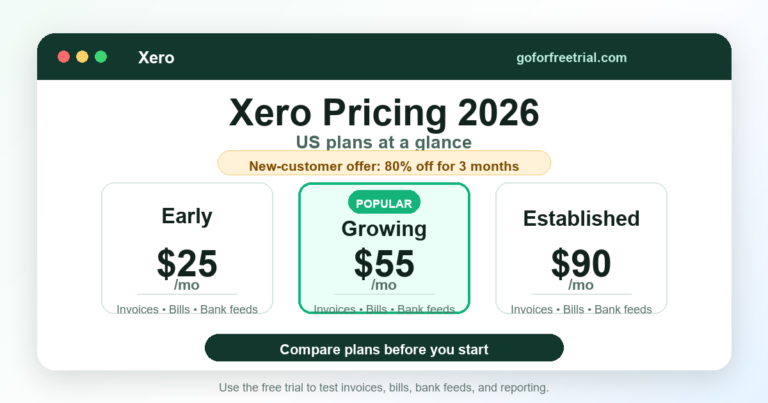
The official Xero pricing screenshot supports the pricing section and makes the plan differences easier to verify visually.
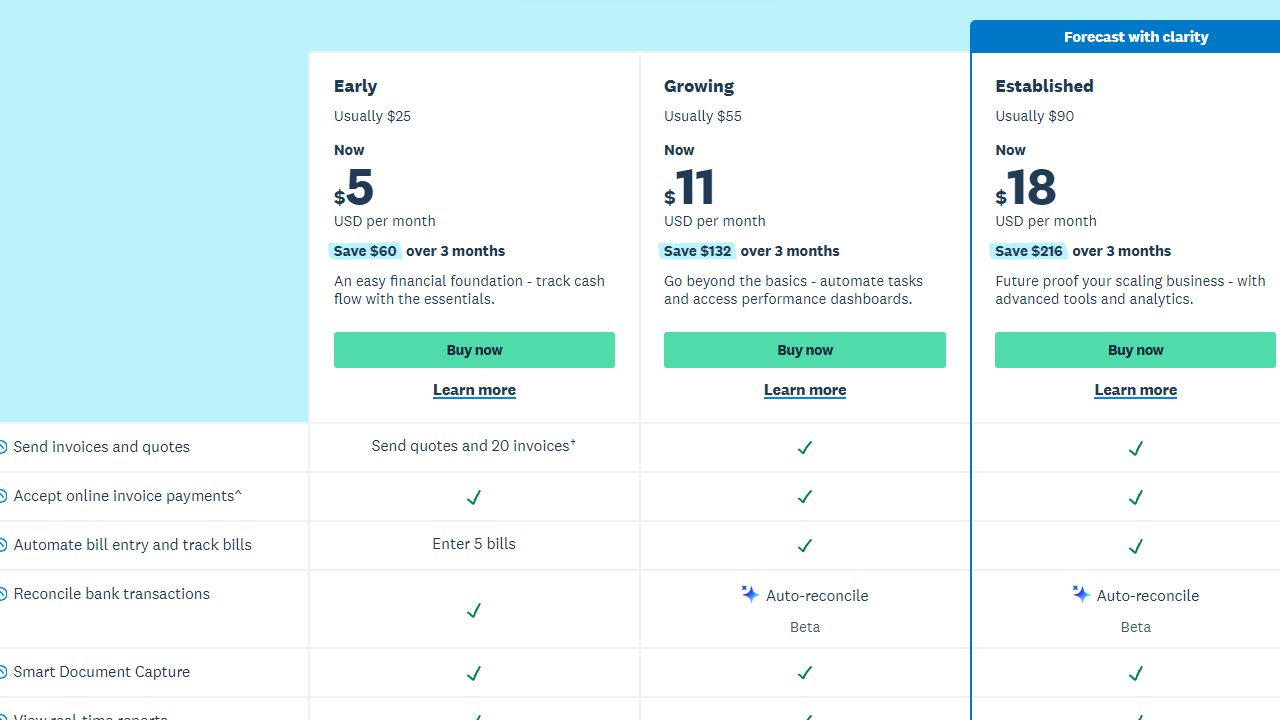
Xero’s US pricing page reviewed in June 2026 showed three core plans: Early, Growing, and Established.
| Plan | Regular Monthly Price | Promotional Price Shown | Best For |
|---|---|---|---|
| Early | $25/month | $5/month for first 3 months | Very small businesses with limited invoices and bills |
| Growing | $55/month | $11/month for first 3 months | Most small businesses that need fewer limits |
| Established | $90/month | $18/month for first 3 months | Growing businesses needing multi-currency, projects, expenses, and deeper analytics |
Xero was advertising 80% off for the first three months for eligible new US customers at the time of review. Xero also states that regular pricing applies after the promotion, subscriptions auto-renew monthly until canceled, and pricing can change.
Pricing tip: Do not choose a plan only by the first-three-month price. Look at the regular price, add-ons, payment fees, inventory needs, payroll integration costs, and what your accountant will charge to support the file.
For a quick side-by-side check of current software discounts and free trial offers, compare live offers here: current accounting software offers.
Xero Plan Comparison
| Feature | Early | Growing | Established |
|---|---|---|---|
| Quotes and invoices | Up to 20 invoices | Included | Included |
| Bills | Up to 5 bills | Included | Included |
| Bank reconciliation | Included | Included, with auto-reconcile beta | Included, with auto-reconcile beta |
| Online invoice payments | Included, payment fees apply | Included, payment fees apply | Included, payment fees apply |
| Smart Document Capture | Included | Included | Included |
| Real-time reports | Included | Included | Included |
| W-9 and 1099 management | Included | Included | Included |
| Sales tax | Included | Included | Included |
| Cash flow forecast | 30 days | 60 days | 180 days |
| Custom dashboards | No | Yes | Yes |
| Financial health scorecards | No | Yes | Yes |
| KPI and ratio analysis | No | No | Yes |
| Multi-currency | No | No | Yes |
| Projects | No | No | Yes |
| Expense claims | No | No | Yes |
| Inventory Plus add-on | No | Optional | Optional |
The biggest practical breakpoints are clear:
- Choose Early only if your invoices and bills are genuinely low-volume.
- Choose Growing if you want the normal small-business plan without Early’s tight limits.
- Choose Established if you need multi-currency, project tracking, expenses, or deeper performance analytics.
Who Should Use Xero?
Xero is a good fit for:
- Small businesses that want cloud accounting
- Teams that need multiple users without per-user fees
- Businesses working with a Xero-friendly accountant or bookkeeper
- Ecommerce sellers using connected apps
- Consultants and agencies that need invoicing and reporting
- Businesses with international customers or suppliers
- Owners who want a cleaner alternative to QuickBooks Online
Xero is not the best fit for:
- Businesses that need full native US payroll inside the accounting product
- Very inventory-heavy companies that need advanced warehouse controls
- Owners whose accountant only works in QuickBooks
- Tiny side businesses that only need free invoicing and expense tracking
- Businesses that dislike online support models
How Xero Works
Xero is cloud accounting software. You log in through a browser or mobile app, connect bank accounts, send invoices, enter bills, reconcile transactions, run reports, and invite your accountant or bookkeeper.
The core accounting workflow looks like this:
1. Connect your bank and credit card accounts. 2. Set up your chart of accounts. 3. Create invoice, bill, tax, and payment settings. 4. Send invoices and receive payments. 5. Enter vendor bills and business expenses. 6. Match bank transactions to invoices, bills, and payments. 7. Reconcile accounts each month. 8. Review profit and loss, balance sheet, cash flow, and tax reports.
That workflow is where Xero shines. It does not magically do bookkeeping for you, but it makes the repetitive parts easier to review and reconcile.
Xero Features
A real Xero product-page screenshot gives the feature review more hands-on context than a generic dashboard illustration.

Invoicing
Xero has strong invoicing tools for small businesses.
You can create quotes, turn quotes into invoices, send online invoices, accept online payments, set payment reminders, and track what customers owe.
This is useful for:
- Consultants
- Agencies
- Contractors
- Professional service firms
- Small B2B businesses
- Ecommerce or wholesale businesses with invoice customers
The Early plan is limited to 20 invoices, and that limit applies to approving and sending invoices. If you send invoices regularly, the Growing plan is usually the safer starting point.
Bank Reconciliation
Bank reconciliation is one of Xero’s strongest features.
Xero imports bank transactions and lets you match them against invoices, bills, transfers, and payment entries. The interface is clean, and the matching flow is easier to understand than many older accounting systems.
Good bank reconciliation helps you avoid:
- Duplicate income
- Missing expenses
- Unmatched Stripe or PayPal deposits
- Misclassified transfers
- Unreconciled bank balances
- Tax-time cleanup
If you care about clean books, this feature is not optional. Reconciliation is the heartbeat of small-business bookkeeping.
Bills and Accounts Payable
Xero lets you enter bills, track due dates, schedule payments, and understand what you owe.
Early allows only up to 5 bills, which is too tight for many real businesses. Growing and Established remove that constraint for most normal small-business workflows.
For a service business with only a few recurring subscriptions, Early can work. For a retailer, ecommerce seller, agency, or company with contractors, Growing usually makes more sense.
Reports
Xero includes the reports small businesses need most:
- Profit and loss
- Balance sheet
- Cash flow statement
- Aged receivables
- Aged payables
- Account transactions
- Sales tax reports
- Budget variance
- Trial balance
- General ledger
Reports are only useful if the underlying books are reconciled. A beautiful profit and loss statement built on messy bank feeds can still be wrong.
Established adds stronger analytics, KPI views, and performance dashboards. That is useful when your business has moved beyond “what happened last month?” and into “what should we change next month?”
Multi-Currency
Xero’s multi-currency support is available on the Established plan.
This matters if you:
- Invoice customers in different currencies
- Pay overseas contractors or suppliers
- Sell internationally
- Hold foreign currency bank accounts
- Need cleaner exchange-rate reporting
If you only occasionally receive a foreign payment, you may not need the Established plan. But if international transactions are normal for your business, multi-currency can save a lot of spreadsheet work.
Projects
Projects are also on the Established plan.
This can help agencies, consultants, trades, and service businesses track time, costs, invoices, and profitability by job or client project.
Project tracking is not a replacement for a full project management system, but it helps answer a very accounting-specific question: did this job actually make money?
Expenses
Expense claims are included on the Established plan.
That is useful when employees, owners, or team members need to submit reimbursable expenses or mileage. Smaller owner-operated businesses may handle expenses through bank feeds and receipt capture instead.
Sales Tax and 1099s
Xero includes sales tax features and W-9/1099 management across plans.
For many US businesses, this is helpful but still requires care. Sales tax rules can get complicated across states, marketplaces, exemptions, ecommerce channels, and local rates.
If sales tax is a major part of your business, do not rely only on a checkbox in accounting software. Confirm your setup with a bookkeeper, CPA, or sales tax specialist.
Inventory
Xero includes basic inventory-style item tracking, but serious inventory businesses may need Inventory Plus or a connected inventory app.
Xero’s pricing page reviewed in June 2026 listed Inventory Plus as an optional add-on at $39/month for Growing and Established.
Consider an inventory add-on if you need:
- Purchase orders
- Bundles
- Warehouses
- Complex SKU tracking
- Landed cost
- Multi-channel stock sync
- Deeper inventory reporting
For a small product seller with simple items, Xero may be enough. For a fast-growing ecommerce operation, Xero plus a specialized inventory connector is usually more realistic.
Ecommerce Accounting
Xero can work well for ecommerce, but the integration stack matters.
Ecommerce bookkeeping is not just “connect Shopify and done.” You need to handle:
- Gross sales
- Refunds
- Discounts
- Sales tax
- Shipping income
- Payment processor fees
- Marketplace deposits
- Inventory and COGS
- Timing differences
- Gift cards
- Chargebacks
Xero is a strong accounting home base if you use the right apps and set up clearing accounts correctly.
For deeper ecommerce-specific guidance, read Best Accounting Software for Ecommerce and Ecommerce Accounting Software Costs.
Payroll
Xero payroll depends on region.
In the US, Xero commonly relies on payroll integrations rather than offering a fully native payroll product inside Xero in the same way QuickBooks does with QuickBooks Payroll.
That is not automatically a problem. Many businesses are happy using Gusto or another payroll provider with Xero.
But payroll is one of the places where you should be conservative. Confirm:
- State support
- Local tax support
- Contractor payments
- Benefits
- Workers’ compensation
- Payroll journal entries
- Integration quality
- Accountant support
If payroll is the center of your accounting decision, compare Xero carefully against QuickBooks and payroll-first systems.
Integrations and App Store
Xero has a large app marketplace covering:
- Ecommerce
- Payroll
- Inventory
- Payments
- Reporting
- CRM
- POS
- Time tracking
- Expense management
- Document capture
- Accounts payable automation
This is one of Xero’s biggest strengths.
But integrations can also create messy books if you connect everything without a plan. The goal is not “more apps.” The goal is clean, reconcilable accounting data.
Mobile App
Xero’s mobile app is useful for everyday business tasks:
- Send invoices
- Review transactions
- Capture receipts
- Check cash flow
- View contacts
- Reconcile simple items
- Monitor business performance
I would not use a phone to do a full monthly close, but the app is good for quick owner-level work.
Security
Xero uses cloud security practices, user permissions, authentication controls, and secure access features.
For most small businesses, a reputable cloud accounting platform is safer than passing spreadsheets around or storing a desktop accounting file on an unmanaged laptop.
Security still depends on your habits:
- Use strong passwords.
- Turn on multi-factor authentication.
- Review user permissions.
- Remove access when staff or contractors leave.
- Do not share login credentials.
- Keep payment and banking access limited.
Ease of Use
Xero is easier than traditional accounting software, but it is still accounting software.
That means a business owner can learn the basics, but setup matters. A messy chart of accounts, bad opening balances, or poorly connected payment apps can make any accounting platform look worse than it is.
Xero feels best when:
- Your bank feeds are connected correctly.
- Your chart of accounts is clean.
- Your invoice and payment settings are configured.
- Your bookkeeper sets rules carefully.
- You reconcile monthly.
If you skip setup and never reconcile, Xero will not save you from cleanup work.
Xero Pros and Cons
| Pros | Cons |
|---|---|
| Unlimited users on plans | Early plan limits invoices and bills |
| Strong bank reconciliation | Multi-currency requires Established |
| Clean cloud interface | Projects and expenses require Established |
| Good accountant collaboration | US payroll usually depends on integrations |
| Strong app marketplace | Advanced inventory may need add-ons |
| Good ecommerce potential | Bad integrations can create messy books |
| Useful reporting | Some users prefer phone support |
| No per-user license fees | Not always the best fit if your accountant prefers QuickBooks |
Xero vs QuickBooks
Xero and QuickBooks Online are the two platforms many small businesses compare first.
| Category | Xero | QuickBooks Online |
|---|---|---|
| Best strength | Unlimited users and clean collaboration | Accountant ecosystem and payroll depth |
| Ease of use | Clean and modern | Familiar but can feel busy |
| Bank reconciliation | Excellent | Strong |
| Payroll | Integration-led in US | Strong native payroll ecosystem |
| Accountant adoption in US | Good but smaller | Very large |
| Ecommerce | Strong with apps | Strong with apps |
| Multi-currency | Established plan | Available on suitable higher plans |
| Best for | Growing teams and Xero-friendly accountants | US businesses wanting mainstream accountant support |
Choose Xero if you want unlimited users, clean bank reconciliation, and a cloud-first system your bookkeeper supports.
Choose QuickBooks if payroll and US accountant familiarity are the top priorities.
For a deeper comparison, read Xero vs QuickBooks.
Xero Alternatives
Xero is strong, but these alternatives may fit better:
| Alternative | Best For |
|---|---|
| QuickBooks Online | US small businesses needing payroll and broad accountant support |
| Zoho Books | Startups wanting strong value and automation |
| FreshBooks | Freelancers and client-service businesses |
| Wave | Very small businesses needing free accounting basics |
| Odoo | Businesses that need ERP-style operations |
| AccountEdge | Desktop accounting and inventory control |
You can also compare broader options in Best Accounting Software 2026 and Best Free Bookkeeping Software.
How We Reviewed Xero
We reviewed Xero from a practical small-business accounting perspective.
The evaluation focused on:
- Pricing and plan limits
- Invoicing
- Bill tracking
- Bank reconciliation
- Reporting
- Payroll options
- Inventory and ecommerce fit
- Multi-currency
- Projects and expenses
- Integrations
- Mobile app usefulness
- Security
- Accountant collaboration
- Long-term value
The question was not “does Xero have a lot of features?” It does.
The better question is: will Xero help a real small business keep clean books, understand cash flow, get paid, manage obligations, and work efficiently with an accountant?
Best Use Cases
Best for Growing Teams
Xero is especially good for growing teams because it does not charge per-user license fees in the same way many business tools do.
That can make collaboration easier as more people touch finance:
- Owner
- Co-founder
- Bookkeeper
- CPA
- Operations manager
- Accounts payable assistant
- Ecommerce manager
Permissions still matter, but access is less painful.
Best for Xero-Friendly Accountants
If your accountant or bookkeeper already works in Xero, that is a strong reason to choose it.
Accounting software is not just a tool for the owner. It is also a working environment for the person who cleans, closes, and reviews the books.
Best for Ecommerce Sellers
Xero can work well for ecommerce if you use proper connectors and reconciliation workflows.
The key is to summarize sales data correctly instead of dumping every order into the accounting file.
Read Ecommerce Accounting Software Statistics if you want a broader look at why automation and connected finance tools matter in ecommerce.
Best for International Businesses
Xero’s Established plan is a good fit for businesses that need multi-currency.
This is useful for remote teams, international contractors, overseas suppliers, and companies billing clients outside the US.
When Not to Choose Xero
Do not choose Xero just because it looks cleaner than QuickBooks.
Choose it because it fits your workflow, accountant, integrations, and reporting needs.
You may want another tool if:
- You need the cheapest possible free bookkeeping tool.
- You need built-in US payroll above all else.
- Your accountant refuses to work outside QuickBooks.
- You need warehouse-level inventory.
- You do not want cloud software.
Xero Setup Checklist
Before you fully commit to Xero, do this:
- Ask your accountant if they support Xero.
- Choose the right plan based on actual invoice and bill volume.
- Connect your main bank and credit card accounts.
- Clean up your chart of accounts before importing too much data.
- Decide how payment processors will be handled.
- Decide how ecommerce sales will flow into Xero.
- Confirm payroll integration needs.
- Set up sales tax carefully.
- Reconcile one test month before relying on reports.
- Review regular pricing after promotional discounts end.
Xero Pricing CTA
Next step for Xero: Compare Xero’s live pricing, current discounts, and free trial terms before choosing a plan. The Early plan can be too limited for many businesses, while Growing and Established fit different levels of complexity.
Frequently Asked Questions
Is Xero good for small businesses?
Yes, Xero is good for many small businesses, especially teams that want cloud accounting, unlimited users, bank reconciliation, invoicing, and accountant collaboration. It works best when the business has a clean setup and a bookkeeper or accountant who understands Xero.
How much does Xero cost in 2026?
Xero’s US pricing page reviewed in June 2026 listed regular prices of $25/month for Early, $55/month for Growing, and $90/month for Established. Xero was also advertising an 80% first-three-month promotion for eligible new US customers, but offers can change.
Which Xero plan is best?
Growing is the best starting point for many small businesses because it avoids the tight invoice and bill limits of Early. Established is better if you need multi-currency, projects, expenses, and deeper analytics.
Is Xero better than QuickBooks?
Xero is better if you want unlimited users, clean collaboration, and strong reconciliation. QuickBooks is often better if you want the largest US accountant ecosystem and integrated payroll options.
Does Xero include payroll?
Xero payroll depends on your country. In the US, businesses usually use payroll integrations rather than a fully native Xero payroll product.
Is Xero good for ecommerce?
Xero can be good for ecommerce if you use the right integrations and reconciliation workflow. Ecommerce sellers should avoid dumping every order into the accounting file without a plan.
Does Xero support multi-currency?
Yes, Xero supports multi-currency on the Established plan. This is useful for businesses that invoice customers, pay suppliers, or hold accounts in more than one currency.
Does Xero have inventory?
Xero has basic inventory capabilities and offers Inventory Plus as an optional add-on for Growing and Established. Businesses with complex stock needs may need a dedicated inventory app.
Is Xero easy to use?
Xero is relatively easy to use once it is set up correctly. Owners still need to understand invoices, bills, bank reconciliation, categories, and monthly review habits.
Can my accountant use Xero?
Many accountants and bookkeepers use Xero, but adoption varies by region and firm. Ask your accountant before switching, because their comfort with the platform affects your real cost.
Final Verdict
Xero is one of the best accounting software choices for small businesses that want strong cloud accounting, clean bank reconciliation, unlimited users, and good collaboration with an accountant or bookkeeper.
It is especially strong for growing teams, ecommerce businesses with the right integrations, service companies, and international businesses that need multi-currency on the Established plan.
It is less ideal if you need built-in US payroll as the center of your workflow, very advanced inventory, or an accountant who only supports QuickBooks.
For most serious small businesses considering Xero, the smart move is to compare Early, Growing, and Established against your real invoice volume, bill volume, payroll needs, ecommerce stack, and reporting requirements. Then check the current promotion before you buy.
Compare Xero Before You Subscribe
Related guides: Check our current Xero pricing guide, compare Xero vs QuickBooks, and use the accounting software free-trial pillar guide to shortlist alternatives.
Official source: Verify current plans and trial terms on the official Xero pricing page.