Choosing the best accounting software in Thailand is not just about picking the most famous name.
I know.
That would be easier.
But a Thai freelancer, ecommerce seller, cafe owner, consulting firm, or growing company needs software that fits real daily work.
Invoices.
Expenses.
Tax records.
Reports.
Bank reconciliation.
Inventory.
Payroll.
Accountant access.
All the fun little things that make business feel like business.
This guide compares global accounting software and Thailand-focused tools so you can shortlist your options without opening 27 random tabs and slowly losing your will to live.
Pricing, plans, features, offers, and local availability can change.
So before you subscribe, always check the official product page and ask your accountant whether the software fits your Thai tax, VAT, withholding tax, payroll, and reporting workflow.
If you want a fast starting point, you can compare current accounting software free trials and offers while reading this guide.
Affiliate Disclosure
Some links in this guide may be affiliate or sponsored links.
We may earn a commission if you sign up through them, at no extra cost to you.
We still recommend tools based on use case, features, pricing transparency, local fit, and real business workflows.
Not just because a tool has a shiny logo.
Shiny logos do not reconcile bank transactions.
Sadly.
Quick Answer: Top Picks for Thailand in 2026
If you want the short version, start here.
For a company registered in Thailand, start with the tools built for Thai tax rules, then look at global platforms if you report to an overseas group:
- FlowAccount: Thai-first, priced in baht from ฿165 a month (billed monthly on Standard), with e-Tax Invoice by Time Stamp from the Standard plan and Lazada, Shopee and TikTok Shop connections on Pro Business.
- PEAK: popular with Thai accounting firms; annual plans from ฿2,500 to ฿12,000 excluding VAT, with full e-Tax Invoice & e-Receipt from the Pro Plus package.
- Xero: strongest for foreign-owned companies whose group or accountant already uses it. It bills in US dollars and has no Thai tax forms built in, so Thai e-Tax invoices and withholding tax certificates need your accountant or a third-party service.
- Zoho Books: good value if you already use Zoho apps; confirm the Thai VAT and withholding tax setup with your accountant before you commit.
FreshBooks suits freelancers in Thailand who invoice overseas clients, but it has no Thai tax features. Xendoo is a US-based bookkeeping service for US businesses, so it is not a fit for Thai-registered companies.
Prices and plan details for FlowAccount and PEAK were checked on each vendor’s official pricing page on 31 October 2026.
Thai Tax Checks and Baht Pricing (October 2026)
Three Thai rules decide most of the shortlist:
- VAT: the rate is 7%, a reduced rate extended to 30 September 2027 by Royal Decree No. 807 (the statutory rate is 10%). Your software must produce compliant tax invoices and the monthly input and output VAT reports.
- Withholding tax: Thai companies issue withholding tax certificates (50 ทวิ) and file P.N.D. returns. Thai tools generate these; global tools usually do not.
- e-Tax Invoice: the Revenue Department accepts electronic tax invoices and receipts. FlowAccount supports them from its Standard plan and PEAK from its e-Document package (full e-Tax Invoice & e-Receipt from Pro Plus); with Xero, Thai firms typically use an accountant or third-party e-Tax service.
| Tool | Plan | Price | e-Tax Invoice | Free option |
|---|---|---|---|---|
| FlowAccount | Standard | ฿199/month list (฿165 promo), or ฿1,990/year | By Time Stamp | Free plan; 30-day trial of all features |
| FlowAccount | Pro | ฿299/month list (฿249 promo), or ฿2,990/year | By Time Stamp | 30-day trial |
| FlowAccount | Pro Business | ฿549/month list (฿457 promo), or ฿5,490/year | By Time Stamp | 30-day trial |
| PEAK | e-Document | ฿2,500/year excl. VAT | By Time Stamp | Free plan (1 user) |
| PEAK | BASIC / PRO | ฿5,000 / ฿9,000 per year excl. VAT | Not included | Trial offered |
| PEAK | PRO Plus | ฿12,000/year excl. VAT | Full e-Tax Invoice & e-Receipt | Trial offered |
Best Accounting Software Thailand 2026: Quick Picks
| Rank | Software | Best for | Why |
|---|---|---|---|
| 1 | FlowAccount | Thai SMEs and freelancers | Thai-first, baht pricing, e-Tax Invoice by Time Stamp from Standard |
| 2 | PEAK | Thai companies working with a local accounting firm | Widely used by Thai accountants; full e-Tax Invoice & e-Receipt from Pro Plus |
| 3 | Xero | Foreign-owned companies and international groups | Strong reports and integrations; Thai tax documents need an accountant or add-on |
| 4 | Zoho Books | Value-focused teams already using Zoho apps | Good automation and price; confirm Thai VAT and withholding setup |
| 5 | Odoo | Businesses needing accounting plus ERP | Inventory, POS, CRM and operations in one system |
| 6 | QuickBooks Online | Businesses whose advisor prefers QuickBooks | Familiar global platform; no Thai tax localization |
| 7 | FreshBooks | Freelancers invoicing overseas clients | Very easy invoicing; no Thai tax features |
| 8 | Wave | Very simple records, if available to you | Free core tools; not built for Thai VAT or payroll |
| 9 | Sage | Established companies | Traditional finance software path |
| 10 | NetSuite | Larger companies | ERP-grade controls |
| 11 | MoneyWorks | Businesses whose accountant supports it | Desktop and hybrid option |
| 12 | MYOB | Businesses with Australia or New Zealand ties | Fits AU/NZ-connected groups |
Watch: Best Accounting Software in Thailand 2026
I also made a video version of this guide if you prefer watching the comparison instead of reading the full article.
The video covers accounting software options for Thailand-based businesses, freelancers, ecommerce sellers, and small companies looking for cloud accounting tools in 2026.
Accounting Software Thailand Comparison Table
Use this table as a quick filter.
Not as the final decision.
Before you pay, check the latest official pricing page and ask your accountant whether the software fits your Thai tax, VAT, withholding tax, payroll, and reporting workflow.
| Software | Best for | Free trial | Pricing note | Cloud | Invoicing | Expenses | Bank reconciliation | Reports | Inventory | Payroll / HR | Thai tax/localization note | Ease | CTA |
|---|---|---|---|---|---|---|---|---|---|---|---|---|---|
| Xero | Small businesses, agencies, accountants, and growing companies | Usually offered through Xero sign-up pages; trial/promo can change by country | US pricing is public; Thailand billing and taxes should be checked before purchase | Yes | Yes | Yes | Yes | Strong | Basic inventory plus add-ons | Payroll availability depends on country | Useful for international reporting, but Thai VAT/payroll workflow should be confirmed with a Thai accountant | Moderate | Compare offers |
| FreshBooks | Freelancers, consultants, agencies, and service businesses | FreshBooks typically promotes a free trial, but offers may change | Plans usually include Lite, Plus, Premium, and Select-style options | Yes | Excellent | Yes | Yes | Good for small service businesses | Limited | Payroll is not the main product and varies by partner/region | Useful for Thailand-based freelancers billing overseas clients | Very easy | Compare offers |
| Xendoo | US-registered businesses only | Service/demo availability may vary | Pricing depends on bookkeeping package and business needs | Service-based | Depends on workflow | Yes, through bookkeeping process | Depends on setup | Monthly reports | Depends on business/tools | Confirm scope | US-based bookkeeping service for US businesses; not suitable for Thai-registered companies | Easy if supported | Compare offers |
| Zoho Books | Value-focused teams and businesses already using Zoho apps | Commonly offers free trial and free plan in selected countries | Pricing is region-specific and may include multiple tiers | Yes | Yes | Yes | Yes | Good | Available on selected plans/features | Zoho Payroll is separate and region-limited | Good for online businesses using Zoho apps; Thai tax treatment should still be reviewed | Easy | Compare offers |
| FlowAccount | Thailand-based freelancers, SMEs, and companies | Free plan; 30-day trial of all features | From ฿199/month list (฿165 promo) or ฿1,990/year (Oct 2026) | Yes | Yes | Yes | Confirm bank feed details | Good for Thai SMEs | Available on selected plans | Confirm current payroll/HR scope | One of the strongest Thai-local workflow options | Easy | Compare offers |
| PEAK | Thai SMEs, accountants, and companies | Free plan; trial offered on paid packages | ฿2,500 to ฿35,000/year excl. VAT (Oct 2026) | Yes | Yes | Yes | Confirm supported banks | Good for local business needs | Depends on plan/features | Confirm separately | Strong local option for Thai accounting documents and workflows | Easy to moderate | Compare offers |
| Odoo | Businesses needing accounting plus ERP | Offers free/trial paths depending on apps | One-app-free model and paid user-based plans may apply | Yes, plus custom options | Yes | Yes | Yes | Strong | Strong with Odoo Inventory/eCommerce/POS | HR apps exist; local payroll must be checked | Good for operations plus accounting | Moderate to advanced | Compare offers |
| QuickBooks Online | Owners who want a known global accounting platform | Trials/promos vary by region | Pricing varies by country and promotion | Yes | Yes | Yes | Yes | Good | Available on selected plans/regions | Payroll is region-specific | Good for international Thai businesses, but local tax/support must be checked | Easy to moderate | Compare offers |
| Wave | Very small businesses and simple freelancers | Free Starter plan in supported markets | Free/paid plans may be listed in USD/CAD; confirm Thailand support | Yes | Yes | Yes | Depends on support and plan | Basic to good | No serious inventory | Supported countries only | May work for simple records, but not for Thai VAT/payroll | Very easy | Compare offers |
| Sage Accounting | Established businesses and finance teams | Trials/demos vary by product and country | Pricing varies by product, country, and partner | Depends on product | Yes | Yes | Depends on product | Strong on higher products | Available in selected products | Varies | Confirm exact Thailand product support | Moderate | Compare offers |
| NetSuite | Larger companies and regional businesses | Usually demo-led | Quote-based | Yes | Yes | Yes | Yes | Enterprise-grade | Strong ERP inventory | Depends on modules/country | Relevant for larger Thailand-based companies | Advanced | Compare offers |
| MoneyWorks | Desktop or hybrid accounting users | Downloads/demos may be available | Pricing and editions vary | Desktop/hybrid | Yes | Yes | Varies | Good traditional reports | Selected editions | Not main reason to choose it | Thai localization should be confirmed | Moderate | Compare offers |
| MYOB | AU/NZ-oriented businesses | Trials in core markets | Market-specific | Yes in core products | Yes | Yes | Supported markets | Good | Depends on product | Strong in AU/NZ | Less obvious fit unless AU/NZ connection exists | Easy to moderate | Compare offers |
Visual Note
The featured image for this article is an original comparison illustration, not a product screenshot.
Product-specific screenshots and pricing screens can change quickly.
So the safest workflow is simple:
Open each official product page linked in the relevant review before making a purchase decision.
Yes, it is less exciting than trusting an old screenshot.
But also safer.
Detailed Reviews of the Best Accounting Software for Thai Businesses
The reviews below focus on practical fit.
I am looking at how each tool helps a real Thailand-based business keep records cleaner, bill customers faster, track costs, work with an accountant, and avoid spreadsheet chaos.
For broader context, you may also want to compare our accounting software free trial roundup, small business accounting software guide, and ecommerce accounting software guide.
Xero Review for Thailand-Based Businesses
Xero is the strongest global option for Thailand-based businesses that want mature cloud accounting, especially foreign-owned companies.
It works especially well for small businesses, agencies, accountants, ecommerce sellers, and growing companies that want cleaner books, stronger reporting, and better collaboration.
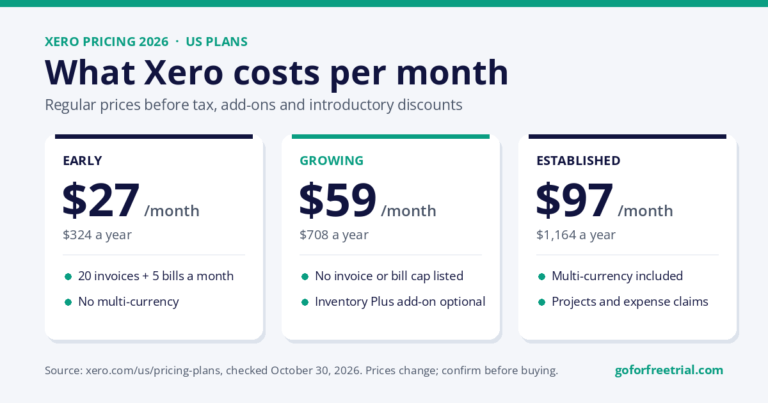
Xero pricing page screenshot captured from the official Xero website. Pricing and promotions may change.
Overview
Xero is best understood as a serious cloud accounting platform.
For Thailand-based users, the key question is not only whether Xero is good.
It is.
The real question is whether it fits your invoices, expenses, VAT records, accountant workflow, language needs, and local compliance process.
If your company sells outside Thailand, bills international clients, works with overseas suppliers, or manages ecommerce channels, Xero can be a strong option.
Cloud access and clean reporting can matter as much as local document templates.
Why Xero Works for Thailand
Xero is useful for Thailand-based businesses with international reporting needs.
It gives you cloud accounting, bank reconciliation, strong reporting, accountant access, app integrations, and better financial visibility.
That said, Thai VAT, withholding tax, payroll, and local reporting workflows should be confirmed with a Thai accountant before you fully rely on it.
This is important.
Global software can help.
But local tax still lives locally.
Very inconvenient.
Very true.
Key Features
Xero covers:
- Quotes and invoices
- Bills
- Expenses
- Bank reconciliation
- Reports
- Multicurrency on higher plans
- App marketplace
- Accountant access
- Basic inventory plus add-ons
In practice, this means fewer manual spreadsheets and a cleaner month-end process if you set up your chart of accounts and tax settings properly.
Pricing and Free Trial Notes
Xero pricing and promotions can change by country.
US pricing is shown publicly through Early, Growing, and Established plans, but Thailand billing, taxes, and country-specific availability should be checked directly with Xero before purchase.
Xero usually offers sign-up pages, free trials, or promotions depending on region and timing.
Always check the live offer.
Not an old screenshot.
Old screenshots are little time capsules of confusion.
Xero Pros
- Mature cloud accounting
- Strong reports
- Good bank reconciliation
- Broad integrations
- Good accountant collaboration
- Strong fit for growing businesses
- Useful for international billing and ecommerce workflows
Xero Cons
- Some features vary by country
- Thai tax workflows may need manual setup or advisor support
- Promotions change often
- Not the most Thai-local interface
- Payroll support should not be assumed for Thailand
Ease of Use
Xero is moderate in ease of use.
A freelancer may judge it by how quickly they can send the first invoice.
A company should judge it by how quickly the owner, staff, accountant, and bookkeeper can work from the same data without breaking the books.
That second part matters more.
Who Should Choose Xero?
Choose Xero if you want a serious cloud accounting system that can grow with your business.
It is a strong fit if:
- You work with international clients
- You sell online
- You want good reporting
- You need accountant access
- You want a mature app ecosystem
- You want to reduce spreadsheet bookkeeping
Who Should Avoid Xero?
Avoid Xero if you need Thai-first payroll, local tax forms, or a local-language workflow built around Thai accounting practice out of the box.
In that case, FlowAccount or PEAK may be easier to test.
Final Verdict on Xero
Xero is worth shortlisting when its strengths match your business type.
Do not choose it only because it is famous.
Choose it because the workflow, support, accountant access, and local requirements make sense.
For a deeper look at Xero specifically, read our Xero review, Xero pricing guide, and Xero vs QuickBooks comparison.
Next Step: Compare Current Offers for Xero
If Xero looks like a fit, compare it with other accounting software before choosing a plan.
Check the official product page too, because pricing, trials, and country availability may change.
Compare Current Free Trials and Offers
Helpful links: free trial accounting software guide | Xero official website | Xero official pricing or product page
FreshBooks Review for Thailand-Based Businesses
FreshBooks is a niche pick for Thailand: freelancers invoicing overseas clients.
It is especially strong for freelancers, consultants, agencies, coaches, designers, writers, and service businesses that mainly send invoices and manage client work.
Overview
FreshBooks is best understood as simple accounting-style software for people who invoice clients.
It is not trying to be a heavy ERP.
And honestly?
That is part of the charm.
FreshBooks is useful for Thailand-based freelancers and service businesses billing overseas clients, especially when time tracking and simple invoices matter more than complex local accounting.
Why FreshBooks Works for Thailand
If you work with international clients, FreshBooks can help you create invoices, track time, manage client payments, record expenses, and keep simple reports.
It is especially useful if you want software that does not feel scary.
Because some accounting dashboards look like they were designed to punish optimism.
FreshBooks does not feel like that.
Key Features
FreshBooks covers:
- Invoicing
- Time tracking
- Estimates
- Expenses
- Online payments in supported countries
- Projects
- Client portal
- Reports
This can reduce manual spreadsheets and help you keep your client work organized.
Pricing and Free Trial Notes
FreshBooks usually promotes a free trial, but trial length, offers, and pricing can change.
Plans often include Lite, Plus, Premium, and custom Select-style options in many markets.
Thailand-based users should check payment support, taxes, and local accountant workflow before relying on it as the main accounting system.
FreshBooks Pros
- Very friendly interface
- Excellent invoicing
- Great for client work
- Strong time tracking
- Simple mobile experience
- Good for freelancers and service businesses
FreshBooks Cons
- Not ideal for complex inventory
- Local Thailand accounting may require accountant adjustments
- Less deep than Xero for full accounting
- Not the best option for complex ecommerce payouts
- Payroll is not the main product
Ease of Use
FreshBooks is very easy.
A freelancer may be able to create an invoice quickly, add a client, track time, and send payment reminders without much friction.
This matters because the best software is the one you actually use.
Not the one you avoid because it looks like a finance exam.
Who Should Choose FreshBooks?
Choose FreshBooks if your daily work is sending invoices, tracking time, and keeping client payments organized.
It is best for:
- Freelancers
- Consultants
- Agencies
- Designers
- Writers
- Coaches
- Service businesses
- International client billing
Who Should Avoid FreshBooks?
Avoid FreshBooks if you manage stock, multiple entities, detailed accounting controls, or complicated ecommerce workflows.
For those cases, Xero, Odoo, FlowAccount, PEAK, or another tool may be a better fit.
Final Verdict on FreshBooks
FreshBooks is worth shortlisting if simple invoicing and client work matter most.
Do not choose it only because it is easy.
Choose it because your business workflow is actually simple enough for it.
Next Step: Compare Current Offers for FreshBooks
If FreshBooks looks like a fit, compare it with other accounting software before choosing a plan.
Check the official product page too, because pricing, trials, and country availability may change.
Compare Current Free Trials and Offers
Helpful links: free trial accounting software guide | FreshBooks official website | FreshBooks official pricing or product page
Xendoo: Not a Fit for Thai-Registered Companies
Xendoo is an online bookkeeping and tax service run by a US-based team for US small businesses. It does not cover Thai VAT, withholding tax, social security or Revenue Department filings, so a Thai company should hire a local bookkeeping firm instead. It can still make sense for a US-registered LLC run by an owner living in Thailand.
Zoho Books Review for Thailand-Based Businesses
Zoho Books is a good-value option if you already use Zoho apps.
Not because it is weak.
It is actually a very good accounting tool.
For Thai-registered companies, compare FlowAccount and PEAK first; Zoho Books is a strong value option for teams already on Zoho.
Overview
Zoho Books is best for small businesses already using Zoho apps, value-focused teams, freelancers, startups, and service businesses.
It can work well for Thailand-based online businesses that use Zoho CRM, Zoho Projects, Zoho Inventory, or Zoho Expense.
It gives you good accounting structure without jumping straight to enterprise software.
Why Zoho Books Works for Thailand
Zoho Books can be a strong fit if your business wants value, automation, invoicing, expenses, bills, bank feeds, projects, reports, and Zoho ecosystem integrations.
If your company sells outside Thailand, bills overseas clients, or uses multiple online tools, Zoho Books can be useful.
But Thai tax treatment should still be reviewed with an accountant.
Global software can organize records.
It does not automatically understand every local compliance detail.
Key Features
Zoho Books covers:
- Invoices
- Estimates
- Expenses
- Bills
- Bank feeds
- Projects
- Automations
- Reports
- Zoho ecosystem integrations
It can reduce spreadsheet work and help create a cleaner month-end process if configured properly.
Pricing and Free Trial Notes
Zoho Books pricing is region-specific.
It may include Free, Standard, Professional, Premium, Elite, and Ultimate tiers depending on country.
Zoho Books commonly offers a free trial and a free plan in selected countries.
Thailand users should confirm local availability, tax settings, bank support, and plan limits before choosing it.
Zoho Books Pros
- Good value
- Clean interface
- Works nicely with Zoho apps
- Useful automation
- Good reports
- Strong for businesses already inside Zoho
Zoho Books Cons
- Regional availability matters
- Advanced workflows may need setup
- Payroll/local tax support varies
- Plan limits can be confusing
- Accountant familiarity may vary in Thailand
Ease of Use
Zoho Books is easy for many users.
It feels cleaner than many older accounting tools.
But if you connect several Zoho apps, workflows can become more complex.
That is not bad.
It just means you need setup discipline.
The software suite is powerful.
Powerful things need configuration.
Annoying, yes.
Useful, also yes.
Who Should Choose Zoho Books?
Choose Zoho Books if you want practical cloud accounting inside the wider Zoho ecosystem.
It is a good fit for:
- Zoho CRM users
- Online businesses
- Budget-conscious teams
- Startups
- Service businesses
- Freelancers
- Small ecommerce sellers
Who Should Avoid Zoho Books?
Avoid Zoho Books if your accountant requires another system or you need confirmed Thai statutory workflows built directly into the product.
Also avoid it if you want the simplest possible invoicing app.
FreshBooks may be easier for that.
Final Verdict on Zoho Books
Zoho Books is worth shortlisting when value and automation matter.
It is not my first pick for this article, but it is still a strong choice for the right Thailand-based business.
Next Step: Compare Current Offers for Zoho Books
If Zoho Books looks like a fit, compare it with other accounting software before choosing a plan.
Check the official product page too, because pricing, trials, and country availability may change.
Compare Current Free Trials and Offers
Helpful links: free trial accounting software guide | Zoho Books official website | Zoho Books official pricing or product page
FlowAccount Review for Thailand-Based Businesses
FlowAccount is one of the strongest Thailand-focused options.
If Thai-language workflows and local SME documents matter, it deserves serious attention.
Overview
FlowAccount is built for Thailand-based small businesses, freelancers, and companies that want Thai-friendly invoicing and accounting workflows.
FlowAccount pricing screenshot captured from the official FlowAccount website. Plans and promotions may change.
Why FlowAccount Works for Thailand
FlowAccount is one of the strongest fits for Thai-language users and local SME workflows.
If your team prefers Thai documents, Thai interface support, and workflows that feel closer to domestic practice, FlowAccount may be easier than a global accounting tool.
Global tools are useful.
But local tools often feel more natural for local paperwork.
Paperwork has culture.
Unfortunately.
Key Features
FlowAccount covers:
- Thai/English cloud accounting
- Quotations
- Invoices
- Receipts
- Expenses
- Reports
- Inventory options
- Accountant collaboration
It can help Thailand-based businesses reduce spreadsheets and keep documents more organized.
Pricing and Free Trial Notes
FlowAccount promotes free trial or sign-up options.
Official pricing is shown on FlowAccount pricing pages and may change by package, promotion, or billing period.
Always check the current plan rules before subscribing.
FlowAccount Pros
- Thailand-focused
- Friendly for local documents
- Practical for SMEs
- Easier for Thai-language teams
- Good local workflow fit
FlowAccount Cons
- International integrations may be narrower than Xero or Odoo
- Plan details must be verified
- Complex groups may outgrow it
- Less global than Xero
Who Should Choose FlowAccount?
Choose FlowAccount if you want a Thai-first accounting workflow that a local team can learn quickly.
It is especially useful for:
- Thai SMEs
- Freelancers
- Local service businesses
- Small companies
- Teams that prefer Thai documents
- Businesses working closely with local accountants
Who Should Avoid FlowAccount?
Avoid FlowAccount if you need deep multinational ERP features or a global app marketplace as your top priority.
For that, Xero, Odoo, or NetSuite may be stronger.
Final Verdict on FlowAccount
FlowAccount is worth shortlisting if Thailand-focused workflows matter more than global app flexibility.
Do not ignore it just because global tools are famous.
Local fit matters.
A lot.
Next Step: Compare Current Offers for FlowAccount
If FlowAccount looks like a fit, compare it with other accounting software before choosing a plan.
Check the official product page too, because pricing, trials, and country availability may change.
Compare Current Free Trials and Offers
Helpful links: free trial accounting software guide | FlowAccount official website | FlowAccount official pricing or product page
PEAK Review for Thailand-Based Businesses
PEAK is another strong Thailand-focused accounting platform.
It is especially useful for Thai SMEs, accountants, and companies that want local cloud accounting workflows.
Overview
PEAK is best understood as a local cloud accounting tool for Thai SMEs and accountants.
It focuses on practical accounting documents, reports, and workflows closer to domestic business needs.
Why PEAK Works for Thailand
PEAK can be a strong local option for Thai businesses that want accounting documents and workflows closer to domestic practice.
If your accountant already knows PEAK or prefers a local tool, that can matter more than a global brand name.
The best accounting software is not always the most famous.
It is the one your team and accountant can actually use every week.
What a concept.
Key Features
PEAK covers:
- Cloud accounting
- Invoices
- Purchases
- Expenses
- Reports
- Accountant workflows
- Local business documents
- Integrations depending on plan
Pricing and Free Trial Notes
PEAK pricing should be checked directly because Thai software plans and promotions may change.
PEAK commonly offers demo, trial, or sign-up paths.
Confirm details from official PEAK pages before choosing a plan.
PEAK Pros
- Thai-market focus
- Accountant-friendly
- Practical for local documents
- Cloud access
- Good for Thai SMEs
PEAK Cons
- English/global buyer information may be less transparent
- International app marketplace may be narrower
- Exact pricing needs confirmation
- May not be best for global ecommerce workflows
Who Should Choose PEAK?
Choose PEAK if your team and accountant prefer a Thailand-focused cloud accounting platform.
It may fit Thai SMEs, accountants, and companies that need local document workflows.
Who Should Avoid PEAK?
Avoid PEAK if your main requirement is a global English-first software ecosystem with extensive international integrations.
Final Verdict on PEAK
PEAK is worth shortlisting if local Thai accounting workflows are your top priority.
It may not be the flashiest tool.
But local fit can beat flashy every time.
Next Step: Compare Current Offers for PEAK
If PEAK looks like a fit, compare it with other accounting software before choosing a plan.
Check the official product page too, because pricing, trials, and country availability may change.
Compare Current Free Trials and Offers
Helpful links: free trial accounting software guide | PEAK official website | PEAK official pricing or product page
Odoo Accounting Review for Thailand-Based Businesses
Odoo is different.
It is not only accounting software.
It is a broader business system.
Overview
Odoo Accounting is best for businesses that want accounting inside a broader ERP covering sales, CRM, ecommerce, inventory, POS, projects, and HR.
That is powerful.
Also more complex.
So do not choose Odoo if you only need to send a few invoices.
That would be like buying a truck to move a lunchbox.
Why Odoo Works for Thailand
Odoo can be good for Thailand businesses that need operations plus accounting, not just bookkeeping.
If your company needs ecommerce, inventory, POS, CRM, approvals, and accounting to connect together, Odoo can be worth testing.
Key Features
Odoo Accounting covers:
- Invoicing
- Bills
- Expenses
- Reconciliation
- Reporting
- Inventory integration
- Ecommerce
- POS
- CRM
- Documents
- Approvals
Pricing and Free Trial Notes
Odoo offers free access or trial paths, including a one-app-free model and trials for paid plans.
Official pricing may include Standard or Custom plans priced per user per month.
Pricing and country terms can change, so confirm current details before choosing.
Odoo Pros
- Broad ERP ecosystem
- Scalable
- One ecosystem for operations
- Strong inventory and ecommerce fit
- Good for businesses that need more than accounting
Odoo Cons
- Setup takes work
- Accounting configuration needs care
- Too much software for simple freelancers
- May need implementation help
Who Should Choose Odoo?
Choose Odoo when accounting should connect tightly with inventory, ecommerce, POS, CRM, or operations.
It is best for businesses that want an operating system, not just bookkeeping software.
Who Should Avoid Odoo?
Avoid Odoo if you want a tiny bookkeeping tool you can configure in one afternoon.
Because Odoo is not tiny.
It arrives with luggage.
Final Verdict on Odoo
Odoo is worth shortlisting if your Thailand business needs ERP-style operations.
If you only need invoices, start with Xero, FreshBooks, FlowAccount, or Zoho Books instead.
Next Step: Compare Current Offers for Odoo Accounting
If Odoo Accounting looks like a fit, compare it with other accounting software before choosing a plan.
Check the official product page too, because pricing, trials, and country availability may change.
Compare Current Free Trials and Offers
Helpful links: free trial accounting software guide | Odoo Accounting official website | Odoo Accounting official pricing or product page
QuickBooks Online Review for Thailand-Based Businesses
QuickBooks Online is a familiar global accounting platform.
But for Thailand-based businesses, the big question is availability and local fit.
Overview
QuickBooks Online is best for owners who want a widely known accounting platform with invoicing, expenses, reporting, and a large advisor ecosystem.
It can work for internationally oriented Thai businesses, but local tax settings and Thai support should be checked carefully.
Why QuickBooks Online Works for Thailand
QuickBooks can be useful if your company sells outside Thailand, bills international clients, or works with advisors who already know QuickBooks.
But do not assume payroll, tax, and support features work the same way in Thailand as they do in the US or other core markets.
Accounting software loves regional differences.
It keeps things spicy.
Key Features
QuickBooks Online covers:
- Invoicing
- Expenses
- Receipt capture
- Reports
- Bank feeds
- Accountant access
- Apps
- Payments in supported regions
Pricing and Free Trial Notes
QuickBooks pricing varies by region and promotion.
QuickBooks often uses trials or promotional discounts, but availability and country access can change.
Verify current details on the official QuickBooks pricing page before choosing.
QuickBooks Pros
- Familiar global brand
- Good dashboard
- Strong invoice and expense workflows
- Many accountants know it
- Good reporting on higher plans
QuickBooks Cons
- Thailand-specific availability can be unclear
- Regional plan differences matter
- Some features sit behind higher plans
- Payroll is region-specific
- Local Thai tax workflows must be confirmed
Who Should Choose QuickBooks Online?
Choose QuickBooks Online if you already work with advisors who use QuickBooks or want a familiar global accounting workflow.
Who Should Avoid QuickBooks Online?
Avoid it if you need guaranteed Thai localization, Thai-language workflows, or Thailand-specific payroll before launch.
If you are narrowing the choice to Xero and QuickBooks, our Xero vs QuickBooks comparison explains the trade-offs in more detail.
Final Verdict on QuickBooks Online
QuickBooks Online is worth shortlisting when your advisor ecosystem supports it.
Do not choose it only because it is famous.
Choose it because the workflow and local requirements make sense.
Next Step: Compare Current Offers for QuickBooks Online
If QuickBooks Online looks like a fit, compare it with other accounting software before choosing a plan.
Check the official product page too, because pricing, trials, and country availability may change.
Compare Current Free Trials and Offers
Helpful links: free trial accounting software guide | QuickBooks Online official website | QuickBooks Online official pricing or product page
Wave Review for Thailand-Based Businesses
Wave is simple and low-cost, but Thailand-based users need to be careful with availability and local fit.
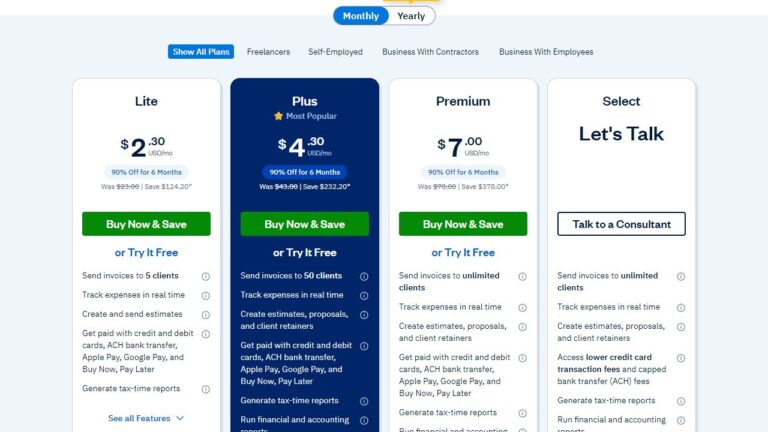
Wave pricing page screenshot captured from the official Wave website. Availability, pricing, and country support may change.
Overview
Wave is best for very small businesses, freelancers, and owners who want simple invoicing and bookkeeping at low cost.
It may work for simple record-keeping.
But Thai bank feeds, VAT, and payroll are not the reason to choose it.
Why Wave Works for Some Thailand Users
Wave can be useful if you just need basic invoicing, simple income and expense records, and low-cost bookkeeping.
But it is not a Thailand-local tool.
If VAT, payroll, bank feeds, or local accountant workflow matter, test carefully before relying on it.
Key Features
Wave covers:
- Invoices
- Bookkeeping records
- Payments in supported countries
- Receipts add-on
- Dashboard
- Reports
- Bank import on supported plans and banks
Pricing and Free Trial Notes
Wave publicly lists a free Starter plan and paid Pro plan in supported markets.
Thailand users should confirm market support before using it seriously.
Payment and payroll features vary by country.
Wave Pros
- Low entry cost
- Simple invoices
- Friendly interface
- Useful for tiny teams
- Free or low-cost path in supported markets
Wave Cons
- Country support is limited
- Weak for inventory
- Payroll and payments are region-specific
- Not Thai-localized
- Not ideal for serious Thai compliance workflows
Who Should Choose Wave?
Choose Wave only if your needs are simple and you confirm the features you need are available from your location.
Who Should Avoid Wave?
Avoid Wave for a Thai company that needs robust VAT workflows, inventory, local support, or payroll.
For very small operations, also compare free bookkeeping software options before assuming a paid plan is necessary.
Final Verdict on Wave
Wave is worth checking for simple records only.
It is not my first pick for Thailand-based businesses with serious accounting needs.
Next Step: Compare Current Offers for Wave
If Wave looks like a fit, compare it with other accounting software before choosing a plan.
Check the official product page too, because pricing, trials, and country availability may change.
Compare Current Free Trials and Offers
Helpful links: free trial accounting software guide | Wave official website | Wave official pricing or product page
Sage Accounting Review for Thailand-Based Businesses
Sage is a traditional accounting software family with deeper finance options.
It may fit established businesses better than freelancers.
Overview
Sage Accounting is best for businesses that want established accounting software options and may grow into Sage Intacct or Sage 50-style workflows.
Sage has a regional presence and a Thailand option in its country selector, but buyers should confirm the exact product supported locally.
Key Features
Sage Accounting can cover:
- Invoicing
- Expense management
- Reporting
- Cloud and desktop-connected accounting options
- Inventory options
- ERP options through the Sage portfolio
Pricing and Free Trial Notes
Sage pricing varies by product, region, and partner channel.
Trials and demos also vary by product and country.
Use the official Sage page for current details.
Sage Pros
- Established vendor
- Good path for growing companies
- Strong finance and ERP options
- Better for more formal accounting needs
Sage Cons
- Product lineup can feel confusing
- Pricing transparency depends on product
- May be more than a freelancer needs
- Local product support must be confirmed
Who Should Choose Sage?
Choose Sage if you want an established finance software family and may need stronger accounting controls as you grow.
Who Should Avoid Sage?
Avoid Sage if you want the simplest self-service SaaS sign-up with fully transparent local pricing.
Final Verdict on Sage
Sage Accounting is worth shortlisting when your business needs more formal accounting depth.
But simple Thailand-based businesses may find Xero, FreshBooks, FlowAccount, or PEAK easier to start with.
Next Step: Compare Current Offers for Sage Accounting
If Sage Accounting looks like a fit, compare it with other accounting software before choosing a plan.
Check the official product page too, because pricing, trials, and country availability may change.
Compare Current Free Trials and Offers
Helpful links: free trial accounting software guide | Sage Accounting official website | Sage Accounting official pricing or product page
NetSuite Review for Thailand-Based Businesses
NetSuite is not ordinary small-business accounting software.
It is ERP.
So please do not compare it like it is FreshBooks.
That would be chaos.
Overview
NetSuite is best for larger companies, multi-entity groups, regional businesses, and finance teams that need ERP-grade controls.
It is relevant for larger Thailand-based companies with regional entities, complex reporting, inventory, approvals, and controls.
Key Features
NetSuite covers:
- Financial management
- ERP
- Revenue
- Procurement
- Order management
- Inventory
- Dashboards
- Multi-entity reporting
- Controls
Pricing and Free Trial Notes
NetSuite pricing is quote-based.
Costs depend on modules, users, implementation, and business complexity.
It is usually demo-led rather than a simple free-trial product.
NetSuite Pros
- Enterprise depth
- Strong controls
- Scalable for complex operations
- Integrated ERP
- Good for regional business groups
NetSuite Cons
- Expensive
- Implementation-heavy
- Not suitable for simple freelancers
- Too much for tiny SMEs
Who Should Choose NetSuite?
Choose NetSuite if your company has complex finance operations and needs ERP rather than simple accounting software.
Who Should Avoid NetSuite?
Avoid NetSuite if you want low-cost, self-service accounting software for a small local business.
Do not bring a spaceship to a bicycle race.
Final Verdict on NetSuite
NetSuite is worth shortlisting only when ERP complexity is real.
If you just need invoices, expenses, and reports, start elsewhere.
Next Step: Compare Current Offers for NetSuite
If NetSuite looks like a fit, compare it with other accounting software before choosing a plan.
Check the official product page too, because pricing, trials, and country availability may change.
Compare Current Free Trials and Offers
Helpful links: free trial accounting software guide | NetSuite official website | NetSuite official pricing or product page
MoneyWorks Review for Thailand-Based Businesses
MoneyWorks may fit businesses that prefer desktop or hybrid accounting software.
It is more traditional than cloud-first tools.
Overview
MoneyWorks is best for businesses that prefer desktop or hybrid accounting software and want a traditional accounting system.
For Thailand-based users, the key question is whether it fits Thai tax, local workflows, and accountant support.
Key Features
MoneyWorks covers:
- General ledger
- Invoicing
- Receivables
- Payables
- Stock in selected editions
- Reports
- Multi-user editions
Pricing and Free Trial Notes
Pricing and editions should be checked directly because regional distribution and product options can vary.
MoneyWorks has historically offered downloads or demos, but confirm current trial and platform details on official pages.
MoneyWorks Pros
- Traditional accounting depth
- Desktop control
- Useful for users who dislike pure SaaS
- Good traditional reports
MoneyWorks Cons
- Less cloud-native
- Local Thailand support/pricing may be unclear
- Integrations may be narrower
- Thai tax localization should be confirmed
Who Should Choose MoneyWorks?
Choose MoneyWorks if you specifically want a traditional accounting package and have an accountant who supports it.
Who Should Avoid MoneyWorks?
Avoid it if you want modern browser-first cloud accounting with many SaaS integrations.
Final Verdict on MoneyWorks
MoneyWorks is worth shortlisting only if traditional accounting software fits your workflow.
For most Thailand-based small businesses, Xero, FreshBooks, FlowAccount, PEAK, or Zoho Books will be easier to compare first.
Next Step: Compare Current Offers for MoneyWorks
If MoneyWorks looks like a fit, compare it with other accounting software before choosing a plan.
Check the official product page too, because pricing, trials, and country availability may change.
Compare Current Free Trials and Offers
Helpful links: free trial accounting software guide | MoneyWorks official website | MoneyWorks official pricing or product page
MYOB Review for Thailand-Based Businesses
MYOB is strongest in Australia and New Zealand.
For Thailand, it usually makes sense only if your business has a regional connection or your accountant already uses it.
Overview
MYOB is best for Australia/New Zealand-oriented businesses or teams whose accountant already uses MYOB.
It is less obvious for Thai-local SMEs unless there is an AU/NZ connection or advisor requirement.
Key Features
MYOB covers:
- Invoicing
- Expenses
- Bank feeds in supported markets
- Payroll in core regions
- Reports
- Inventory/options by product
Pricing and Free Trial Notes
MYOB pricing is market-specific, mainly around MYOB Business and related products.
Thailand buyers should confirm availability, features, and support before choosing.
MYOB Pros
- Strong in AU/NZ
- Accountant ecosystem
- Useful if business has regional ties
- Good reports in supported markets
MYOB Cons
- Thailand availability may be limited
- Local compliance fit may be limited
- Pricing is region-specific
- Not Thai-first
Who Should Choose MYOB?
Choose MYOB if your business or accountant already sits inside the MYOB ecosystem.
Who Should Avoid MYOB?
Avoid MYOB if you need Thailand-first tax workflows and local support as the main buying factor.
Final Verdict on MYOB
MYOB is worth shortlisting only when AU/NZ workflow or accountant preference makes it practical.
Otherwise, Thai-focused or more globally flexible tools may be better.
Next Step: Compare Current Offers for MYOB
If MYOB looks like a fit, compare it with other accounting software before choosing a plan.
Check the official product page too, because pricing, trials, and country availability may change.
Compare Current Free Trials and Offers
Helpful links: free trial accounting software guide | MYOB official website | MYOB official pricing or product page
Thailand-Specific Buying Guide
A good accounting app should match how your Thai business actually operates.
A Bangkok cafe, Chiang Mai freelancer, Lazada seller, and BOI company will not all need the same software.
I know.
Annoying that one answer does not solve everything.
But that is business.
Cloud vs Desktop
Cloud accounting software is usually better if you want browser access, automatic updates, shared accountant access, and mobile receipt capture.
Desktop software can still make sense if your business wants local files, custom processes, or weaker internet dependency.
But for most modern small businesses, cloud is easier.
Especially if your accountant needs access.
And they usually do.
Thai Tax and VAT Needs
Check whether the software supports the records your accountant needs for:
- VAT
- Withholding tax
- Tax invoices
- Receipts
- Credit notes
- Month-end reporting
Global tools may track tax, but Thai-specific document workflows may need configuration.
Do not guess here.
Ask your accountant.
Tax guessing is not a personality trait we want.
Invoicing Requirements
Thailand businesses often need quotations, tax invoices, receipts, partial payments, and bilingual customer documents.
Test a real invoice before subscribing.
Not a fake one with “Test Customer.”
A real-style one.
With your actual business details.
That is how you find problems early.
Multi-Currency Support
If you bill overseas clients in USD, EUR, AUD, JPY, or another currency, multicurrency matters.
Check whether currency support is included in your plan or locked behind a higher tier.
A cheap plan becomes less cheap if you need spreadsheets for currency work.
English and Thai Language Support
A founder may prefer English.
Staff and accountant may prefer Thai.
That matters.
FlowAccount and PEAK may feel easier for Thai-language workflows.
Global tools may suit English-first teams or businesses with international customers.
Bank Feeds and Reconciliation
Bank feeds save time only when your bank is supported and matching rules work.
During a trial, import real bank transactions or ask the vendor which Thai banks are supported.
Do not assume.
Assumptions are where reconciliation goes to suffer.
Ecommerce Integrations
Shopee, Lazada, Shopify, WooCommerce, POS, payment gateways, and inventory integrations can decide the winner.
If ecommerce is central, test the order-to-accounting workflow.
Not just invoices.
Not just sales.
Test refunds, fees, payouts, tax, and inventory too.
That is where ecommerce accounting gets spicy.
Payroll and HR
Payroll is deeply local.
Do not assume a global payroll feature works for Thailand.
If payroll matters, verify local support or use separate Thai payroll software.
Payroll is not the place to freestyle.
People notice when salaries are wrong.
Inventory Management
Retailers, wholesalers, restaurants, and ecommerce sellers need stock movement, cost of goods, purchase orders, and valuation.
Simple invoice tools are often not enough.
If inventory matters, test it carefully during the trial.
Inventory mistakes can make profit reports lie confidently.
Very dangerous.
Accountant Access
Your accountant should be able to review transactions, adjust entries, export reports, and close periods without asking for spreadsheet dumps every month.
If your accountant hates the tool, your year-end process may become painful.
Ask before buying.
Not after.
After is where regret lives.
Mobile App
For owners on the move, test receipt capture, invoice sending, approvals, and dashboard visibility on the mobile app.
A good mobile app helps small tasks happen before they pile up.
A bad mobile app makes you say, “I’ll do it later.”
And later becomes tax season.
Again.
Customer Support
Support language and time zone matter.
A low monthly price is less attractive if you cannot get help during a VAT filing rush.
Check support before you need support.
This is boring wisdom.
The best kind.
Data Security
Use strong passwords, two-factor authentication, role-based access, audit logs where available, and careful user permissions.
Accounting software contains sensitive business data.
Do not give everyone admin access just because it is faster.
Fast today.
Messy later.
Pricing and Free Trial
Use the trial to test actual workflows, not just the dashboard.
Pricing may change, so compare current offers before committing.
A trial is not sightseeing.
It is where you test whether the software can survive your real business.
Scalability
A freelancer can start simple.
A growing company should think about users, entities, inventory, approvals, audit trails, API access, and reporting before migrating later.
Migration is possible.
But avoiding unnecessary migration is also nice.
Best Accounting Software by Business Type in Thailand
Best Accounting Software for Freelancers in Thailand
FreshBooks is the easiest starting point for many freelancers.
Xero is better if you expect to grow or need stronger accounting.
Zoho Books can work if value matters.
FlowAccount is useful if Thai-local documents matter more.
Freelancers should prioritize simple invoices, expense capture, client records, and tax-ready reports.
Best Accounting Software for Small Businesses in Thailand
Xero suits foreign-owned small businesses that want cloud accounting, reports, bank reconciliation, and integrations.
FlowAccount and PEAK are strong if Thai-local workflows matter most.
Zoho Books is useful for value-focused teams.
FreshBooks works well for service-based businesses.
Small businesses should test invoices, bills, bank reconciliation, accountant access, and VAT reporting support.
Best Accounting Software for Ecommerce Sellers in Thailand
Xero is a strong first trial for ecommerce sellers that need cloud accounting and integrations.
Odoo is worth testing if inventory, POS, CRM, and operations need to connect.
Zoho Books with Zoho Inventory can work for value-focused sellers.
FlowAccount or PEAK may work depending on local workflow needs.
Sellers on Shopify, WooCommerce, Shopee, or Lazada should test order sync, payment fees, refunds, inventory, and marketplace payouts.
Do not skip payout testing.
That is where ecommerce bookkeeping gets sneaky.
Best Accounting Software for Restaurants and Cafes in Thailand
Look closely at POS integration, inventory, supplier bills, cash handling, and daily sales reconciliation.
Odoo can work if you need POS plus inventory.
FlowAccount or PEAK may work if accounting documents are the main concern.
Xero can work if you use the right integrations and your accountant supports the setup.
Best Accounting Software for Service Businesses in Thailand
FreshBooks, Xero, Zoho Books, and FlowAccount fit many agencies, consultants, salons, repair shops, and professional services.
FreshBooks is easiest for invoices and client work.
Xero is stronger for proper accounting and reporting.
FlowAccount is better for Thai-local documents.
Zoho Books is good for value and automation.
Best Accounting Software for Accountants and Bookkeepers in Thailand
Xero, PEAK, FlowAccount, QuickBooks, and Zoho Books are worth reviewing depending on client profile.
Accountant access, client switching, reports, audit trail, and export quality matter more than flashy dashboards.
Flashy dashboards are nice.
Clean exports are nicer.
Best Accounting Software for Startups in Thailand
Startups should think about future fundraising, investor reports, recurring revenue, expense controls, and multi-currency billing.
Xero is a strong pick for foreign-owned companies.
Zoho Books is useful if value and automation matter.
Odoo is better if operations and ERP-style workflows matter.
FlowAccount can be practical for local operations.
Best Accounting Software for Companies That Need Inventory
Odoo, Xero with add-ons, Zoho Books/Inventory, PEAK, FlowAccount, Sage, and NetSuite should be compared carefully.
Inventory is where simple invoice software often breaks down.
If inventory matters, test stock movement, purchase orders, costing, returns, and reports before subscribing.
Global vs Local Accounting Software in Thailand
Global tools like Xero, FreshBooks, Zoho Books, QuickBooks, Sage, and Odoo often win on cloud accounting, integrations, reporting, and international familiarity.
They are useful when your company bills overseas clients, works with international advisors, or needs broader app connections.
Local tools like FlowAccount and PEAK may fit Thai-language teams, local documents, and domestic SME operations better.
The interface, templates, support expectations, and accountant familiarity can feel more natural for Thai users.
The best choice depends on business size, accounting needs, tax needs, budget, language preference, and whether the business wants local workflows or international integrations.
There is no universal winner.
There is only “best for your workflow.”
I know.
Less dramatic.
More correct.
How We Chose the Best Accounting Software in Thailand
We reviewed public product pages, pricing pages, help documents, demo materials, and available screenshots.
Where direct hands-on access was available, we considered dashboard design, setup flow, invoicing, reporting, and ease of use.
We evaluated each tool based on:
- Ease of use
- Invoicing
- Expense tracking
- Bank reconciliation
- Reporting
- Pricing transparency
- Free trial availability
- Thai business relevance
- Integrations
- Mobile app
- Support
- Security
- Scalability
- User experience
- Suitability for accountants and bookkeepers
You can also review our broader review methodology.
Final Verdict: Which Accounting Software Should You Choose?
Choose FlowAccount if you are a Thai SME or freelancer and want Thai-language invoicing, VAT reports and e-Tax invoices at a low baht price.
Choose PEAK if your accounting firm already uses it or you need full e-Tax Invoice & e-Receipt and more users.
Choose Xero if you are a foreign-owned company reporting to an overseas group, and agree with your accountant how Thai tax documents will be produced.
Choose Zoho Books if you already use Zoho apps or want good value, after checking the Thai VAT setup.
Choose Odoo if you need accounting inside a broader ERP system, or NetSuite if you run a larger business with complex finance needs.
Choose FreshBooks only if you are a freelancer invoicing overseas clients and handle Thai tax separately. For done-for-you bookkeeping, use a local Thai firm.
FAQs About Accounting Software in Thailand
What Is the Best Accounting Software in Thailand?
For a Thai-registered company, start with FlowAccount and PEAK, which handle Thai VAT, withholding tax and e-Tax invoices. Foreign-owned companies reporting to an overseas group often add Xero or Zoho Books.
After that, compare Odoo, QuickBooks Online and Wave depending on your ecommerce needs, accountant preference and budget.
Is Xero Available in Thailand?
Xero can be used by many international businesses, but buyers in Thailand should confirm billing, support, tax settings, bank feeds, and local advisor fit before subscribing.
Is FreshBooks Good for Freelancers in Thailand?
Yes, FreshBooks can be a good option for Thailand-based freelancers, consultants, and service businesses billing clients locally or overseas.
It is best when invoicing, time tracking, and client payments matter more than complex local accounting.
Is Xendoo Good for Thailand-Based Businesses?
No, not for a Thai-registered company. Xendoo is a US-based bookkeeping service for US businesses.
It may suit a US-registered company run from Thailand; otherwise use a local Thai bookkeeping firm.
Is Zoho Books Good for Small Businesses in Thailand?
Zoho Books can be good for Thailand-based online businesses, startups, and service businesses that want value and automation.
But Thai tax treatment, bank feeds, and local workflow should still be checked before choosing it.
What Accounting Software Is Best for Small Businesses in Thailand?
Xero, FlowAccount, PEAK, FreshBooks, and Zoho Books are strong options.
Xero is better for cloud accounting and international workflows.
FlowAccount and PEAK are better for Thai-local workflows.
FreshBooks is better for simple service businesses.
Zoho Books is better for value-focused teams.
Which Accounting Software Has a Free Trial in Thailand?
Free trials and promotions change often.
Xero, FreshBooks, Zoho Books, Odoo, FlowAccount, PEAK, and QuickBooks may offer trial or sign-up options depending on region and current promotions.
Verify the current offer before committing.
Which Accounting Software Is Best for Ecommerce Sellers in Thailand?
Xero, Odoo, Zoho Books with Zoho Inventory, FlowAccount, and PEAK are worth comparing.
Test marketplace payouts, refunds, fees, inventory, tax records, and ecommerce integrations before choosing.
Do Thai Businesses Need Cloud Accounting Software?
Not every business must use cloud accounting.
But cloud tools make it easier to work with an accountant, reconcile transactions, send invoices, access records remotely, and reduce spreadsheet errors.
For growing businesses, cloud accounting is usually easier to manage.
Can Accounting Software Help With VAT Records?
Yes, accounting software can help organize VAT-related records, invoices, sales, purchases, and reports.
However, you should ask a Thai accountant to confirm that the setup matches current requirements.
Is Local Thai Accounting Software Better Than Global Accounting Software?
Local software may be better for Thai-language workflows and domestic documents.
Global software may be better for integrations, international billing, and broader reporting.
The right answer depends on your business.
Not the software’s popularity contest score.
What Should I Check Before Choosing Accounting Software?
Check:
- Invoicing
- VAT/tax setup
- Bank reconciliation
- Accountant access
- User permissions
- Reports
- Integrations
- Mobile app
- Support language
- Pricing
- Trial availability
- Upgrade limits
How Much Does Accounting Software Cost in Thailand?
Thai cloud tools are inexpensive: FlowAccount starts at ฿199 a month (list price) and PEAK packages run from ฿2,500 to ฿35,000 a year excluding VAT, as of October 2026. Global tools are usually billed in US dollars, and ERP systems are quote-based.
Pricing may depend on users, modules, country, tax, promotions, support, and billing period.
Always check the official pricing page before buying.
Can Accounting Software Replace an Accountant in Thailand?
No.
Accounting software can reduce manual work and improve records.
But most businesses still need an accountant or tax advisor for filing, compliance, payroll, tax decisions, and year-end review.
Software helps.
It does not become your accountant.
Thankfully.
Or terrifyingly.
Depends how you look at it.
What Is the Best Accounting Software With Free Trial Thailand Buyers Should Compare?
Compare FlowAccount (30-day trial), PEAK, Zoho Books (14-day trial), Xero (one month free) and QuickBooks where available.
Use the trial to test real invoices, expenses, bank feeds, reports, and accountant access.
Conclusion
The best accounting software in Thailand is the one your business will actually use correctly every week.
Not the one with the loudest ad.
Not the one with the fanciest dashboard.
Not the one your friend uses for a totally different business.
Start with your workflow.
Test real invoices.
Check VAT and tax setup.
Ask your accountant.
Compare the total cost.
For a Thai-registered company, start with FlowAccount and PEAK, then compare Xero or Zoho Books if you report to an overseas group.
For a quick next step, compare current accounting software free trials and offers before choosing a plan.
Continue Your Accounting Software Comparison
Related guides: Start with our accounting software free-trial pillar, compare small-business accounting tools, and review ecommerce accounting software.
Official Thailand reference: Confirm local plans and VAT features on the official FlowAccount pricing page.
Related Videos
More walkthroughs from Janak Uparkoti’s YouTube channel: