Affiliate disclosure: GoForFreeTrial may earn a commission if you sign up for Xero through some links on this page. It does not change the price you pay or the numbers below. See our review methodology and full disclosure.
Quick verdict: Zoho Books is cheaper, and its free plan is genuinely usable for a one-person business earning under $50,000 a year. Xero costs more at the start, but it charges no per-user fees and its official Shopify integration is free on every plan. Zoho Books’ native Shopify sync only starts on its $150-a-month Elite plan. If you sell on Shopify or need several people in the books, Xero usually works out better value. If you are a solo service business watching every dollar, Zoho Books is hard to beat.
All prices are US list prices from each vendor’s official pricing page, checked on October 30, 2026. They exclude sales tax and change often, so confirm them before you buy.
Xero vs Zoho Books at a Glance
| Xero | Zoho Books | |
|---|---|---|
| Free plan | No | Yes, for businesses under $50K annual revenue |
| Paid plans (monthly billing) | $27, $59, $97 | $20, $50, $70, $150, $275 |
| Users | No per-user license fees | 1 to 15 users depending on plan, then $3 per extra user |
| Entry plan limits | Early: 20 invoices and 5 bills a month | Free: 1,000 invoices a year. Standard: 5,000 a year |
| Multi-currency | Established ($97) | Professional ($50) |
| Inventory | Inventory Plus add-on on Growing and Established | Included from Professional ($50) |
| Projects and time billing | Established ($97) | Professional ($50) |
| Shopify integration | Official app, free on all plans | Native integration from Elite ($150), up to 2 stores |
| Payroll (US) | Xero Payroll powered by Gusto: $36/month + $6 per person | Separate Zoho Payroll: from $39/month + $6 per employee |
| Current intro offer | 90% off for 6 months (ends November 2, 2026) | Cheaper annual billing |
Pricing: Zoho Books Starts Lower
Zoho Books has six plans, including a free one, and offers lower prices if you pay annually. Xero has three plans and bills monthly.
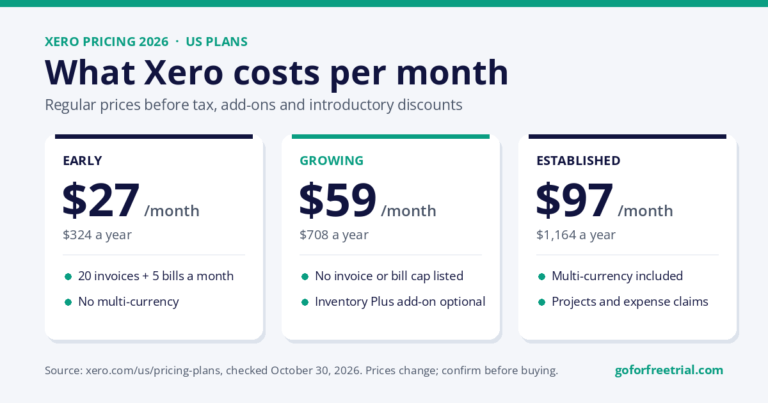
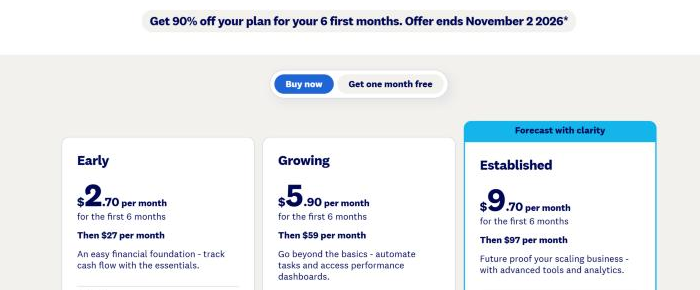
| Xero plan | Regular monthly price | Key limits |
|---|---|---|
| Early | $27 | 20 invoices and 5 bills a month. No multi-currency. |
| Growing | $59 | No invoice or bill cap listed. No multi-currency or projects. |
| Established | $97 | Adds multi-currency, projects, and expense claims. |
| Zoho Books plan | Monthly / billed annually | Users | Invoices per year |
|---|---|---|---|
| Free | $0 | 1 + 1 accountant | 1,000 |
| Standard | $20 / $15 | 3 | 5,000 |
| Professional | $50 / $40 | 5 | 10,000 |
| Premium | $70 / $60 | 10 | 25,000 |
| Elite | $150 / $120 | 10 | 100,000 |
| Ultimate | $275 / $240 | 15 | Not stated |
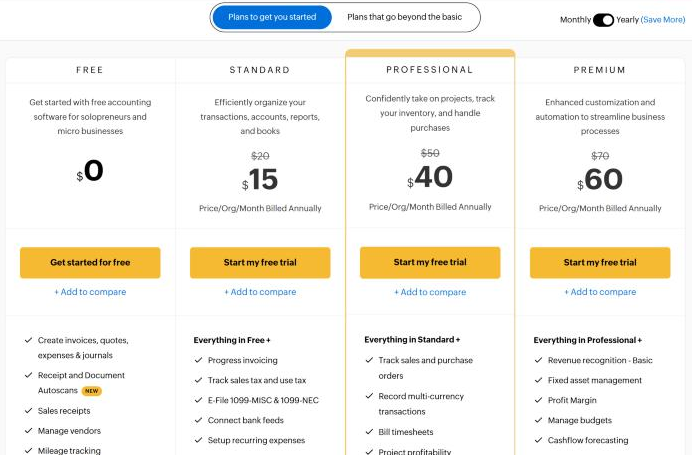
Sources: Xero US pricing and Zoho Books US pricing. Zoho prices are per organization.
Two things change this picture. First, Xero is currently offering new US customers 90% off for the first 6 months, which brings Growing down to $5.90 a month until the regular price applies. Xero says this offer ends on November 2, 2026. Second, Zoho Books’ user limits mean a growing team can be pushed onto a higher plan, or pay $3 per extra user each month ($2.50 if billed annually).
Entry Plans: Zoho Books Gives You More Room
This is where Zoho Books has a clear advantage. Xero Early allows 20 invoices and 5 bills a month. That is 240 invoices a year, and the 5-bill limit is easy to hit if you pay a few suppliers and subscriptions.
Zoho Books Free allows 1,000 invoices and 1,000 bills or expenses a year, and Standard raises that to 5,000. Standard also adds bank feeds. For a small business sending a steady number of invoices, Zoho Books Standard at $20 a month covers more than Xero Early at $27.
In practice, most Xero users who outgrow Early move to Growing at $59. The fair comparison for an active small business is often Xero Growing against Zoho Books Standard or Professional.
Users and Team Access: Xero Wins for Teams
Xero lists “no per-user license fees” on its pricing page, so adding a bookkeeper, a business partner, or an operations manager does not change your subscription.
Zoho Books includes a set number of users per plan: 1 on Free (plus an accountant), 3 on Standard, 5 on Professional, 10 on Premium and Elite, and 15 on Ultimate. Beyond that, each extra user costs $3 a month. That is cheap for one or two extra people, but it adds up for larger teams, and it is worth checking before you choose a plan.
Shopify and Ecommerce: The Biggest Difference
If you sell online, this section matters more than any price difference.
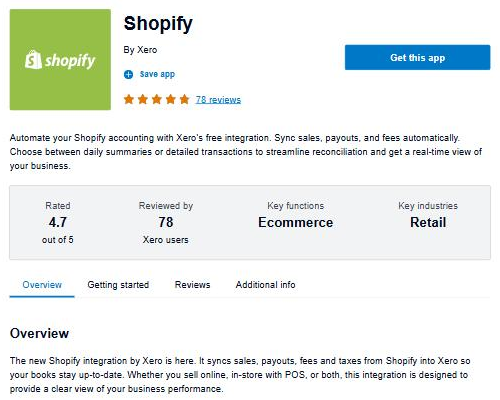
Xero offers “Shopify integration by Xero”, which its App Store listing says is free on all Xero plans. It brings in sales from your Shopify online store and Shopify POS, matches payouts (including Shopify Payments) to your bank account, and records fees, refunds, and taxes. You can sync a daily summary or individual sales, and pull in up to 90 days of history.
Zoho Books lists its Shopify integration on the Elite plan, which costs $150 a month (or $120 billed annually) and covers up to 2 stores. On lower Zoho plans, you would need a third-party connector from the Zoho Marketplace, at extra cost, or manual entry.
So a Shopify seller on Xero Growing pays $59 a month with Shopify sync included. The same seller wanting native sync on Zoho Books pays $150 a month. For sellers with more complex marketplaces, see our guide to the best accounting software for ecommerce.
Multi-Currency, Inventory, and Projects: Zoho Books Is Cheaper
For these three features, Zoho Books gets you there for less:
- Multi-currency: Zoho Books Professional ($50) versus Xero Established ($97).
- Inventory: Zoho Books includes inventory tracking from Professional, with warehouses and bin tracking from Elite. Xero offers Inventory Plus as an optional add-on on Growing and Established, billed on top of the plan.
- Projects and time billing: Zoho Books Professional ($50) versus Xero Established ($97).
If you invoice international clients, track stock, or bill by the hour, Zoho Books Professional is roughly half the price of the Xero plan that includes the same feature.
Payroll
Neither product includes full US payroll in the base price.
- Xero: Xero Payroll, powered by Gusto, is listed at $36 a month plus $6 per employee or contractor, as an option on all three plans.
- Zoho: Zoho Payroll is a separate product. Its Standard plan is $39 a month plus $6 per employee (or $29 plus $5 billed annually) and covers single-state payroll in all 50 states. Multi-state payroll needs the Professional plan. Check with Zoho how it connects to your Zoho Books account before relying on it.
For a business with five employees, both options land in a similar range, around $65 to $70 a month on top of the accounting plan.
What It Really Costs: Three Examples
These examples use the regular monthly prices above, without introductory discounts, payroll, or add-ons.
| Business | Xero | Zoho Books | Cheaper option |
|---|---|---|---|
| Solo consultant, about 10 invoices a month, under $50K revenue | Early: $27/month ($324/year) | Free: $0 | Zoho Books |
| Agency with 4 users, about 60 invoices a month | Growing: $59/month ($708/year) | Standard + 1 extra user: $23/month ($276/year) | Zoho Books |
| Shopify store wanting built-in Shopify sync | Growing + free Shopify app: $59/month ($708/year) | Elite: $150/month ($1,800/year) | Xero |
The pattern is clear. Zoho Books wins on price for service businesses and small teams. Xero wins once Shopify sync is part of the requirement, and it stays the same price as your team grows.
Ease of Use and Learning Curve
Both are cloud tools with bank reconciliation, invoicing, and reporting built in, and both can be set up in an afternoon for a simple business. The bigger difference is the ecosystem: Zoho Books connects naturally with other Zoho apps such as CRM and Inventory, while Xero leans on its App Store of third-party integrations.
If you want to see each one in use before you sign up, Janak has published step-by-step setup walkthroughs for both: the Xero tutorial for beginners and the Zoho Books tutorial for beginners.
One practical tip: ask your accountant which one they already support. Working in the software your accountant knows usually saves more money than the difference in subscription price.
Who Should Choose Xero
- Shopify sellers who want sales, fees, refunds, and payouts synced without paying for a top-tier plan.
- Teams that expect to add users, since Xero has no per-user license fees.
- Businesses whose accountant or bookkeeper already works in Xero.
- Anyone who can use the current 90% discount to test it properly for six months.
For plan-by-plan detail, see our Xero pricing guide and our full Xero review.
Who Should Choose Zoho Books
- Freelancers and solo businesses under $50K revenue who can use the free plan.
- Service businesses that need multi-currency or project billing without paying $97 a month.
- Product businesses that want inventory tracking included rather than added on.
- Businesses already using Zoho CRM or other Zoho apps.
If you want a free option and are not tied to either, our best free bookkeeping software guide compares Zoho Books Free with other free tools.
What About QuickBooks?
QuickBooks Online is the other name most people shortlist. It starts at $38 a month for Simple Start and goes up to $340 for Advanced, with user limits on each plan. If QuickBooks is also on your list, read our Xero vs QuickBooks comparison.
Frequently Asked Questions
Is Zoho Books cheaper than Xero?
Usually, yes. Zoho Books has a free plan and paid plans from $20 a month ($15 billed annually), while Xero starts at $27 a month. The exception is ecommerce: if you need Shopify sync, Xero Growing at $59 is cheaper than Zoho Books Elite at $150.
Is Zoho Books really free?
Yes, for businesses whose revenue for the financial year stays under $50,000. The free plan includes 1 user plus 1 accountant, 1,000 invoices a year, and bank reconciliation. Bank feeds start on the Standard plan.
Does Xero have a free plan?
No. Xero’s cheapest plan is Early at $27 a month. Xero currently offers new US customers 90% off for 6 months (until November 2, 2026), and its pricing page also shows a “one month free” option. See our Xero promo codes page for the latest offer.
Which is better for Shopify, Xero or Zoho Books?
Xero, for most stores. Its official Shopify integration is free on all plans and syncs sales, payouts, fees, refunds, and taxes. Zoho Books lists native Shopify integration only on its Elite plan.
Which has more users included?
Xero charges no per-user license fees. Zoho Books includes between 1 and 15 users depending on the plan, with extra users at $3 a month each.
Final Verdict
Choose Zoho Books if you run a small service business, want the lowest monthly cost, or need multi-currency, projects, or inventory without paying for a top plan.
Choose Xero if you sell on Shopify, expect your team to grow, or your accountant already works in it. Its higher starting price is often offset by the free Shopify integration and the absence of per-user fees.
Both are worth testing with your own data before you commit. Import a month of real transactions, run a profit and loss report, and invite your accountant.
Related Videos
More walkthroughs from Janak Uparkoti’s YouTube channel:
 Zoho Books Tutorial for Beginners 2026
 Xero Tutorial for Beginners 2026: Full Course
 Best Accounting Software for Ecommerce 2026 (Xero vs QuickBooks vs Zoho)
Author and Review Notes
Written by Janak Uparkoti, GoForFreeTrial editor. Janak publishes accounting software tutorials and comparisons on his YouTube channel, including setup walkthroughs for both Xero and Zoho Books. Prices, plan limits, and integration details in this article come from Xero’s and Zoho’s official pricing pages and the Xero App Store listing, checked on October 30, 2026. See our review methodology.