Choosing accounting software sounds simple.
Until you actually start comparing the tools.
Then suddenly you have Xero, FreshBooks, Xendoo, Zoho Books, QuickBooks, Wave, Sage, and about twelve other names waving at you from different tabs.
Very calm.
Very relaxing.
Not really.
The best accounting software in 2026 is not just the one with the biggest brand name or the longest feature list.
It is the one that fits how your business actually works.
A freelancer does not need the same setup as an ecommerce seller.
A growing small business does not need the same workflow as a solo consultant.
And a business owner who hates bookkeeping may need something completely different from someone who enjoys reconciling transactions.
Yes, those people exist.
Probably.
Short answer: Xero is my first pick for most small businesses in 2026 because it gives you strong accounting, clean bank reconciliation, collaboration, and room to grow.
FreshBooks is second because it is simple, freelancer-friendly, and great for invoices, clients, estimates, payments, and time tracking.
Xendoo is third because some business owners need bookkeeping help, not just another software dashboard.
Zoho Books is fourth because it offers strong value, automation, and a good feature set, especially if you already use Zoho products.
That is the order I would compare them.
Affiliate Disclosure
GoForFreeTrial may earn a commission if you try some tools through links on this page.
This does not change the way this guide is written.
The goal here is simple: help you compare accounting software by fit, workflow, free trials, pricing, and real small-business needs.
Not hype.
Not “every tool is amazing.”
Because no.
They are not.
Quick Verdict
If you want the fast version, here it is.
Choose Xero if you want the best overall accounting software for small business, collaboration, bank reconciliation, accountant access, and long-term growth.
Choose FreshBooks if you are a freelancer, consultant, agency, coach, designer, writer, or service business that wants simple invoicing and client-friendly workflows.
Choose Xendoo if you want bookkeeping support instead of doing everything yourself.
Choose Zoho Books if you want value, automation, and a broader business software ecosystem at a lower cost.
Choose QuickBooks Online if you are a US business and your accountant strongly prefers QuickBooks, especially if payroll and advanced reporting matter.
Choose Wave if you need a free or low-cost starting point for very simple bookkeeping.
Best Accounting Software 2026: Quick Picks
| Rank | Software | Best For | Main Reason |
|---|---|---|---|
| 1 | Xero | Best overall accounting software | Strong accounting, reconciliation, collaboration, and growth path |
| 2 | FreshBooks | Best for freelancers and service businesses | Simple invoicing, clients, estimates, payments, and time tracking |
| 3 | Xendoo | Best done-for-you bookkeeping support | Helpful for owners who do not want to manage books alone |
| 4 | Zoho Books | Best value accounting software | Strong features, automation, and Zoho ecosystem |
| 5 | QuickBooks Online | Best for US accountant familiarity | Payroll, accountant network, inventory, and deeper reporting |
| 6 | Wave | Best free accounting software | Good free starting point for simple small businesses |
| 7 | Sage Accounting | Best traditional accounting brand | Strong regional accounting and compliance fit |
| 8 | FreeAgent | Best UK freelancer option | UK-focused tax and freelancer workflow |
| 9 | Odoo Accounting | Best ERP-style path | Accounting plus broader business operations |
| 10 | NetSuite | Best enterprise option | Best when ERP complexity is real |
How I Compared These Accounting Tools
I compared these tools like a real buyer would.
Not like a spreadsheet trying to win an argument.
The main factors were:
- Ease of use
- Free trial or free plan
- Pricing
- Bank reconciliation
- Invoicing
- Expense tracking
- Bills
- Reporting
- Payroll path
- Ecommerce support
- Inventory
- Accountant access
- Integrations
- Mobile app
- Data export
- Support
- Upgrade path
- Hidden costs
I also looked at who each tool is actually best for.
Because this matters.
A tool can be excellent and still be wrong for your business.
That is the annoying truth.
A Ferrari is excellent.
Still not great for delivering sacks of potatoes.
Pricing and Free Trial Warning
Pricing changes.
Promotions change.
Free trial offers change.
Sometimes companies change pricing like they are rearranging furniture.
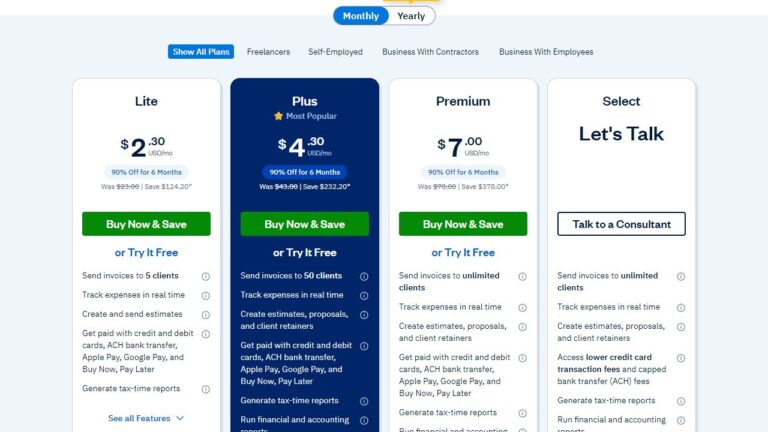
So treat any price in this article as a snapshot and always check the official pricing page before buying.
Boring?
Yes.
Important?
Also yes.
Do not choose accounting software only because the first-month price looks cheap.
The real cost may include:
- Payroll
- Extra users
- Payment processing fees
- Ecommerce connectors
- Receipt capture
- Inventory tools
- Accountant support
- Migration help
- Cleanup work
The monthly subscription is only one part of the story.
Tiny price boxes do not always tell the whole truth.
Best Overall Accounting Software: Xero
Xero is my first pick for best accounting software in 2026.
For many small businesses, it gives the best balance of real accounting power, clean workflows, bank reconciliation, collaboration, and long-term flexibility.
It works well for small businesses, freelancers who are growing, ecommerce sellers, agencies, consultants, bookkeepers, and teams that want proper cloud accounting.
Xero is cloud-based, so you can access your books from your laptop, tablet, or phone.
Very useful if you do not want your accounting stuck on one computer like it is 2007.
With Xero, you can manage invoices, bills, bank feeds, expenses, contacts, reports, and accountant access.
It is especially strong for bank reconciliation.
That sounds boring.
It is boring.
But it is also one of the most important parts of clean bookkeeping.
Xero is also a strong choice when more than one person needs access.
Owners, bookkeepers, accountants, and staff can work together without turning every extra login into a pricing crisis.
That matters as the business grows.
Xero Pros
- Strong overall accounting workflow
- Clean bank reconciliation
- Good collaboration features
- Useful for accountants and bookkeepers
- Good app ecosystem
- Strong fit for growing small businesses
- Better international flexibility than many tools
- Good ecommerce foundation with the right connectors
Xero Cons
- Entry-level plan limits may not fit growing businesses
- Payroll depends on country and partners
- Serious inventory may need add-ons
- Beginners may need setup help
- Not free forever
Who Should Choose Xero?
Choose Xero if you want proper accounting software that can grow with your business.
It is a strong fit for:
- Small businesses
- Freelancers who plan to grow
- Ecommerce sellers
- Agencies
- Consultants
- Bookkeepers
- International businesses
- Teams working with accountants
If you want the best first trial, start with Xero.
Xero Free Trial and Pricing
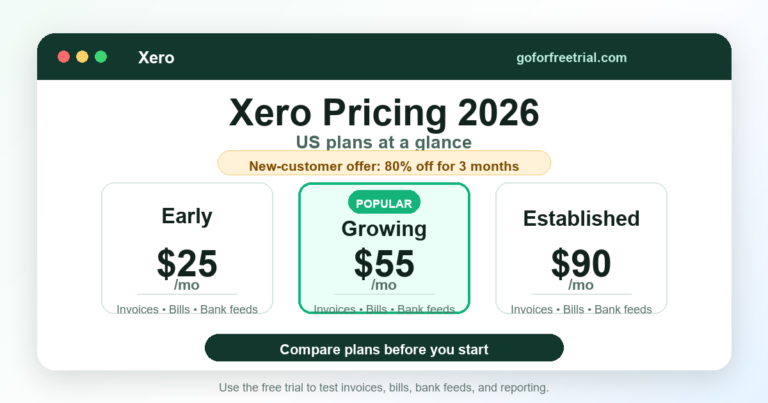
Xero usually offers a free trial or promotional discount in many regions, but offers can vary by country and date.
Check the current Xero pricing page before choosing a plan.
If your business is very small, the entry plan may look tempting.
But make sure invoice, bill, user, currency, and feature limits fit your real workflow.
Do not buy for day one only.
Buy for the next 12 months.
Future-you will appreciate that.
Best for Freelancers and Client Work: FreshBooks
FreshBooks is my second pick.
And honestly, FreshBooks deserves that spot because it is simple.
Not “simple after watching six tutorials.”
Actually simple.
FreshBooks is especially good for freelancers, consultants, agencies, coaches, marketers, designers, writers, and service-based businesses.
It focuses on the things many freelancers care about most:
- Invoices
- Estimates
- Clients
- Payments
- Time tracking
- Expenses
- Projects
- Simple reports
If your main goal is to send professional invoices, track client payments, and avoid spreadsheet chaos, FreshBooks can feel like a relief.
It is not trying to be the deepest accounting system for every business type.
And that is okay.
Sometimes software is better when it knows what it is.
FreshBooks is very good for client work.
If you bill by project, hourly work, retainers, or services, it can make your workflow easier.
FreshBooks Pros
- Very easy to use
- Excellent invoicing
- Strong client workflow
- Good time tracking
- Useful estimates and proposals
- Good for freelancers and service businesses
- Lower learning curve than many accounting tools
FreshBooks Cons
- Not the best for complex inventory
- May not fit advanced accounting workflows
- Add-ons can raise the cost
- Not ideal for ecommerce sellers with complex marketplace payouts
- Reporting is not as deep as some full accounting platforms
Who Should Choose FreshBooks?
Choose FreshBooks if you are a freelancer or service business owner who wants accounting to feel less scary.
It is a good fit for:
- Freelancers
- Consultants
- Designers
- Writers
- Coaches
- Marketing agencies
- Creative agencies
- Service businesses
- Client-based online businesses
If you care most about invoicing, clients, payments, and simple expense tracking, FreshBooks is worth checking right after Xero.
FreshBooks Free Trial and Pricing
FreshBooks usually offers a free trial or promotional offer for new users.
Plan names and pricing can change, so check the current FreshBooks pricing page before signing up.
When testing FreshBooks, do not just click around the dashboard.
Create a real sample invoice.
Add a client.
Track time.
Send an estimate.
Record expenses.
Check the reports.
That is how you know whether it fits your actual work.
Best Done-for-You Bookkeeping Help: Xendoo
Xendoo is my third pick because it solves a different problem.
Xendoo is not just accounting software.
It is more like an online bookkeeping service for business owners who do not want to manage the books alone.
And honestly?
That is a very real need.
Some people do not need another dashboard.
They need help.
If you are busy running the business, selling, marketing, managing customers, handling products, or doing client work, bookkeeping can easily fall behind.
Then one day you open the books and everything looks like a financial mystery novel.
Not the fun kind.
Xendoo can help by giving you bookkeeping support instead of leaving you to figure everything out yourself.
This can be useful for growing small businesses, ecommerce sellers, service businesses, and owners who want cleaner monthly reports without doing all the bookkeeping manually.
Xendoo Pros
- More hands-off than DIY software
- Helpful for busy business owners
- Can save bookkeeping time
- Good for owners who are behind on books
- Provides bookkeeping support
- Useful for growing businesses that want monthly financials
Xendoo Cons
- Not the same as pure accounting software
- Usually costs more than DIY tools
- You need to confirm what services are included
- Workflow may depend on integrations and bookkeeping process
- Not ideal if you want full control over every transaction
Who Should Choose Xendoo?
Choose Xendoo if you want bookkeeping help instead of doing everything alone.
It is a good fit if:
- You are behind on bookkeeping
- You do not want to reconcile transactions yourself
- You want monthly financial reports
- You run an ecommerce or service business
- You prefer done-for-you support
- You are willing to pay for help instead of saving every dollar manually
If you keep saying, “I’ll fix the books later,” Xendoo may be worth checking.
Because later has a habit of becoming tax season.
Very quickly.
Xendoo Pricing and Trial Notes
Xendoo pricing depends on the service level, business needs, and bookkeeping package.
Before choosing it, check:
- What bookkeeping tasks are included
- How often reports are delivered
- Whether your sales channels are supported
- What accounting software they work with
- Whether catch-up bookkeeping costs extra
- How communication works
Do not compare Xendoo only against cheap software.
Compare it against the time and stress it may save.
Sometimes paying for bookkeeping help is cheaper than spending your weekends fixing books.
And weekends deserve better.
Best Value Accounting Software: Zoho Books
Zoho Books is my fourth pick.
Not because it is weak.
It is actually a strong accounting tool.
But in my preferred order, I would compare Xero first, FreshBooks second, Xendoo third, and Zoho Books fourth.
Zoho Books is best for businesses that want value, automation, and a wider business software ecosystem.
It is especially interesting if you already use Zoho CRM, Zoho Inventory, Zoho Expense, Zoho Projects, or other Zoho apps.
Zoho Books can handle invoicing, expenses, bills, bank feeds, reports, payment reminders, automation, and more depending on the plan.
It offers a lot for the price.
Sometimes a surprising amount.
The main thing to watch is plan complexity.
Zoho has many plans, limits, add-ons, and country-specific differences.
So you need to check carefully before building your workflow around it.
Zoho Books Pros
- Strong value
- Good automation features
- Free or low-cost path in eligible markets
- Works well with Zoho ecosystem
- Good invoicing and reporting tools
- Useful mobile app
- Can work for small businesses and growing teams
Zoho Books Cons
- Plan limits can be confusing
- Accountant familiarity may be weaker than QuickBooks in the US
- Advanced features may require higher plans
- Best fit often depends on country
- Not always as simple as FreshBooks
Who Should Choose Zoho Books?
Choose Zoho Books if value matters most and you like the Zoho ecosystem.
It is a good fit for:
- Budget-conscious small businesses
- Zoho users
- Startups
- Service businesses
- Small ecommerce sellers
- Teams that want automation
- Businesses that want a free or low-cost starting path
Zoho Books is a good tool.
I just would not rank it above Xero, FreshBooks, or Xendoo for this article.
Zoho Books Free Trial and Pricing
Zoho Books may offer a free plan in eligible markets and free trials for paid plans.
But eligibility, plan names, limits, and features can vary by country.
Before choosing Zoho Books, check:
- Revenue limits
- User limits
- Invoice limits
- Automation limits
- Inventory features
- Bank feed support
- Accountant access
- Integrations with your other tools
Zoho Books can be a great deal.
Just make sure the deal fits your real business.
QuickBooks Online: Best for US Accountant Familiarity
QuickBooks Online is still one of the biggest names in small-business accounting.
For many US businesses, it is the default choice because accountants and bookkeepers already know it.
That matters.
A lot.
If your CPA prefers QuickBooks and charges more to work with another system, QuickBooks may be the practical choice.
QuickBooks is especially strong for US payroll, accountant workflows, inventory on higher plans, class tracking, location tracking, and reporting depth.
The downside is that QuickBooks can feel busier than Xero or FreshBooks.
It can also become expensive as you need more users, features, payroll, payments, or higher-tier plans.
QuickBooks Pros
- Strong US accountant network
- Native payroll ecosystem
- Good reporting on higher plans
- Inventory features on Plus and Advanced
- Broad app ecosystem
- Familiar to many small businesses
QuickBooks Cons
- Can feel busy
- User limits by plan
- Pricing can rise quickly
- Upsells can be annoying
- Not always the cleanest workflow for beginners
Who Should Choose QuickBooks?
Choose QuickBooks if your business is US-based and your accountant strongly prefers it.
It is also a good fit if payroll, inventory, class tracking, and advanced reporting matter more than simple collaboration.
Do not choose it only because it is popular.
Popularity does not clean your books.
Unfortunately.
Wave: Best Free Accounting Software for Simple Businesses
Wave is a good free accounting option for very small businesses, freelancers, and simple service businesses.
It is useful if you want invoicing and basic bookkeeping without paying upfront.
Wave can help you track income, send invoices, record expenses, and manage simple business finances.
It is not the best fit for complex inventory, advanced reporting, payroll-heavy teams, or ecommerce sellers with complicated payouts.
But for a tiny business?
It can be enough.
And free is nice.
Free with limits, but still nice.
Wave Pros
- Free starting path
- Simple invoicing
- Good for microbusinesses
- Easy to start
- Useful for basic records
Wave Cons
- Limited advanced features
- Not ideal for complex businesses
- Automation may require paid plan
- Limited scalability
- Not the best for inventory or ecommerce
Who Should Choose Wave?
Choose Wave if your business is very small and simple.
It is best for microbusinesses, freelancers, and owners who need a free way to start tracking income and expenses.
Upgrade when manual work starts costing too much time.
Accounting Software Comparison Table
| Software | Best For | Free Trial / Free Plan | Main Watchout |
|---|---|---|---|
| Xero | Best overall accounting software | Free trial or promotional offers vary by region | Entry plan limits and add-ons |
| FreshBooks | Freelancers and service businesses | Free trial commonly available | Not ideal for complex inventory |
| Xendoo | Done-for-you bookkeeping support | Service-based pricing | Not pure DIY software |
| Zoho Books | Value and automation | Free plan in eligible markets plus trials | Plan limits and country differences |
| QuickBooks Online | US accountant familiarity | Trial or discount path may be available | User limits and pricing jumps |
| Wave | Free simple bookkeeping | Free plan available in supported markets | Limited advanced workflow |
| Sage Accounting | Traditional accounting needs | Free trials vary by market | Product differences by country |
| FreeAgent | UK freelancers | 30-day trial often available | Best mainly for UK users |
| Odoo Accounting | ERP-style accounting | Trial/start paths vary | Setup can be complex |
| NetSuite | Enterprise accounting | Demo/sales process | Too expensive for ordinary small businesses |
How to Choose the Right Accounting Software Free Trial
A good accounting software free trial should help you test real work.
Not just click around a pretty dashboard and think, “Nice.”
That tells you almost nothing.
Before you choose Xero, FreshBooks, Xendoo, Zoho Books, QuickBooks, Wave, or another tool, test the things you actually do every week.
Create sample invoices.
Connect a bank feed if possible.
Enter bills.
Record expenses.
Check reports.
Invite your accountant or bookkeeper if you work with one.
Basically, test your real workflow.
The best free trial for a freelancer is not always the best trial for an ecommerce seller, agency, contractor, or growing small business.
A freelancer may care most about invoices, estimates, time tracking, client payments, and simple expense tracking.
An ecommerce seller usually needs payout reconciliation, sales-channel integrations, payment fee tracking, refunds, tax handling, and inventory workflows.
A growing team may need user permissions, accountant access, automation, approval workflows, and reports that still make sense after the trial ends.
So do not choose only because one tool looks popular.
Choose the one that fits how your business actually works.
Free Trial Checklist
Before the trial ends, check these things:
- Make sure the trial includes the same features as the paid plan you are considering.
- Confirm the regular monthly price after discounts or promo codes expire.
- Test bank reconciliation, invoice reminders, expense capture, tax reports, and accountant access.
- Check whether ecommerce, payroll, inventory, CRM, or payment integrations cost extra.
- Export a report before the trial ends so you know your data is not trapped.
And one more thing.
Do not wait until the last day of the trial to test everything.
That is how panic happens.
Start testing on day one.
Best Accounting Software by Business Type
Freelancers
FreshBooks is the easiest place to start for many freelancers.
Xero is better if you expect to grow or want stronger accounting.
Xendoo is better if you want bookkeeping support.
Zoho Books is better if budget matters most.
Small Businesses
Xero is the best overall first pick.
FreshBooks works well for service-based businesses.
Xendoo works well if the owner wants bookkeeping help.
Zoho Books is good for value-focused teams.
QuickBooks is strong if US payroll or accountant preference matters.
Ecommerce Sellers
Xero is the best first trial for many ecommerce sellers.
You may need a connector for Shopify, Amazon, Etsy, eBay, Walmart, PayPal, or Stripe payouts.
Xendoo can help if you want bookkeeping support.
Zoho Books can work for smaller stores, especially if value matters.
Agencies
FreshBooks is strong for client work, invoices, estimates, time tracking, and payments.
Xero is stronger for more complete accounting and reporting.
Xendoo is worth checking if the agency wants bookkeeping support.
Startups
Xero is a strong startup choice because collaboration and clean financial visibility matter early.
Zoho Books is useful if value and automation matter.
FreshBooks can work for service-based startups.
Growing Teams
Xero is the best first pick for clean accounting and team collaboration.
QuickBooks may be better if payroll, inventory, or US accountant support is central.
Xendoo may help if the team wants bookkeeping support instead of DIY work.
Hidden Costs to Watch
Accounting software pricing can look simple.
Then the extras appear.
Like little budget gremlins.
Watch for:
- Payroll fees
- Payment processing fees
- Extra users
- Inventory add-ons
- Ecommerce connectors
- Receipt capture limits
- Priority support
- Migration costs
- Bookkeeping cleanup
- Training time
A cheap tool can become expensive if it creates messy books.
A more expensive tool can be cheaper if it saves time and prevents cleanup.
That is annoying.
But very true.
Common Accounting Software Mistakes
The first mistake is choosing software only because it is cheap.
Cheap is good.
Cheap and wrong is expensive.
The second mistake is choosing software only because it is popular.
Popular software can still be wrong for your workflow.
The third mistake is ignoring your accountant.
If your accountant hates your software, your year-end process may become painful.
The fourth mistake is not testing exports.
Your data should not feel trapped.
The fifth mistake is waiting too long to reconcile.
Reconciliation is easier every week than every quarter.
The sixth mistake is buying advanced software too early.
Do not buy ERP-level tools if you only need invoices and expenses.
That is how people end up paying for a spaceship when they needed a bicycle.
When to Upgrade From Free Accounting Software
Free accounting software can be a good starting point.
But it is not always enough.
Upgrade when:
- Manual entry takes too long
- Reports feel too basic
- You need payroll
- You add employees or contractors
- You sell through multiple channels
- You need inventory tracking
- You want accountant access
- You need better tax reports
- You keep fixing the same bookkeeping problems every month
A paid tool can be worth it if it saves time and reduces mistakes.
The point is not to pay more.
The point is to stop wasting time.
There is a difference.
Migration and Data Export Tips
Before switching accounting software, export everything important.
Keep copies of:
- General ledger
- Trial balance
- Profit and loss
- Balance sheet
- Chart of accounts
- Customer list
- Vendor list
- Products or services
- Unpaid invoices
- Unpaid bills
- Payroll reports
- Tax reports
- Bank reconciliations
Choose a clean switch date.
Month-end is usually better than mid-month.
Reconcile old accounts before moving.
Import opening balances carefully.
Then compare the trial balance.
If your opening balances are wrong, the new software will look wrong even if the software itself is fine.
Poor software gets blamed for bad migration all the time.
Very unfair.
Probably.
Final Verdict
For most small businesses in 2026, I would start with Xero.
It gives you the best overall balance of accounting features, collaboration, bank reconciliation, reporting, and growth potential.
FreshBooks is my second pick if you are a freelancer, consultant, agency, or service business that wants simple invoicing and client workflows.
Xendoo is my third pick if you want bookkeeping support instead of doing everything yourself.
Zoho Books is my fourth pick if you want value, automation, and a broader business software ecosystem.
QuickBooks is still a strong option for US businesses that need payroll, inventory, reporting depth, and accountant familiarity.
Wave is a good free starting point for very simple businesses.
The best accounting software is not the one with the longest feature list.
It is the one you will actually use every week.
Without avoiding it.
Without dreading it.
Without opening a spreadsheet called “final-final-real-final-accounts.xlsx.”
We have all suffered enough.
FAQ
What Is the Best Accounting Software in 2026?
Xero is my first pick for best accounting software in 2026 because it balances accounting features, bank reconciliation, collaboration, reporting, and growth potential.
FreshBooks is second for freelancers and service businesses.
Xendoo is third for bookkeeping support.
Zoho Books is fourth for value and automation.
Is Xero Better Than FreshBooks?
Xero is better if you want stronger accounting, bank reconciliation, reporting, collaboration, and growth.
FreshBooks is better if you mainly need simple invoices, clients, payments, estimates, and time tracking.
Is Xendoo Accounting Software?
Xendoo is more like an online bookkeeping service than pure accounting software.
It helps business owners who want bookkeeping support instead of doing everything themselves.
Is Zoho Books Good for Small Business?
Yes, Zoho Books is a good option for small businesses that want value, automation, and Zoho ecosystem tools.
Just check plan limits, country availability, and features before choosing it.
Which Accounting Software Is Best for Freelancers?
FreshBooks is usually the best fit for freelancers who care about invoices, clients, payments, and time tracking.
Xero is better if the freelancer expects to grow into a more complete business setup.
Which Accounting Software Is Best for Ecommerce?
Xero is the best first trial for many ecommerce sellers.
For complex marketplace payouts, you may also need connectors like A2X or Link My Books.
Which Accounting Software Is Best for Bookkeeping Help?
Xendoo is best if you want bookkeeping help instead of managing everything yourself.
It is useful for busy business owners who want more done-for-you support.
Which Accounting Software Has a Free Trial?
Xero, FreshBooks, Zoho Books, QuickBooks, and many other tools often offer free trials or promotions.
Offers change by country and date, so always check the official pricing page.
Which Accounting Software Has a Free Plan?
Wave and Zoho Books may offer free plans depending on your country and business limits.
Free plans are useful, but they may not fit growing businesses forever.
Should I Choose Accounting Software Only by Price?
No.
Choose based on workflow, features, accountant support, integrations, reporting, and total cost.
A cheap tool that creates messy books can become expensive later.
Sources and Further Reading
Xero pricing
FreshBooks pricing
Xendoo pricing
Zoho Books pricing
QuickBooks pricing
Wave pricing
Best ecommerce accounting software guide
Xero vs QuickBooks comparison
Free bookkeeping software guide
Author And Review Notes
Reviewed by Janak Uparkoti, GoForFreeTrial editor.
Janak researches SaaS free trials, accounting software pricing, ecommerce bookkeeping workflows, and affiliate software deals for small-business readers.
See our review methodology for how we separate hands-on testing, official-source research, screenshot-style visuals, and affiliate recommendations.
Related Accounting Software Buying Guides
Need a trial-first shortlist? Use the dedicated best accounting software with free trial pillar guide. For narrower needs, compare small-business accounting software, free bookkeeping software, or ecommerce accounting tools.
Official plan references: Check current offers directly on the Xero, QuickBooks, and Zoho Books pricing pages.