Xero vs QuickBooks is not a clean beauty contest.
I know.
That would be easier.
But accounting software does not work like that.
In 2026, Xero is usually better for collaborative, international, and software-friendly small businesses.
QuickBooks Online is usually better for US businesses that want native payroll, strong accountant support, deeper reporting, and more built-in features on higher plans.
So the real question is not, “Which one is better?”
The better question is this:
Which one fits how your business actually works?
Because the wrong accounting software will not politely tell you it is wrong.
It will just slowly annoy you every week.
Very rude.
This guide compares Xero vs QuickBooks Online by pricing, features, ecommerce, payroll, reporting, support, migration, hidden costs, and real small-business workflows.
Pricing may change, so always check the official pricing pages before you buy.
Yes, that is the boring warning.
Yes, it matters.
Key Takeaways
If you want the fast version, here it is.
Xero wins for collaboration because it avoids per-user license fees and keeps the workflow cleaner for many small teams.
QuickBooks Online wins for many US businesses because payroll, accountants, inventory, and reporting are stronger inside the Intuit ecosystem.
Xero has the cheaper regular entry plan based on official US pricing checked June 13, 2026: Xero Early at $25 per month versus QuickBooks Simple Start at $38 per month.
For ecommerce, it is a tie.
Xero is excellent with the right connector.
QuickBooks Plus is stronger when inventory and US sales tax sit at the center of the business.
Outside the US, Xero is usually the better starting point.
For accountants in the US, QuickBooks Online usually has the advantage because more firms already use it every day.
Quick Verdict: Xero or QuickBooks?
Choose Xero if you want clean cloud accounting, unlimited users, strong bank reconciliation, multi-currency on the top plan, and a global app ecosystem.
Choose QuickBooks Online if your business is US-centered and you need native payroll, deeper inventory and reporting tiers, class and location tracking, or a bookkeeper who basically lives inside QuickBooks.
That last part matters.
If your accountant refuses to use Xero, Xero’s clean interface will not save you.
Sad, but true.
The wrong choice is the one your team will not maintain.
A perfect feature list means nothing if your bank feeds, payroll, sales tax, ecommerce settlements, and month-end reconciliation do not work in real life.
Accounting software should fit your workflow.
Not your fantasy workflow.
The real one.
With missing receipts and weird Stripe fees.
Xero vs QuickBooks: Winner Table
| Category | Winner | Why it wins |
|---|---|---|
| Ease of use | Xero | Cleaner interface and fewer plan distractions for day-to-day bookkeeping. |
| Regular entry pricing | Xero | Xero Early is lower than QuickBooks Simple Start based on official US list prices checked June 13, 2026. |
| Payroll | QuickBooks | QuickBooks has the stronger native US payroll path. |
| Reporting depth | QuickBooks | Plus and Advanced support more robust business reporting, classes, locations, dashboards, and workflows. |
| Unlimited users | Xero | Xero promotes no per-user license fees. |
| Inventory | QuickBooks | QuickBooks Plus is stronger for product businesses that want inventory in the core accounting plan. |
| Ecommerce | Tie | Xero is strong with connector workflows; QuickBooks is strong when inventory, sales tax, and US accountants matter. |
| International support | Xero | Xero has a stronger global accounting posture and multi-currency fit. |
| US accountant network | QuickBooks | More US accountants and bookkeepers already know QuickBooks Online. |
| Long-term value | Depends | Xero wins for team access; QuickBooks wins if it prevents payroll and reporting add-on sprawl. |
Compare Current Trial and Pricing Links
Use our live pricing/trial tracker before choosing a plan.
Xero and QuickBooks promotions change often, and this tracker belongs in your buying workflow.
Open tracker
Feature Comparison Table
| Feature | Xero | QuickBooks Online | Practical note |
|---|---|---|---|
| Cloud accounting | Yes | Yes | Both are mature cloud accounting platforms. |
| Bank reconciliation | Excellent | Excellent | Xero feels faster for many reconciliation-heavy workflows. |
| Invoicing | Strong, but Early has invoice limits | Strong | Check invoice limits before choosing Xero Early. |
| Bills | Strong, but Early has bill limits | Strong | Vendor-heavy businesses should avoid constrained starter plans. |
| Expenses and receipt capture | Included features vary by plan | Included features vary by plan | Test receipt capture on mobile during trial. |
| Inventory | Basic or add-on dependent | Stronger on Plus and above | Product businesses should model landed costs and SKUs. |
| Projects | Established | Plus and Advanced | Agencies need project profitability, not just invoicing. |
| Multi-currency | Established | Plan and market dependent | Xero is usually the cleaner international choice. |
| Payroll | Partner-led in the US | Native Intuit payroll path | QuickBooks wins if payroll is central. |
| Accountant access | Strong | Very strong in US | Choose what your accountant will actually support. |
| APIs | Strong developer reputation | Strong Intuit developer platform | Ask your developer which API they prefer for your app stack. |
| AI features | JAX and analytics positioning | Intuit Intelligence features on pricing page | Treat AI as assistance, not a replacement for review controls. |
Screenshot-Style UI Capability Designs
The visuals below are editorial UI mockups designed to make the workflow differences easier to scan.
They are not official Xero or QuickBooks screenshots.
They also do not claim exact product screen layouts.
Tiny disclaimer.
Big difference.
Pricing Comparison: Xero Pricing vs QuickBooks Pricing
Pricing is the section most likely to go stale.
Because software companies love changing prices and promotions.
It keeps us humble, apparently.
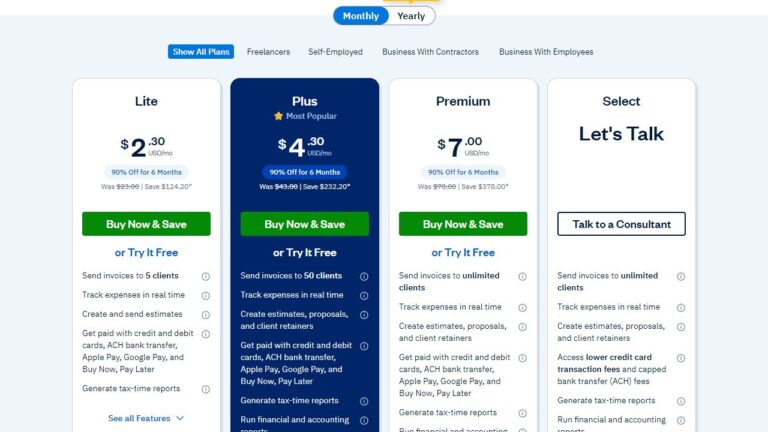
QuickBooks pricing is the other side of the comparison; plan prices and discounts can change, so the official screenshot is important context.
Official QuickBooks Online pricing screenshot. Check the live page because offers and plan prices may change.
Xero pricing is one side of the comparison, and the official screenshot helps readers verify current plan tiers.
Official Xero pricing page screenshot. Prices and promotional offers can change.
On June 13, 2026, Xero’s US pricing page listed regular monthly prices of Early $25, Growing $55, and Established $90.
The same page showed a temporary 80% discount for the first three months for eligible new US customers.
On June 13, 2026, QuickBooks Online’s US pricing page listed regular monthly prices of Simple Start $38, Essentials $75, Plus $115, and Advanced $275.
It also showed a temporary 50% discount for three months and a 30-day free trial path.
Again, pricing may change.
Check the official Xero pricing page, the official QuickBooks pricing page, and our trial and pricing tracker before buying.
Xero vs QuickBooks Plan Comparison
| Plan | Regular monthly price checked June 13, 2026 | Best fit | Watch-outs |
|---|---|---|---|
| Xero Early | $25 | Very small service businesses with light invoice and bill volume | Invoice and bill limits can become annoying quickly. |
| Xero Growing | $55 | Most small businesses that want the core Xero workflow | Multi-currency, projects, and expenses live higher. |
| Xero Established | $90 | International, project, expense, and analytics-heavy teams | Inventory may still require add-ons for serious product operations. |
| QuickBooks Simple Start | $38 | Solo businesses that want QuickBooks basics | 1 user and limited growth room. |
| QuickBooks Essentials | $75 | Service teams needing more users and bill workflows | Inventory and project depth still point to Plus. |
| QuickBooks Plus | $115 | Product businesses, projects, classes, locations | Cost jumps, but functionality expands meaningfully. |
| QuickBooks Advanced | $275 | Larger small businesses needing permissions, workflows, backup, and priority support | Too expensive for simple bookkeeping. |
Try Xero if Team Access Matters
Xero is best when owners, bookkeepers, operations, and outside advisors all need access without per-user friction.
Start with Growing unless Early’s limits truly fit.
Read our Xero pricing guide or check Xero promo codes.
Check Xero
Try QuickBooks if US Payroll Matters
QuickBooks Online is best when payroll, inventory, class/location tracking, and accountant familiarity carry more weight than unlimited users.
Compare more accounting tools.
Check QuickBooks
Ease of Use and Setup
Xero wins ease of use for many beginners because the interface feels calmer.
It is cleaner.
Less noisy.
A freelancer can connect a bank, create a basic chart of accounts, send invoices, and start reconciling without feeling like they accidentally opened a tax control room.
QuickBooks is not hard.
But it has more surfaces.
Payroll.
Tax.
Payments.
Banking.
Reports.
Add-ons.
Advisor tools.
That breadth is useful once you need it.
But when you only need simple books, it can feel like someone gave you a cockpit instead of a dashboard.
For setup, the best platform is often the one your bookkeeper can configure correctly.
A bad chart of accounts in Xero is still bad accounting.
A good QuickBooks setup can beat a sloppy Xero setup every time.
Software helps.
It does not magically fix messy bookkeeping decisions.
Rude, but true.
Bank Reconciliation
Both platforms handle bank feeds and reconciliation well.
Xero has long been loved for fast reconciliation because it encourages simple rules, bank feed matching, and clean review habits.
QuickBooks also has strong banking features and is familiar to many US bookkeepers.
Here is the hidden truth.
Bank feed quality depends on your bank, country, connection provider, and login rules.
So do not judge from a demo account.
Before you switch, connect your actual checking account and credit card during the trial.
Reconcile one real statement period.
Then decide.
Yes, this is boring.
Yes, this is how you avoid regret.
Invoicing, Bills, and Expense Tracking
Xero invoicing is clean and practical.
But the Early plan limits invoices and bills.
That makes Early risky for businesses that look small today but send lots of small invoices or process recurring vendor bills.
Small today does not always mean small next month.
Business has a habit of becoming inconvenient.
QuickBooks invoicing is strong, especially when you combine it with QuickBooks Payments, reminders, and the broader Intuit ecosystem.
Service businesses that want invoice-to-payment workflows may prefer QuickBooks if their customers already use or trust Intuit payment links.
For expenses, test the receipt workflow on your phone.
Seriously.
The best receipt capture tool is not the one with the prettiest marketing page.
It is the one you will actually use before receipts disappear into your glovebox, inbox, or that one drawer where paper goes to die.
Inventory and Ecommerce
QuickBooks Plus has the clearer core-accounting advantage for inventory-heavy US businesses.
It supports product businesses that need inventory, classes, locations, budgets, and project profitability in one QuickBooks workflow.
Xero can work very well for ecommerce, but serious sellers often need a connector and inventory app.
That is not automatically a weakness.
It is fine if your stack is deliberate.
It becomes a problem if you expect Xero to magically turn Shopify, Amazon, Stripe, PayPal, refunds, fees, sales tax, and marketplace settlements into clean books without mapping.
That is not accounting.
That is wishful thinking with transaction data.
Ecommerce Comparison
| Ecommerce need | Xero fit | QuickBooks fit | Recommendation |
|---|---|---|---|
| Shopify store with simple catalog | Strong with the right connector | Strong | Choose based on accountant and inventory needs. |
| Amazon seller with many settlements | Strong with settlement connector | Strong with connector | Do not import every order as a messy invoice. |
| Inventory in accounting system | Often add-on dependent | Better on Plus | QuickBooks Plus usually wins. |
| International marketplace seller | Stronger | Good, but local fit varies | Xero Established is often cleaner. |
| US sales tax workflow | Capable, often app-assisted | Stronger native fit | QuickBooks may reduce friction. |
For a deeper buying path, read our best ecommerce accounting software guide, ecommerce accounting software cost guide, and ecommerce accounting statistics.
Payroll, Tax, and Accountant Collaboration
QuickBooks wins payroll for most US businesses because Intuit offers a native payroll path and many accountants know the workflow.
If payroll is your biggest operational risk, QuickBooks should be on your shortlist.
Payroll is not the place to be adventurous for fun.
People like being paid correctly.
Wild concept, I know.
Xero can still be excellent with Gusto or another payroll partner.
The question is whether you want one vendor or a best-of-breed stack.
A two-vendor setup can work beautifully.
But it needs clean mapping, clear responsibility, and regular reconciliation.
For accountant collaboration, QuickBooks has the larger US familiarity advantage.
Xero is strong with modern firms, global practices, and teams that value collaborative access.
So ask your accountant before switching.
Not after.
After is where expensive surprises live.
Reporting, Dashboards, and AI Automation
QuickBooks has the reporting edge when you move into Plus and Advanced.
Classes, locations, project profitability, budgets, custom dashboards, workflows, and backup/restore features are valuable for growing US businesses.
Xero reporting is good for owners who want readable financials, dashboards, and cash-flow context without too much clutter.
Established adds more advanced capabilities, including multi-currency and project and expense features.
Both companies are pushing AI.
Xero promotes JAX and analytics features.
QuickBooks pricing pages now highlight Intuit Intelligence and AI-assisted setup, categorization, insights, sales tax, and workflows.
That sounds exciting.
And it can be useful.
But treat AI as an assistant.
Not the person closing your books.
AI can help you move faster.
It should not silently decide your month-end numbers while everyone is busy doing something else.
That is how weird accounting stories begin.
Integrations, APIs, and Developer Friendliness
Xero and QuickBooks both have mature app ecosystems.
Xero’s app marketplace is especially attractive for global businesses and SaaS-style workflows.
QuickBooks has a large US app ecosystem and deep Intuit relationships across payroll, payments, tax, Mailchimp, and accountant tools.
Developers often like Xero’s API clarity.
Intuit’s developer platform is also powerful, but the ecosystem can feel more complex because QuickBooks connects into a larger family of products.
If custom integrations matter, ask your developer to review the details before you choose.
They should check authentication, rate limits, data model, sandbox quality, and the exact objects you need to sync.
That sentence sounds boring.
It can save you weeks.
Security, Data Ownership, Cancellation, and Exports
Both Xero and QuickBooks are serious cloud platforms with security programs, authentication controls, and official trust and security resources.
Your bigger day-to-day risks are usually less glamorous.
Weak passwords.
Too many admin users.
Unreconciled bank feeds.
Poorly controlled app integrations.
The villain is not always a hacker in a hoodie.
Sometimes it is “everyone has admin access.”
Data ownership matters when you switch or cancel.
Before canceling either product, export the important reports and lists.
Keep copies of:
- General ledger
- Trial balance
- Profit and loss
- Balance sheet
- Aged receivables
- Aged payables
- Chart of accounts
- Contacts and customers
- Vendors
- Items
- Tax reports
- Payroll reports
- Bank reconciliations
- Audit trail, where available
QuickBooks says customers can switch or cancel QuickBooks Online plans at any time on its official pricing FAQ.
Xero’s pricing terms say subscriptions auto-renew monthly until canceled and that pricing can change.
Save a PDF of your plan terms before purchase if your accounting file is mission-critical.
Yes, this feels extra.
Accounting rewards extra.
Migration: Switching From Xero to QuickBooks or QuickBooks to Xero
Migration is not hard because the buttons are confusing.
Well, sometimes the buttons are confusing.
But the real problem is the data.
Accounting data has history, exceptions, tax settings, payroll records, inventory quantities, open invoices, deposits, reconciled periods, and reporting expectations.
That is why migration needs a plan.
Not vibes.
Migration Checklist
- Pick a clean cutoff date, ideally month-end or fiscal year-end.
- Reconcile all bank and credit card accounts before export.
- Export the full report package from the old system.
- Clean duplicate customers, vendors, products, and chart-of-account names.
- Import only what you need.
- Do not bring years of dirty detail unless required.
- Enter opening balances and compare the trial balance.
- Reconnect banks, payment processors, payroll, Shopify, Amazon, Stripe, PayPal, and tax apps.
- Run both systems in parallel for one close if the business is complex.
- Keep the old file accessible for audit and tax support.
Most clean small-business migrations take one to four weeks.
Ecommerce, inventory, payroll, and multi-currency files can take longer.
Do not migrate during tax season unless staying put is riskier than switching.
Tax season already has enough drama.
Hidden Costs and Limitations Competitors Miss
The monthly price is only part of the story.
Sometimes the cheap plan becomes expensive because you need payroll, payments, ecommerce connectors, inventory apps, cleanup, training, or a better plan two months later.
The price page says one thing.
Your workflow says another.
Listen to your workflow.
| Hidden cost | Xero risk | QuickBooks risk | How to avoid it |
|---|---|---|---|
| Plan upgrades | Early limits push many users to Growing | Inventory/reporting push users to Plus or Advanced | Buy for the next 12 months, not the cheapest month one. |
| Payroll | Partner payroll adds another subscription | Payroll is native but still an add-on cost | Model full payroll cost, not accounting-only cost. |
| Payments | Provider fees vary | QuickBooks Payments fees vary | Compare card, ACH, and international payment fees. |
| Ecommerce connectors | Often required for clean settlements | Often required for marketplace complexity | Budget for connector plus setup support. |
| Bookkeeper preference | Some US firms charge more or refuse Xero | Some modern firms dislike QuickBooks workflows | Ask before switching. |
| Cleanup | Bad imports create reporting noise | Bad rules create miscategorized transactions | Pay for cleanup once instead of fixing every month. |
Common Complaints From Users, Forums, and Review Discussions
Public user discussions about Xero vs QuickBooks usually repeat the same pattern.
Xero fans praise the clean interface, bank reconciliation, collaboration, and international feel.
Xero critics complain about support speed, plan limits, inventory depth, and the need for add-ons when the business becomes operationally complex.
QuickBooks fans praise the accountant network, payroll, reporting depth, inventory on Plus, and the fact that many US tax professionals already know it.
QuickBooks critics complain about pricing, upsells, interface clutter, support inconsistency, and plan limitations that become visible as the company grows.
The useful lesson is not that one side is always right.
The lesson is this:
People become unhappy when they buy the brand instead of the workflow.
A Shopify seller with messy settlements, a contractor with job costing, and a freelancer with five invoices per month do not need the same accounting system.
This is obvious.
And yet, people ignore it every day.
The internet is brave like that.
What Accountants and Bookkeepers Usually Care About
Accountants rarely choose accounting software only by interface.
They care about clean source documents, consistent categorization, audit trails, reconciled bank feeds, payroll records, tax reports, and month-end close discipline.
Not sexy.
Very important.
Many US accountants prefer QuickBooks Online because their staff, templates, workflows, and client training are already built around it.
That matters.
If your CPA charges more to support Xero or refuses to work in it, Xero’s feature advantages may not matter for your business.
Modern cloud-focused firms often like Xero because client collaboration is smoother and the interface is less intimidating for owners.
Xero can also be attractive for firms serving ecommerce, global, or app-heavy clients, as long as the connector stack is designed carefully.
Again, ask before switching.
Your accountant is part of the software decision whether you like it or not.
Performance and Day-to-Day Reliability
Performance depends on file size, browser, internet connection, connected apps, bank feeds, and how much historical data you bring into the company file.
A light freelance file will feel very different from a seven-year ecommerce file with thousands of products and transactions.
Xero generally feels fast for reconciliation and routine owner tasks.
QuickBooks can feel heavier, but the tradeoff is more built-in depth on higher tiers.
If your team spends hours every week inside reports, inventory, payroll, or classes, the heavier system may still save time overall.
Do not judge performance from a demo account alone.
During the trial, connect real bank feeds, import representative data, run the reports you actually use, and test the close process.
The demo account is not your business.
Your business has weird transactions.
Every business does.
AI Automation Trends and 2026 Roadmap Signals
Both companies are moving toward AI-assisted accounting.
Xero is positioning JAX and analytics as part of its future workflow.
QuickBooks is leaning hard into Intuit Intelligence across setup, categorization, sales tax, insights, and workflows.
This can help owners answer questions faster and reduce repetitive review work.
But it does not remove the need for accounting controls.
AI can misclassify transactions.
It can miss context.
It can suggest actions that make sense statistically but not operationally.
In 2026, the winning setup is human-reviewed automation.
Use bank rules, receipt capture, invoice reminders, payment matching, sales tax checks, payroll review, and month-end exception reports.
Use AI to surface work.
Do not let it silently close the books.
That sentence should be printed on a mug.
When Not to Choose Xero
Do not choose Xero if your US payroll workflow must stay inside the same native vendor.
Do not choose Xero Early if you may exceed invoice or bill limits soon.
Do not choose Xero if your accountant will not support it or will charge significantly more to do so.
Do not choose Xero if you need advanced inventory, warehouse, or manufacturing controls without add-ons.
Do not choose Xero if the business owner expects phone-heavy support for every issue.
Xero is strong.
But it is not the answer to every accounting problem.
Nothing is.
Except maybe reconciling monthly.
That solves many things.
When Not to Choose QuickBooks
Do not choose QuickBooks if user limits will block collaboration across owners, staff, and advisors.
Do not choose QuickBooks if your team wants the lightest possible bookkeeping interface.
Do not choose QuickBooks only because it is popular.
Popularity does not clean up bad setup.
Do not choose QuickBooks if international accounting, multi-currency simplicity, or global app fit is the main need.
Do not choose QuickBooks Advanced unless the cost is justified by permissions, workflows, backups, dashboards, and support.
QuickBooks is powerful.
But power you do not need becomes clutter you still pay for.
Unexpected Strengths
Xero’s unexpected strength is shared financial visibility.
Owners, bookkeepers, accountants, and operational staff can work together without turning every extra login into a pricing conversation.
That is genuinely useful.
QuickBooks’ unexpected strength is not only accounting.
It is the surrounding US operating system: payroll, payments, tax, accountants, apps, reports, and training.
That ecosystem can reduce decision fatigue for a business that wants one familiar stack.
Not exciting.
Very practical.
Xero Pros and Cons
Xero Pros
- Clean interface for beginners
- No per-user license fees promoted on pricing page
- Strong reconciliation workflow
- Good international posture
- Strong app marketplace and developer appeal
Xero Cons
- Early plan limits invoices and bills
- US payroll usually means a partner
- Advanced inventory often needs add-ons
- Some US accountants still prefer QuickBooks
- Plan differences can matter more than marketing suggests
QuickBooks Pros and Cons
QuickBooks Pros
- Huge US accountant and bookkeeper adoption
- Native payroll ecosystem
- Strong reporting, classes, locations, and inventory on higher plans
- Deep Intuit ecosystem
- Advanced plan includes stronger permissions, workflows, backup, and support
QuickBooks Cons
- Higher regular entry price
- User limits by plan
- Interface can feel busy
- Upsells and add-ons can increase total cost
- International fit varies by country and business model
Best Accounting Software by Business Type
| Business type | Best pick | Why |
|---|---|---|
| Freelancers | Xero for simple collaboration; QuickBooks if tax pro prefers it | Keep invoicing, banking, and taxes simple. |
| Startups | Xero | Unlimited users and clean collaboration help distributed teams. |
| Agencies | Xero or QuickBooks Plus | Xero for clean billing; QuickBooks Plus for classes, locations, and project profitability. |
| Retail | QuickBooks Plus | Inventory and reporting depth matter. |
| Ecommerce | Tie | Connector strategy decides the winner. |
| Accountants | QuickBooks in US; Xero for global/client-collaboration practices | Standardization saves time. |
| Bookkeepers | Depends on client base | Use the system that reduces cleanup and training. |
| Nonprofits | QuickBooks if fund/class tracking is central; Xero for simpler orgs | Reporting requirements decide it. |
| International companies | Xero | Global design and multi-currency fit are stronger. |
| US companies | QuickBooks | Payroll, accountants, and tax ecosystem are hard to beat. |
| Budget-conscious businesses | Xero | Lower entry list price and no per-user fees can reduce total cost. |
| Growing businesses | QuickBooks Plus/Advanced or Xero Established | Choose based on reporting, payroll, and international needs. |
Who Should Choose Xero?
Choose Xero if you want modern cloud accounting, strong reconciliation, broad collaboration, global flexibility, and a calmer interface.
It is especially attractive for freelancers, startups, agencies, international businesses, and teams that want owners and staff inside the books without counting seats.
If team access matters, Xero should be high on your shortlist.
Who Should Choose QuickBooks?
Choose QuickBooks if your business is US-centered, payroll matters, your accountant prefers QuickBooks, inventory matters, or you need stronger plan tiers for reporting, permissions, classes, locations, projects, and workflows.
QuickBooks is not always calmer.
But for many US businesses, it is the path of least resistance.
And sometimes that wins.
Who Should Choose Neither?
Choose neither if you need full ERP, manufacturing resource planning, complex warehouse operations, enterprise consolidation, industry-specific fund accounting, or a tax/accounting workflow that your CPA says cannot be handled cleanly in either product.
In that case, compare ERP, NetSuite-style systems, or vertical accounting platforms.
Do not force small-business accounting software to act like enterprise infrastructure.
That is how everyone ends up unhappy.
Including the software.
Probably.
Alternatives to Xero and QuickBooks
If neither platform fits, compare FreshBooks for service freelancers, Zoho Books for value and ecosystem breadth, Wave for very small budget-conscious businesses, Sage for traditional accounting needs, and NetSuite or ERP systems for larger operations.
Start with our best accounting software 2026 guide, free bookkeeping software guide, and Xero review.
How We Tested and Evaluated
We evaluated Xero vs QuickBooks as a buying decision.
Not as a feature checklist contest.
Because feature checklists can make everything look equal.
Real workflows do not.
The analysis weighted pricing, setup effort, bank reconciliation, invoicing, bills, reporting, payroll, inventory, integrations, ecommerce workflows, accountant collaboration, migration risk, data exports, cancellation, hidden costs, and fit by business type.
We checked official pricing pages and product pages on June 13, 2026.
We also mapped the results to common small-business workflows: freelancer invoicing, ecommerce settlements, agency projects, US payroll, accountant handoff, and international operations.
Final Verdict
Xero is the better accounting software in 2026 for teams that value collaboration, clean workflows, international flexibility, and a lower regular starting price.
QuickBooks Online is the better accounting software for many US businesses that need payroll, inventory, reporting depth, and the widest accountant support.
If you still feel stuck, use this simple rule.
Choose Xero when team access and bookkeeping simplicity matter most.
Choose QuickBooks when payroll, US accountant support, inventory, and advanced reporting matter most.
Choose neither if your business has outgrown small-business accounting software.
There.
Not glamorous.
But useful.
Final Buying Step
Check current prices and trial terms before subscribing.
Promotions shown by Xero and QuickBooks change often, and the best plan depends on your users, payroll, inventory, ecommerce connector, and accountant.
Compare current offers
FAQs
Is Xero Better Than QuickBooks in 2026?
Xero is better for teams that want unlimited users, clean bank reconciliation, global flexibility, and a lighter interface.
QuickBooks is better for many US businesses that need native payroll, deeper plan tiers, inventory on Plus, and a huge accountant network.
Is Xero Cheaper Than QuickBooks Online?
At regular US list prices checked June 13, 2026, Xero starts lower.
Xero Early is $25 per month.
QuickBooks Simple Start is $38 per month.
Promotions change often, so check the official pricing pages before buying.
Which Is Easier for Beginners?
Xero usually feels easier for owners who want a simple ledger, invoicing, and reconciliation workflow.
QuickBooks can feel more crowded, but many US bookkeepers know it well and can set it up quickly.
Which Has Better Reporting?
QuickBooks has stronger reporting depth on Plus and Advanced, especially for classes, locations, inventory, project profitability, and custom dashboards.
Xero reports are clean and useful, but heavier reporting often needs add-ons or Xero Established features.
Which Is Better for Shopify?
Neither platform should receive raw Shopify order noise without a proper connector strategy.
Xero is strong with ecommerce connectors such as A2X-style settlement workflows.
QuickBooks is attractive if you also need inventory, sales tax, and US accountant support.
Which Is Better for Amazon Sellers?
Amazon sellers should prioritize settlement reconciliation, fee mapping, inventory, and sales tax.
Xero works well with the right connector.
QuickBooks Plus may fit better when inventory and US sales tax reporting are central.
Which Has Better Payroll?
QuickBooks has the stronger native US payroll path through Intuit.
Xero commonly pairs with Gusto or other payroll partners in the US.
That can be excellent, but it adds another vendor and bill.
Does Xero Include Unlimited Users?
Xero promotes no per-user license fees on its US pricing page.
That is a major advantage for teams that want owners, operations staff, bookkeepers, and accountants working in one file.
How Many Users Does QuickBooks Online Include?
QuickBooks Online pricing checked June 13, 2026 lists 1 user for Simple Start, 3 for Essentials, 5 for Plus, and 25 for Advanced, with accountant access listed separately.
Which Is Better Outside the US?
Xero is usually the stronger starting point outside the US because of its global roots and international accounting posture.
QuickBooks remains a major option, but local availability and accountant preference matter.
Can I Migrate From QuickBooks to Xero?
Yes.
But migration quality depends on the source file, chart of accounts, open invoices, inventory, payroll history, and cutoff date.
Keep exports, reconcile before switching, and compare the trial balance after import.
Can I Migrate From Xero to QuickBooks?
Yes.
Export core reports and lists from Xero, choose a clean cutoff date, import opening balances, reconnect banks and apps, and reconcile the first month carefully.
Payroll and inventory history may need separate handling.
Who Should Avoid Xero?
Avoid Xero if your US payroll workflow must be native, your accountant refuses to support it, you need advanced inventory without add-ons, or your team wants every report and permission pattern built into the core accounting plan.
Who Should Avoid QuickBooks?
Avoid QuickBooks if per-user limits will frustrate your team, you dislike upsells, you work internationally, or you want the cleanest collaborative bookkeeping workflow with minimal plan complexity.
Is QuickBooks a Good Xero Alternative?
Yes.
QuickBooks Online is one of the strongest Xero alternatives for US businesses, especially when payroll, accountant familiarity, inventory, and reporting depth matter more than unlimited users.
Is Xero a Good QuickBooks Alternative?
Yes.
Xero is one of the best QuickBooks alternatives for teams that want simpler collaboration, strong bank reconciliation, global support, and lower regular entry pricing.
Which Has Better Mobile Apps?
Both offer mobile apps.
QuickBooks tends to feel stronger for owners who live inside the Intuit ecosystem.
Xero works well for invoices, receipts, approvals, and on-the-go checks.
Test your must-have tasks during the trial.
Which Has Better Bank Feeds?
Both support bank feeds, but feed quality depends on the bank, country, connection provider, and reauthentication rules.
The best test is to connect your actual bank during the trial and reconcile a sample month.
Should I Switch From QuickBooks to Xero?
Switch only if the gain is real.
That might mean lower collaboration friction, better international fit, cleaner workflow, or lower total cost.
Do not switch during tax season or while your books are unreconciled.
That is not bravery.
That is chaos.
Should I Switch From Xero to QuickBooks?
Switch if your accountant, payroll, inventory, or advanced reporting needs have outgrown Xero.
Keep Xero exports and compare reports after the move so you can catch opening balance errors early.
Continue Comparing Xero and QuickBooks
Related Xero research: Check Xero pricing, read the Xero review, review Xero discounts, or return to the accounting software free-trial pillar.
Official pricing references: Verify live terms on the Xero pricing page and QuickBooks pricing page.