Last fact check: June 10, 2026 Editorial note: Pricing, trials, discounts, and included features can change without notice. Before you buy, compare the vendor’s live pricing page and current promotions.
Introduction
The best accounting software for small business in 2026 is the one that fits how money actually moves through your company.
That sounds obvious, but it is where many owners make the wrong choice. A freelancer who sends five invoices a month does not need the same system as a Shopify seller with inventory, sales tax, payment fees, returns, and a bookkeeper closing the books every month.
If I were sitting with you over coffee, I would not start by asking which app has the prettiest dashboard. I would ask:
Do you invoice clients, sell products, or both?
Do you need payroll?
Do you need inventory?
Do you sell in more than one currency?
Will your accountant actually use this software?
How much cleanup pain are you trying to avoid at tax time?
This guide compares 15 small business accounting software tools across pricing, features, ease of use, integrations, mobile apps, support, security, and best-fit business types.
It is written for owners who want a clear answer, not a sales pitch.
Quick answer: For most small businesses, QuickBooks Online is the safest all-around choice because of its accountant network, payroll ecosystem, reporting, and integrations. Xero is a strong alternative for growing businesses that want unlimited users and cleaner collaboration. Zoho Books is the best value for many startups. Wave is the best free option for very small service businesses. FreshBooks is easiest for freelancers and client-service businesses.
Video: Best Accounting Software for Small Business 2026 (Janak Uparkoti on YouTube)
Quick Comparison Table
Software
Best For
Starting Price*
Free Plan
Payroll
Inventory
Strongest Advantage
Main Limitation
QuickBooks Online
Overall small business
Check current offer
No
Yes, add-on
Yes on higher plans
Accountant ecosystem
Costs rise quickly
Xero
Growing teams
$27/mo regular Early plan
No
Gusto integration in US
Optional Inventory Plus
Unlimited users
Entry plan limits invoices/bills
Zoho Books
Budget-conscious startups
Free plan, paid from $15/mo annually
Yes
Limited by region/integration
Yes on Professional+
Excellent value
Less accountant mindshare in US
FreshBooks
Freelancers and agencies
$23/mo regular Lite plan
No
Add-on
Limited
Client billing workflow
Client limits on lower tiers
Wave
Free bookkeeping
Starter free, Pro paid
Yes
Add-on
No
Truly approachable free basics
Limited advanced accounting
Sage Accounting
Simple cloud accounting
Check current offer
No
Separate Sage products
Limited
Solid core accounting
Interface can feel less modern
Kashoo
Simple owner-managed books
Check current offer
No
No native full payroll
No
Simplicity
Fewer advanced integrations
ZipBooks
Very small businesses
Free starter available historically
Yes
No
No
Simple invoicing
Product momentum has been uneven
AccountEdge
Desktop inventory/accounting
$20/mo Pro
No
Add-on
Yes
Desktop control
Less cloud-native
OneUp
Sales and inventory workflow
Check current offer
No
No
Yes
Inventory plus CRM style tools
Smaller ecosystem
Odoo
ERP-style growth
One app free, Standard paid
Yes, one app
HR/payroll varies by region
Yes
All-in-one business suite
Setup complexity
Patriot Software
US payroll plus accounting
Accounting plans commonly low-cost
No
Yes
No
Payroll-first simplicity
US-focused
Manager.io
Offline/desktop accounting
Desktop free, cloud paid
Yes desktop
No
Yes
Very low-cost control
Less guided support
Akaunting
Open-source/cloud accounting
Free/self-host options, paid cloud/apps
Yes
Add-ons
Add-ons
Flexible and open-source
Add-on costs and setup
FreeAgent
UK freelancers and small companies
UK plans from regular monthly pricing
Free with eligible banks
UK payroll
Limited
UK tax workflow
Less ideal for US businesses
*Starting prices are based on public vendor pricing reviewed in June 2026 where available. Promotions can change. For a quick offer check, compare current deals here: current accounting software offers.
Free accounting and invoicing basics for tiny businesses
Best Ecommerce
Xero
Strong app marketplace and cleaner multi-user collaboration
Best Freelancer
FreshBooks
Excellent proposals, invoicing, time tracking, and client workflows
Best Startup
Zoho Books
Free and low-cost tiers with room to grow
Best Mobile App
Zoho Books
Strong mobile functionality across everyday bookkeeping tasks
Best Inventory
AccountEdge
Inventory depth for desktop-oriented businesses
Best Payroll
Patriot Software
Payroll-first workflow for US employers
Best International Business
Xero
Multi-currency on higher plan and international presence
Accountant’s note: The cheapest software is not always the lowest-cost software. If a $15 plan creates $900 of cleanup work at year-end, it was not cheap.
How We Tested and Compared
We compared each platform using the workflow a small business actually runs every month:
Create invoices and receive payments
Import bank and credit card transactions
Reconcile accounts
Categorize expenses
Track bills and vendor payments
Review profit and loss, balance sheet, cash flow, and tax reports
Invite an accountant or bookkeeper
Connect ecommerce, payroll, payment, and productivity tools
Use the mobile app for receipts, invoices, mileage, or approvals
Understand pricing without needing a sales call
We also looked at practical fit. A product can be excellent and still be wrong for your business.
For example, FreshBooks can be wonderful for a solo consultant billing retainers and projects. That same consultant may outgrow it if they add inventory-heavy product sales.
Likewise, Odoo can become powerful when you need accounting, inventory, CRM, ecommerce, purchasing, and operations under one roof. But it may feel like too much system for a business that only needs invoices and expense tracking.
Best Accounting Software by Business Type
If you want the safest overall choice
Choose QuickBooks Online if you want the most familiar option for US accountants, tax preparers, lenders, and small business bookkeepers.
QuickBooks is rarely the cheapest, but it is often the least surprising. That matters when you hire help, apply for financing, or need clean reports quickly.
If you want a QuickBooks alternative
Choose Xero if you want strong cloud accounting, unlimited users, good reporting, and a more collaborative feel.
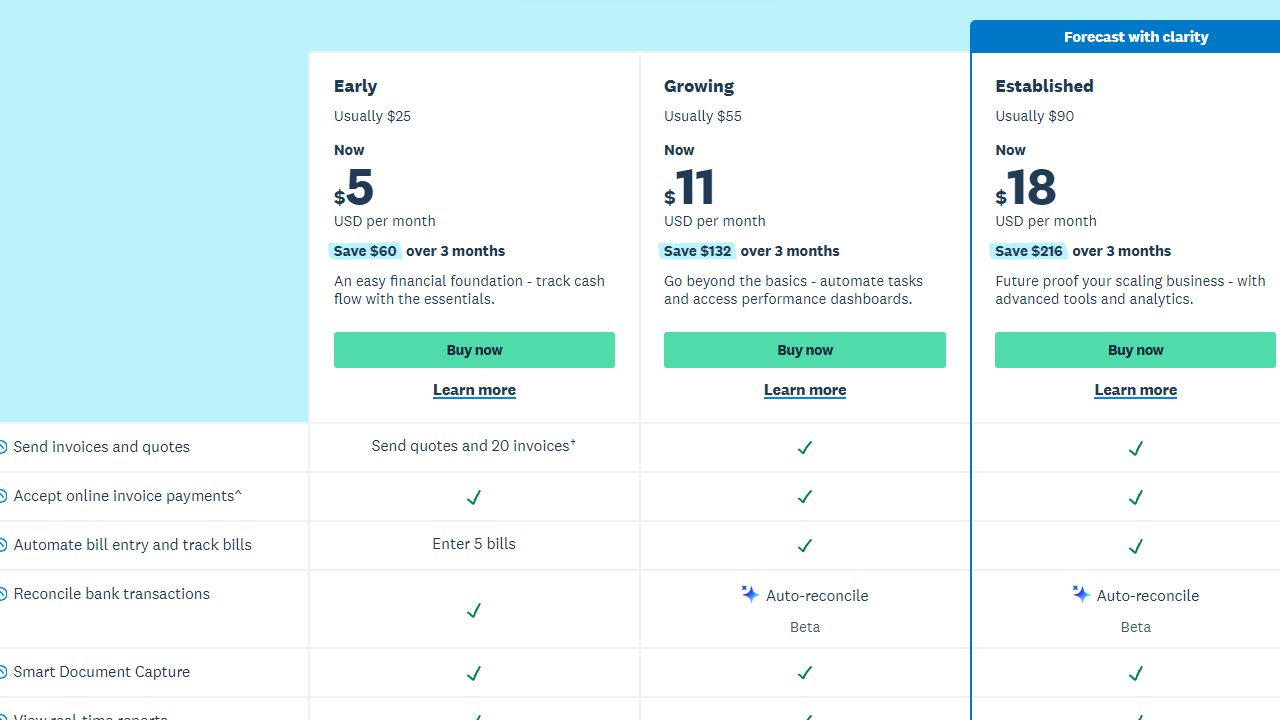
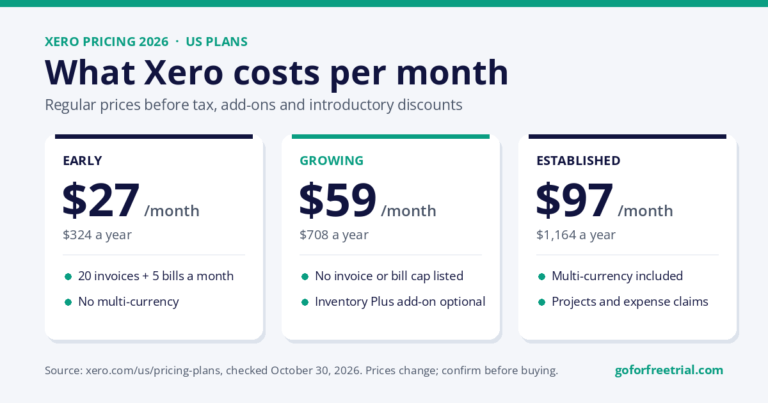
Xero is especially good when several people need access: owner, bookkeeper, accountant, operations manager, and maybe an outside advisor. Xero’s US pricing page lists Early, Growing, and Established plans, with regular prices of $27, $59, and $97 per month before promotions (checked October 30, 2026).
If you want the best low-cost system
Choose Zoho Books if you want serious accounting features without jumping straight into premium pricing.
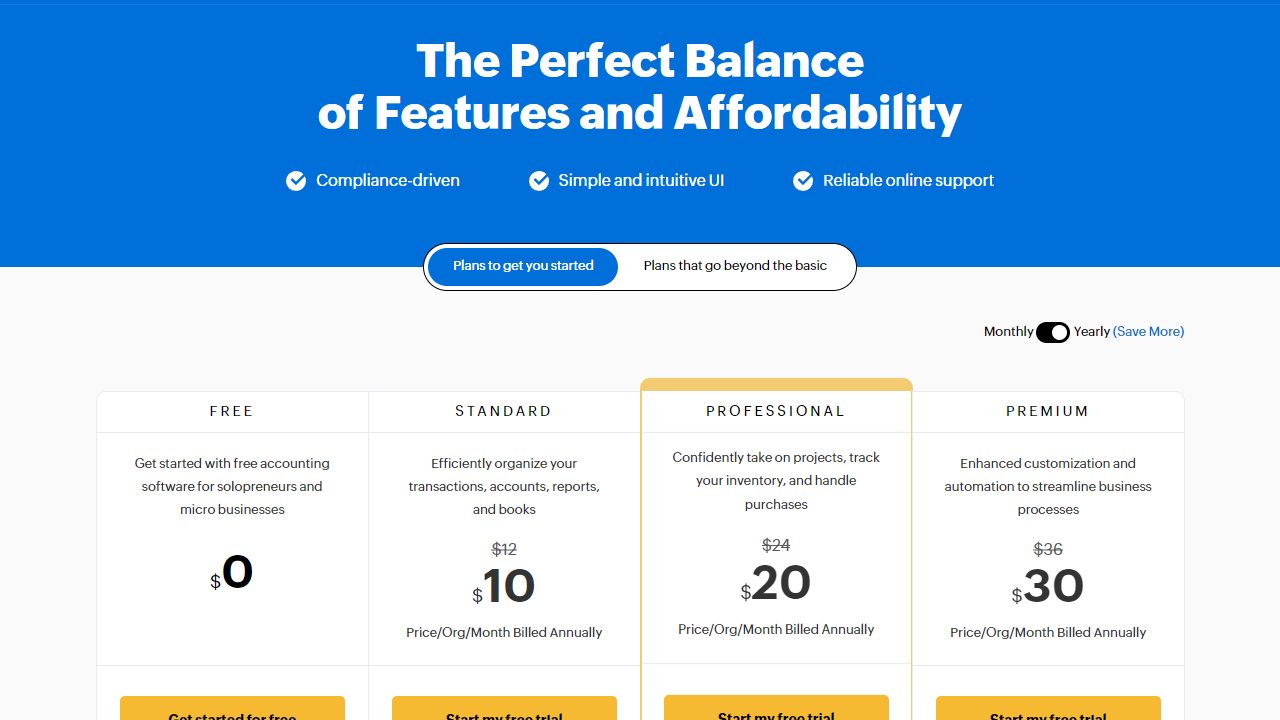
Zoho Books has a free plan and paid plans that start at $15 per organization per month when billed annually, according to Zoho’s US pricing page reviewed in June 2026. It also includes useful automation, bank feeds, sales tax features, project profitability, and inventory on higher tiers.
If you are a freelancer
Choose FreshBooks if your business revolves around clients, estimates, proposals, retainers, time tracking, and easy invoice payment.
FreshBooks is not trying to be a full ERP. That is part of its charm. It makes the client billing side of the business feel lighter.
If you want free accounting software
Choose Wave if you are a very small service business, freelancer, or side business that needs income and expense tracking, invoicing, receipts, and basic reports.
Wave’s free plan is attractive, but do not expect it to replace a more advanced system for inventory, complex sales tax, multi-entity reporting, or deeper controls.
Detailed Reviews: 15 Best Accounting Software Tools
1. QuickBooks Online
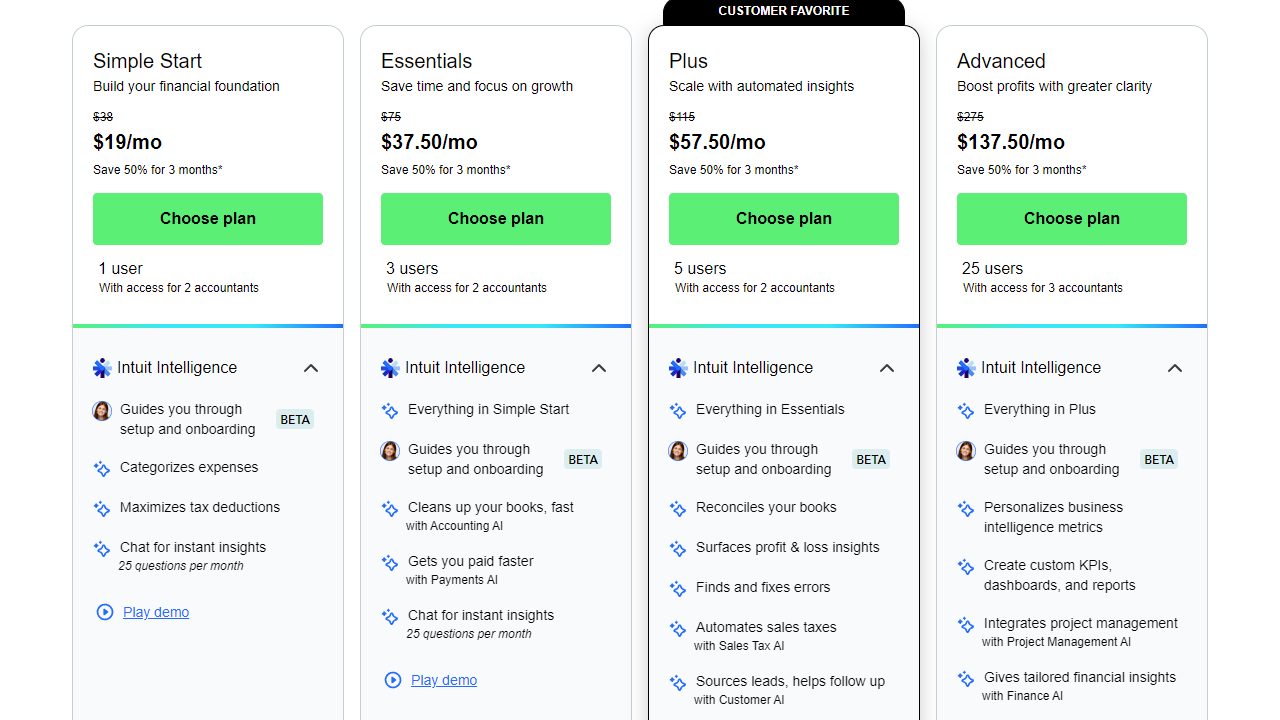
QuickBooks is the safest all-around pick for many US businesses, so the official pricing screenshot helps readers verify plan limits and current promotional pricing.
Official QuickBooks Online pricing screenshot. Check the live page because offers and plan prices may change.
Designed dashboard-style image for the QuickBooks Online review section showing accounting metrics, invoices, expenses, bank reconciliation, and reporting widgets.
QuickBooks Online
Overall accounting command center
Cash flow
$48.2k
Monthly activity
Best-fit signals
Payroll readyInventory on PlusAccountant access
Cash flow trend
Bookkeeping workflow
InvoicesExpensesBank matchReports
Illustrative dashboard image created for this review. Not an official QuickBooks Online product screenshot.
Illustrative QuickBooks Online dashboard-style image for comparison purposes. Not an official product screenshot.
QuickBooks Online is the default answer for many US small businesses, and there is a reason for that.
It has strong accounting fundamentals, deep integrations, an enormous accountant network, payroll options, good reporting, and enough plan variety to support many types of small businesses.
Best For
QuickBooks Online is best for:
Local service businesses
Contractors
Retailers
Growing businesses with employees
Owners who plan to use an outside bookkeeper
Businesses that want payroll and accounting in one ecosystem
Key Features
QuickBooks Online covers the core bookkeeping workflow well:
Invoices and estimates
Expense tracking
Bank feeds
Bank reconciliation
Bills and accounts payable
Sales tax tracking
Mileage tracking
Project profitability on higher plans
Inventory on higher plans
Payroll add-ons
Accountant access
Ease of Use
QuickBooks is easier than traditional desktop accounting software, but it still has enough depth to confuse brand-new owners.
The dashboard is approachable. The harder part is understanding how categories, bank rules, sales tax, undeposited funds, payment processors, and payroll liabilities affect the books.
Integrations
This is one of QuickBooks’ biggest advantages.
You can connect payment processors, ecommerce tools, POS systems, time tracking apps, payroll, reporting tools, CRM systems, and tax products.
Customer Support
Support quality varies by plan and issue complexity.
The bigger advantage is not only Intuit support. It is the number of outside bookkeepers and accountants who already know QuickBooks.
Mobile App
The mobile app is strong for invoicing, receipt capture, mileage, transaction review, and basic customer activity.
It is not where I would do a full monthly close, but it is good for owner-level daily work.
Security
QuickBooks Online uses modern cloud security practices, user permissions, data encryption, and account protection features. For most small businesses, that is better than keeping an accounting file on an unmanaged laptop.
Pros and Cons
Pros
Cons
Huge accountant network
Can get expensive
Strong payroll ecosystem
Some useful features live on higher plans
Excellent integrations
Interface can feel busy
Good reporting
Cleanup can be painful if setup is poor
Works for many industries
Promotions and regular pricing can differ a lot
Pricing
QuickBooks pricing changes often and promotions are common. Before publishing or purchasing, check the current QuickBooks offer and compare it against the live deal tracker: current accounting software offers.
Verdict
QuickBooks Online is the best overall accounting software for many US small businesses because it balances features, accountant familiarity, payroll, integrations, and scalability.
Next step for QuickBooks Online: QuickBooks Online is worth comparing if you want a mainstream accounting platform with strong payroll, reporting, and accountant support.
It is not the cheapest. It is the practical pick when you want fewer surprises.
2. Xero
Xero is a strong QuickBooks alternative, and the pricing screenshot makes plan limits, user value, and current offers easier to compare.
Official Xero pricing page screenshot. Prices and promotional offers can change.
Designed dashboard-style image for the Xero review section showing accounting metrics, invoices, expenses, bank reconciliation, and reporting widgets.
Xero
Cloud collaboration dashboard
Reconciled
94%
Monthly activity
Best-fit signals
Unlimited usersBank rulesMulti-currency
Cash flow trend
Bookkeeping workflow
InvoicesExpensesBank matchReports
Illustrative dashboard image created for this review. Not an official Xero product screenshot.
Illustrative Xero dashboard-style image for comparison purposes. Not an official product screenshot.
Xero is one of the strongest QuickBooks alternatives, especially for businesses that value collaboration and cloud-first workflows.
Its biggest everyday advantage is unlimited users. That can make a real difference when the owner, bookkeeper, accountant, and managers all need access without adding per-user fees.
Best For
Xero is best for:
Growing small businesses
Ecommerce businesses using app integrations
Teams that need multiple users
Businesses with international activity
Owners who want a cloud-first QuickBooks alternative
Key Features
Xero includes:
Quotes and invoices
Bill entry
Bank reconciliation
Bank connections
Smart document capture
Sales tax
1099 support
Cash flow forecasting
Reports
Multi-currency on the Established plan
Projects and expenses on the Established plan
Optional Inventory Plus
Ease of Use
Xero feels clean once it is set up.
The reconciliation workflow is one of its strengths. Business owners often like the way Xero presents bank matching and transaction review.
Integrations
Xero’s app marketplace is broad, with strong coverage for ecommerce, inventory, payments, payroll partners, reporting, and workflow tools.
For Shopify accounting, Amazon sellers, and multi-app businesses, Xero can work well when the integration stack is chosen carefully.
Customer Support
Xero support is primarily online. That works fine for routine questions, but some owners prefer live phone access when payroll or bank feeds misbehave.
Mobile App
Xero’s mobile app is good for invoices, expenses, bank reconciliation, and quick views of business performance.
Security
Xero provides cloud security, user access controls, authentication features, and data protection practices suitable for small business accounting.
Pros and Cons
Pros
Cons
Unlimited users
Early plan has invoice and bill limits
Strong bank reconciliation
Payroll is not native in every region
Good international presence
Established plan needed for multi-currency
Clean collaboration workflow
Support model may not suit everyone
Strong app marketplace
Inventory depth may require add-ons
Pricing
Xero’s US pricing page reviewed on October 30, 2026 listed regular monthly prices of:
On October 30, 2026, Xero was also advertising 90% off the first six months for new US customers, ending November 2, 2026. Xero states that pricing and offers may change.
Verdict
Xero is the best accounting software for growing teams that want a serious cloud system without paying per-user fees.
Next step for Xero: Xero is a strong pick if you want unlimited users, cloud collaboration, and a clean QuickBooks alternative.
It is also one of the best Xero alternatives to QuickBooks if your accountant is comfortable with both.
3. Zoho Books
Zoho Books is the value-focused option in this list, so the pricing screenshot helps readers see the free and paid tiers clearly.
Official Zoho Books pricing screenshot showing plan tiers and annual pricing context.
Designed dashboard-style image for the Zoho Books review section showing accounting metrics, invoices, expenses, bank reconciliation, and reporting widgets.
Zoho Books
Startup finance workspace
Runway
11 mo
Monthly activity
Best-fit signals
Free planAutomationMobile-first
Cash flow trend
Bookkeeping workflow
InvoicesExpensesBank matchReports
Illustrative dashboard image created for this review. Not an official Zoho Books product screenshot.
Illustrative Zoho Books dashboard-style image for comparison purposes. Not an official product screenshot.
Zoho Books is the best budget accounting software for many startups and small businesses.
It is not “cheap” in the bad sense. It is feature-rich, thoughtfully organized, and especially attractive if you already use Zoho CRM, Zoho Inventory, Zoho Expense, or other Zoho apps.
Best For
Zoho Books is best for:
Startups
Budget-conscious small businesses
Remote teams
Businesses already using Zoho
Owners who want automation without premium pricing
Key Features
Zoho Books includes:
Invoicing
Expenses
Bank feeds
Bank reconciliation
Sales tax and use tax
1099 support
Recurring expenses
Custom reports
Project profitability
Multi-currency on Professional+
Inventory on Professional+
Workflow automation
Mobile apps
Ease of Use
Zoho Books is easy enough for many owners, though it has more configuration depth than Wave or FreshBooks.
The settings area can feel dense because Zoho gives you many knobs to turn. That is useful once the business grows.
Integrations
Zoho Books integrates best inside the Zoho ecosystem. It also connects with payment gateways, ecommerce tools, collaboration apps, and APIs.
Customer Support
Zoho’s pricing page lists email, voice, and chat support on paid plans. Free users usually get more limited support.
Mobile App
Zoho Books has one of the best mobile experiences in this list. It is practical for invoices, expenses, approvals, time tracking, and transaction work.
Security
Zoho offers cloud security controls, role-based access, and broader enterprise-grade infrastructure across its app suite.
Pros and Cons
Pros
Cons
Excellent value
Some features require higher tiers
Free plan available
Less accountant adoption than QuickBooks in the US
Strong automation
Can feel configuration-heavy
Good mobile app
Best value often appears if you use Zoho suite
Inventory on Professional+
Payroll availability varies
Pricing
Zoho Books’ US pricing page reviewed in June 2026 listed:
Plan
Monthly
Annual Equivalent
Notes
Free
$0
$0
Limits apply
Standard
$20/mo
$15/mo billed annually
Bank feeds, 1099, sales tax, reports
Professional
Higher tier
Annual discount available
Multi-currency, inventory, project profitability
Premium, Elite, Ultimate
Higher tiers
Annual discount available
More users, limits, automation, advanced features
Zoho publishes invoice, expense, report scheduling, receipt scan, and user limits by plan.
Verdict
Zoho Books is the best accounting software for startups that want meaningful accounting power without starting at premium pricing.
Next step for Zoho Books: Zoho Books is a good fit for startups and budget-conscious teams that still want automation and room to grow.
If you are already in the Zoho ecosystem, it deserves a very serious look.
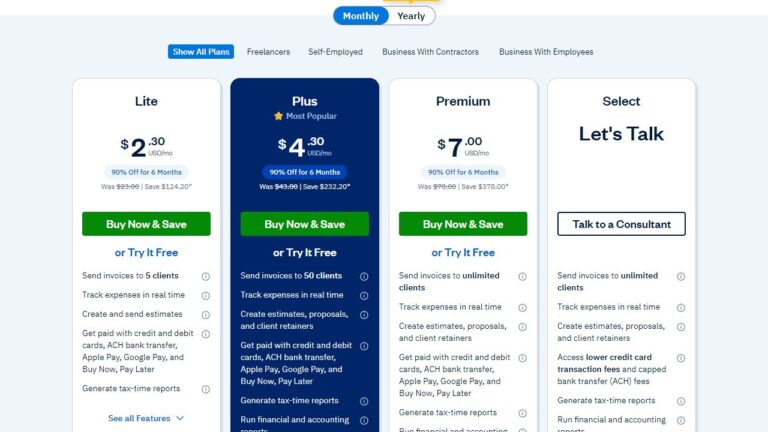
4. FreshBooks
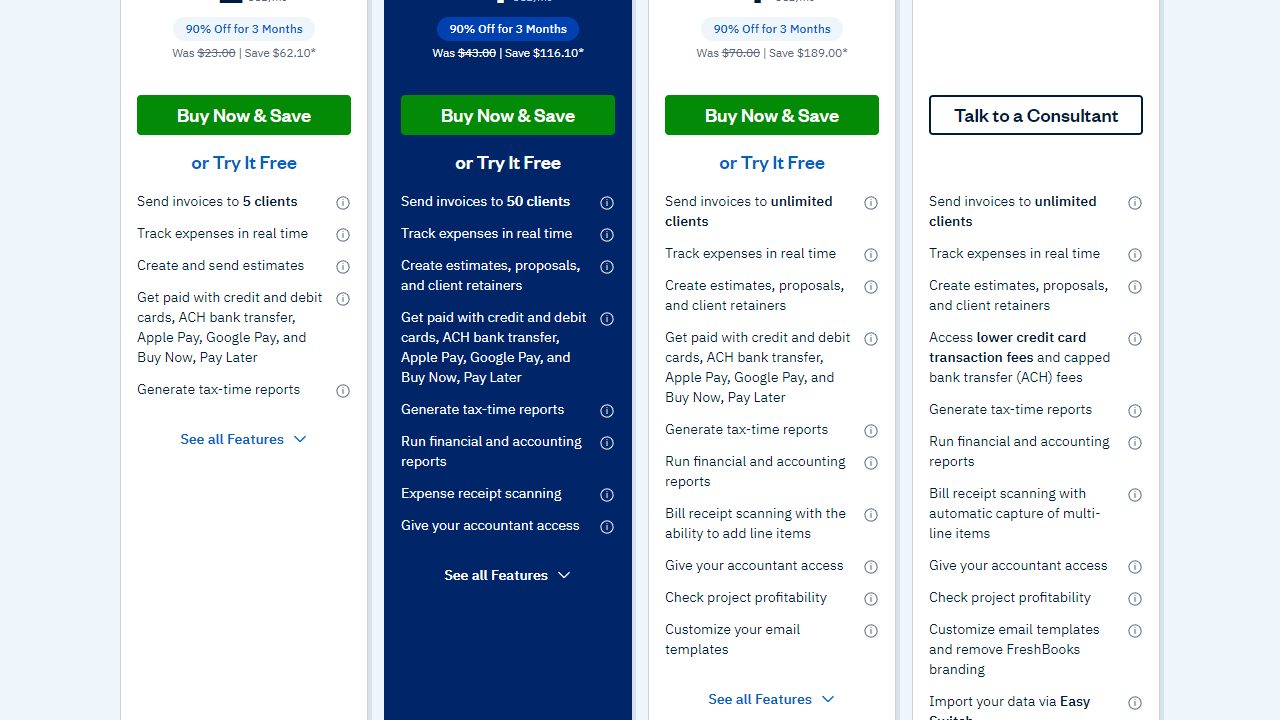
FreshBooks is especially relevant for freelancers and client-service businesses, where client limits and plan features affect the real monthly cost.
Official FreshBooks pricing screenshot. Introductory offers and regular prices may change.
Designed dashboard-style image for the FreshBooks review section showing accounting metrics, invoices, expenses, bank reconciliation, and reporting widgets.
FreshBooks
Freelancer billing dashboard
Invoices paid
87%
Monthly activity
Best-fit signals
ProposalsTime trackingClient portal
Cash flow trend
Bookkeeping workflow
InvoicesExpensesBank matchReports
Illustrative dashboard image created for this review. Not an official FreshBooks product screenshot.
Illustrative FreshBooks dashboard-style image for comparison purposes. Not an official product screenshot.
FreshBooks is built around getting paid by clients.
That makes it a natural fit for freelancers, consultants, creatives, agencies, coaches, and service businesses that live inside estimates, proposals, retainers, time tracking, and invoices.
Best For
FreshBooks is best for:
Freelancers
Consultants
Agencies
Designers and creatives
Client-service businesses
Owners who hate bookkeeping software
Key Features
FreshBooks includes:
Invoices
Estimates
Proposals
Client retainers
Time tracking
Expense tracking
Bank import
Mileage tracking
Tax-time reports
Client portals
Online payments
Bank reconciliation on Plus+
Double-entry accounting reports on Plus+
Payroll add-on
Ease of Use
FreshBooks is one of the easiest tools in this guide.
The interface makes sense to people who think in clients and projects instead of debits and credits. That is a real advantage for service businesses.
Integrations
FreshBooks integrates with payment tools, payroll, project apps, and business workflow tools.
It has fewer deep accounting ecosystem advantages than QuickBooks, but it covers the everyday needs of many freelancers well.
Customer Support
FreshBooks is known for more human support than many accounting platforms. Higher-tier and Select customers may receive more support options.
Mobile App
The mobile app is strong for invoices, expenses, mileage, and quick client work.
Security
FreshBooks uses cloud-hosted account security, payment protections through payment partners, and access controls.
Pros and Cons
Pros
Cons
Excellent for freelancers
Lower plans limit billable clients
Easy invoicing and payments
Less ideal for inventory businesses
Time tracking and retainers
Advanced accounting depth is limited
Good mobile app
Team members cost extra
Friendly interface
Payroll is an add-on
Pricing
FreshBooks pricing reviewed in June 2026 showed regular monthly prices before a promotional discount:
Plan
Regular Price
Best For
Lite
$23/mo
Up to 5 clients
Plus
$43/mo
Up to 50 clients
Premium
$70/mo
Unlimited clients
Select
Custom
Larger client-service businesses
FreshBooks was advertising a limited-time discount at the time reviewed. Add-ons included team members, advanced payments, and payroll.
Verdict
FreshBooks is the best bookkeeping software for freelancers and small service businesses that care more about client billing than complex accounting controls.
Next step for FreshBooks: FreshBooks is easiest to compare if your business depends on proposals, time tracking, retainers, and client invoices.
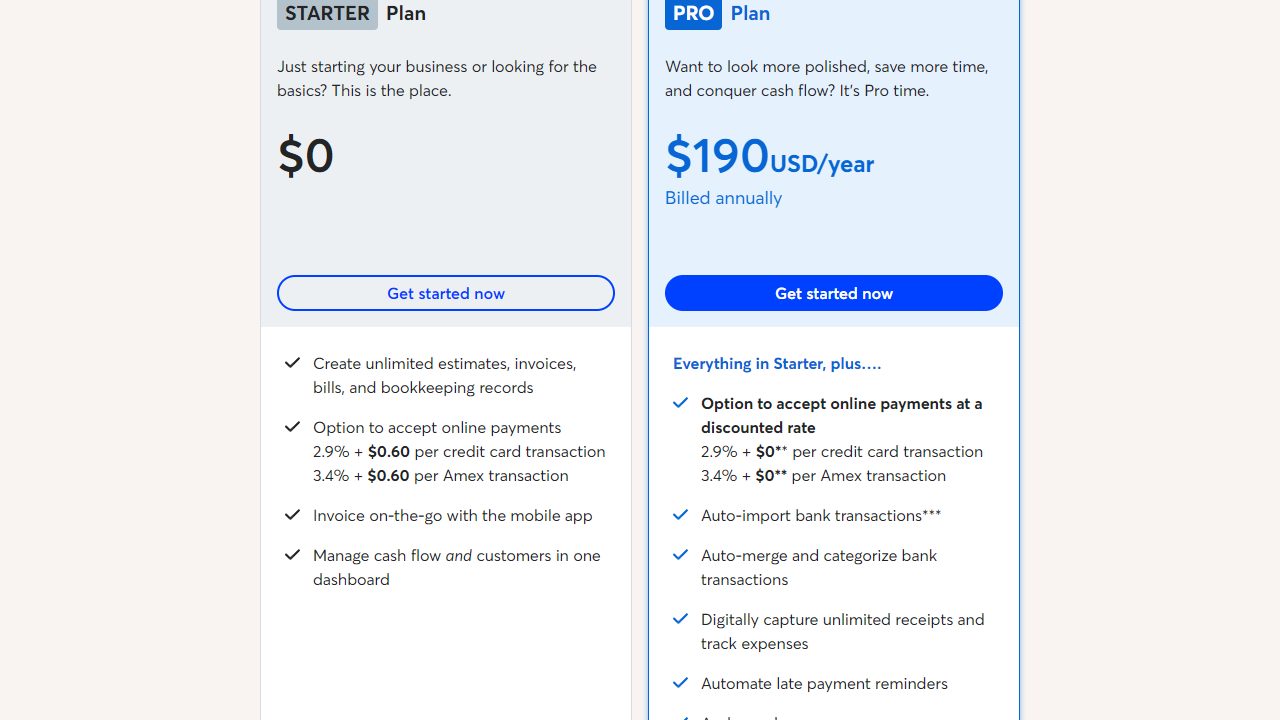
Wave is the free-accounting benchmark, and the official pricing screenshot shows what is included in Starter versus Pro.
Official Wave pricing screenshot showing the free Starter plan and paid Pro option.
Designed dashboard-style image for the Wave review section showing accounting metrics, invoices, expenses, bank reconciliation, and reporting widgets.
Wave
Free bookkeeping snapshot
Expenses
$3.4k
Monthly activity
Best-fit signals
Free basicsReceiptsPayments
Cash flow trend
Bookkeeping workflow
InvoicesExpensesBank matchReports
Illustrative dashboard image created for this review. Not an official Wave product screenshot.
Illustrative Wave dashboard-style image for comparison purposes. Not an official product screenshot.
Wave is the best free accounting software for very small businesses.
It is especially useful for freelancers, side businesses, solo service providers, and new owners who need a low-friction way to send invoices and track income and expenses.
Best For
Wave is best for:
Freelancers
Side businesses
Very small service businesses
New owners testing a business idea
Businesses that do not need inventory
Key Features
Wave includes:
Accounting
Invoicing
Estimates
Receipts
Mobile app
Payments
Payroll add-on
Advisor/bookkeeping services
Ease of Use
Wave is friendly and fast to start.
That matters for owners who would otherwise avoid bookkeeping entirely.
Integrations
Wave has fewer integrations than QuickBooks, Xero, or Zoho Books.
That is usually fine for a tiny service business. It can become limiting as operations get more complex.
Customer Support
Support depends on the plan and service level. Paid plans and add-ons generally bring more support access.
Mobile App
Wave’s mobile app supports invoices, expenses, receipts, and basic on-the-go work.
Security
Wave provides cloud account security and payment-processing protections through its platform and partners.
Pros and Cons
Pros
Cons
Free plan
Not built for inventory
Easy invoices
Limited advanced reporting
Good for tiny businesses
Less accountant ecosystem depth
Payroll add-on
Not ideal for complex sales tax
Receipt and mobile tools
May be outgrown quickly
Pricing
Wave’s pricing pages reviewed on October 30, 2026 showed a free Starter plan and a Pro plan at $19/month (or $190/year). Payroll is an add-on at $40/month plus $6 per active employee or contractor paid, and bookkeeping/advisor services are priced separately.
Verdict
Wave is the best free accounting app for tiny service businesses that need the basics now and can migrate later if the business grows.
Next step for Wave: Wave is the first place many tiny businesses should check when they want free invoicing and bookkeeping basics.
Designed dashboard-style image for the Sage Accounting review section showing accounting metrics, invoices, expenses, bank reconciliation, and reporting widgets.
Sage Accounting
Core accounting dashboard
Profit
18.6%
Monthly activity
Best-fit signals
InvoicesBank feedsReports
Cash flow trend
Bookkeeping workflow
InvoicesExpensesBank matchReports
Illustrative dashboard image created for this review. Not an official Sage Accounting product screenshot.
Illustrative Sage Accounting dashboard-style image for comparison purposes. Not an official product screenshot.
Sage Accounting is a cloud accounting option from a long-established accounting software company.
It is best for small businesses that want core accounting without chasing every new app trend.
Best For
Sage is best for:
Small service businesses
Owners who want straightforward accounting
Businesses familiar with Sage products
Companies that may later need broader Sage solutions
Key Features
Sage Accounting commonly covers:
Invoicing
Quotes and estimates
Expenses
Bank connections
Bank reconciliation
Reporting
Cash flow visibility
Multi-user access on suitable plans
Ease of Use
Sage is fairly approachable, though not always as modern-feeling as FreshBooks or Zoho Books.
It works best when the business has a standard accounting workflow and does not need many niche integrations.
Pros and Cons
Pros
Cons
Established accounting brand
Less exciting UI
Solid core accounting
Payroll and advanced tools may require separate products
Good for straightforward books
Ecosystem varies by region
Cloud access
Less dominant among US small-business accountants
Pricing
Sage pricing and promotions vary by region. Check the live vendor page before publishing plan-level prices.
Verdict
Sage is a steady option for owners who want reliable cloud accounting from a known accounting software provider.
Next step for Sage Accounting: Sage Accounting is worth checking if you want straightforward cloud accounting from an established accounting brand.
Designed dashboard-style image for the Kashoo review section showing accounting metrics, invoices, expenses, bank reconciliation, and reporting widgets.
Kashoo
Simple owner bookkeeping
Open items
12
Monthly activity
Best-fit signals
Easy setupBank importTax reports
Cash flow trend
Bookkeeping workflow
InvoicesExpensesBank matchReports
Illustrative dashboard image created for this review. Not an official Kashoo product screenshot.
Illustrative Kashoo dashboard-style image for comparison purposes. Not an official product screenshot.
Kashoo is designed for simplicity.
That is its biggest selling point and its biggest limitation.
Best For
Kashoo is best for:
Solo owners
Service businesses
Businesses that want minimal setup
Owners who do not need heavy integrations
Key Features
Kashoo commonly focuses on:
Income and expense tracking
Invoicing
Bank connections
Reconciliation
Reporting
Basic tax organization
Ease of Use
Kashoo is one of the simpler accounting tools to understand.
If QuickBooks feels like too much and Wave feels too light, Kashoo may sit in the middle.
Pros and Cons
Pros
Cons
Simple interface
Fewer advanced features
Good for basic bookkeeping
Smaller ecosystem
Less overwhelming
Not ideal for inventory-heavy business
Owner-friendly
Mobile and integration options may be limited
Pricing
Kashoo pricing should be checked live before publication because public offers can change.
Verdict
Kashoo is best for owners who want simple bookkeeping and do not need the broader app ecosystem of QuickBooks, Xero, or Zoho.
Next step for Kashoo: Kashoo is worth comparing if you want simple owner-managed bookkeeping without a crowded feature set.
Designed dashboard-style image for the ZipBooks review section showing accounting metrics, invoices, expenses, bank reconciliation, and reporting widgets.
ZipBooks
Lightweight invoicing board
Due soon
$2.1k
Monthly activity
Best-fit signals
InvoicesPaymentsBasic reports
Cash flow trend
Bookkeeping workflow
InvoicesExpensesBank matchReports
Illustrative dashboard image created for this review. Not an official ZipBooks product screenshot.
Illustrative ZipBooks dashboard-style image for comparison purposes. Not an official product screenshot.
ZipBooks is a simple accounting and invoicing option that has historically appealed to very small businesses looking for free or low-cost bookkeeping.
It is worth considering, but I would verify product activity, support responsiveness, and current plan availability before committing a growing business to it.
Best For
ZipBooks is best for:
Very small businesses
Simple invoicing
Owners testing a lightweight bookkeeping setup
Key Features
ZipBooks has historically offered:
Invoicing
Expense tracking
Basic reporting
Online payments
Customer/vendor tracking
Pros and Cons
Pros
Cons
Simple to use
Product momentum should be verified
Free/low-cost appeal
Fewer advanced features
Good for basic invoices
Not ideal for complex accounting
Lightweight
Smaller support ecosystem
Pricing
Check ZipBooks’ current pricing and account availability before recommending it as a primary system.
Verdict
ZipBooks can work for simple needs, but I would choose Wave, Zoho Books, or FreshBooks first unless ZipBooks specifically fits your workflow.
Next step for ZipBooks: ZipBooks is worth checking for simple invoicing, but verify current plan availability and support before committing.
Designed dashboard-style image for the AccountEdge review section showing accounting metrics, invoices, expenses, bank reconciliation, and reporting widgets.
AccountEdge
Desktop inventory accounting
Stock value
$72k
Monthly activity
Best-fit signals
InventoryPurchasesPayroll add-on
Cash flow trend
Bookkeeping workflow
InvoicesExpensesBank matchReports
Illustrative dashboard image created for this review. Not an official AccountEdge product screenshot.
Illustrative AccountEdge dashboard-style image for comparison purposes. Not an official product screenshot.
AccountEdge is different from most tools in this guide because it remains strong for desktop and on-premise accounting.
That can be a benefit for businesses that want local control, inventory depth, and a traditional accounting file structure.
Best For
AccountEdge is best for:
Desktop accounting users
Inventory-based small businesses
Businesses that prefer local files
Owners moving from older desktop accounting workflows
Key Features
AccountEdge includes:
Sales and invoicing
Purchases and expenses
Bank reconciliation
Financial reporting
Budgeting
Inventory management
Payroll processing add-on
Time billing
Contact management
Data backup
Accountant copy
Ease of Use
AccountEdge feels more like traditional accounting software than a modern SaaS app.
That is good if you value control. It is less ideal if you want the lightest possible cloud experience.
Pricing
AccountEdge’s pricing page reviewed in June 2026 listed:
Plan
Price
Notes
AccountEdge Pro
$20/mo
Single user, desktop/on-premise
Network Edition
$30/mo
Includes 2 users, desktop/on-premise
Hosted
$50/mo per user
Browser access
Popular add-ons included payroll at $20/month, telephone support at $10/month, bank feeds at $5/month, and AccountEdge Connect starting at $15/month.
Pros and Cons
Pros
Cons
Strong inventory
Less cloud-native
Desktop control
Add-ons increase cost
Good traditional accounting depth
Interface can feel older
Hosted option available
Not as integration-rich as cloud leaders
Verdict
AccountEdge is the best inventory choice for businesses that want desktop accounting control instead of a purely cloud-first system.
Next step for AccountEdge: AccountEdge is worth comparing if desktop accounting, inventory depth, and local file control matter to your business.
Designed dashboard-style image for the OneUp review section showing accounting metrics, invoices, expenses, bank reconciliation, and reporting widgets.
OneUp
Sales and inventory workflow
Orders
148
Monthly activity
Best-fit signals
CRMInventoryAutomation
Cash flow trend
Bookkeeping workflow
InvoicesExpensesBank matchReports
Illustrative dashboard image created for this review. Not an official OneUp product screenshot.
Illustrative OneUp dashboard-style image for comparison purposes. Not an official product screenshot.
OneUp combines accounting with sales, CRM-style workflows, and inventory features.
It is not as widely known as QuickBooks or Xero, but it can appeal to product-based businesses that want accounting close to sales operations.
Best For
OneUp is best for:
Small product businesses
Businesses that want inventory plus accounting
Owners who like automated bookkeeping suggestions
Key Features
OneUp commonly includes:
Invoicing
CRM
Inventory
Purchase orders
Bank reconciliation
Accounting reports
Automation
Pros and Cons
Pros
Cons
Inventory and sales workflow
Smaller ecosystem
Automation features
Less accountant familiarity
Useful for product businesses
Current pricing should be verified
Broader than basic bookkeeping
May not fit service-only businesses
Pricing
Check OneUp’s current pricing page before publication. Pricing and plan names can change.
Verdict
OneUp is worth a look if inventory and sales workflow matter more than accountant ecosystem size.
Next step for OneUp: OneUp is worth a look if you want accounting closer to sales, CRM, and inventory workflow.
Designed dashboard-style image for the Odoo review section showing accounting metrics, invoices, expenses, bank reconciliation, and reporting widgets.
Odoo
ERP-style business suite
Apps active
8
Monthly activity
Best-fit signals
All appsInventoryEcommerce
Cash flow trend
Bookkeeping workflow
InvoicesExpensesBank matchReports
Illustrative dashboard image created for this review. Not an official Odoo product screenshot.
Illustrative Odoo dashboard-style image for comparison purposes. Not an official product screenshot.
Odoo is not just accounting software. It is a business app suite.
That makes it powerful for companies that want accounting, inventory, ecommerce, CRM, sales, purchase, projects, HR, and operations in one system.
Best For
Odoo is best for:
Growing businesses with multiple departments
Ecommerce and inventory businesses
Companies that want ERP-like tools
Owners willing to invest in setup
Key Features
Odoo includes apps for:
Accounting
Invoicing
Expenses
Documents
Ecommerce
Inventory
CRM
Sales
Purchase
Projects
POS
HR
Ease of Use
Odoo is powerful, but it is not the simplest accounting tool here.
If you only need invoices and expenses, it is likely too much. If you need a connected operating system, it can be excellent.
Odoo also states that Standard and Custom plans include all apps for a single fee, with hosting, maintenance, and unlimited support included. Promotional discounts may apply for initial users.
Pros and Cons
Pros
Cons
All-in-one suite
More setup work
Strong inventory and ecommerce
Can be overkill
One app free option
Implementation quality matters
Scales beyond accounting
Per-user cost rises with team size
Verdict
Odoo is the best accounting-adjacent platform for businesses that need ERP-style operations, not just bookkeeping.
Next step for Odoo: Odoo is best compared as a business suite, especially if ecommerce, inventory, purchasing, CRM, and accounting should work together.
Designed dashboard-style image for the Patriot Software review section showing accounting metrics, invoices, expenses, bank reconciliation, and reporting widgets.
Patriot Software
Payroll-first accounting
Next payroll
Jun 14
Monthly activity
Best-fit signals
PayrollTax filingSimple books
Cash flow trend
Bookkeeping workflow
InvoicesExpensesBank matchReports
Illustrative dashboard image created for this review. Not an official Patriot Software product screenshot.
Illustrative Patriot Software dashboard-style image for comparison purposes. Not an official product screenshot.
Patriot is strongest when payroll is central to the decision.
For US small businesses with employees, payroll can be more urgent than fancy dashboards. Patriot keeps that workflow simple.
Best For
Patriot is best for:
US small businesses with employees
Owners who want payroll and accounting from one provider
Businesses that value accessible support
Key Features
Patriot commonly offers:
Basic and premium accounting plans
Invoices
Income and expense tracking
Estimates and recurring invoices on higher accounting tiers
Payroll plans
Contractor and employee payroll
Tax filing on full-service payroll
Employee portal
Pros and Cons
Pros
Cons
Payroll-first strength
US-focused
Simple pricing style
Less inventory depth
Good for small employers
Not ideal for international businesses
Accounting plus payroll
Fewer broad integrations than QuickBooks
Pricing
Patriot’s accounting and payroll prices should be verified on the live vendor page before publishing. Public reviews and prior pricing have commonly placed accounting and payroll in affordable small-business ranges, but this article should not rely on stale plan figures.
Verdict
Patriot is the best payroll-first pick for US small businesses that want simple accounting alongside payroll.
Next step for Patriot Software: Patriot Software is worth checking if payroll is the main reason you are buying accounting software.
Designed dashboard-style image for the Manager.io review section showing accounting metrics, invoices, expenses, bank reconciliation, and reporting widgets.
Manager.io
Desktop accounting ledger
Accounts
23
Monthly activity
Best-fit signals
Free desktopInventoryMulti-currency
Cash flow trend
Bookkeeping workflow
InvoicesExpensesBank matchReports
Illustrative dashboard image created for this review. Not an official Manager.io product screenshot.
Illustrative Manager.io dashboard-style image for comparison purposes. Not an official product screenshot.
Manager.io is a practical accounting system with a free desktop edition and paid cloud/server options.
It appeals to owners who want control, low cost, and a more traditional accounting structure.
Best For
Manager.io is best for:
Owners who want free desktop accounting
Businesses comfortable with a less guided interface
Users who prefer control over polish
Small businesses with straightforward bookkeeping
Key Features
Manager.io includes:
General ledger
Invoicing
Bank accounts
Receipts and payments
Reports
Inventory
Fixed assets
Multi-currency
Desktop and cloud/server options
Pros and Cons
Pros
Cons
Free desktop edition
Less hand-holding
Broad accounting modules
Interface is utilitarian
Inventory and multi-currency
Support model differs from SaaS tools
Good for cost control
Cloud option costs extra
Pricing
Check Manager.io’s current pricing page for cloud and server edition prices. The desktop edition has historically been free.
Verdict
Manager.io is one of the best free bookkeeping software choices for owners who want accounting control and do not need a polished SaaS onboarding experience.
Next step for Manager.io: Manager.io is worth comparing if you want free desktop accounting and a practical, ledger-style workflow.
Designed dashboard-style image for the Akaunting review section showing accounting metrics, invoices, expenses, bank reconciliation, and reporting widgets.
Akaunting
Open-source accounting hub
Modules
12
Monthly activity
Best-fit signals
Self-hostAdd-onsMulti-currency
Cash flow trend
Bookkeeping workflow
InvoicesExpensesBank matchReports
Illustrative dashboard image created for this review. Not an official Akaunting product screenshot.
Illustrative Akaunting dashboard-style image for comparison purposes. Not an official product screenshot.
Akaunting is an open-source accounting platform with cloud and self-hosted options.
It is appealing when flexibility, ownership, and add-ons matter.
Best For
Akaunting is best for:
Open-source users
International small businesses
Owners who want self-hosting options
Businesses with developer or technical help
Key Features
Akaunting commonly offers:
Invoicing
Expenses
Banking
Reports
Customer and vendor management
Multi-currency support
App marketplace/add-ons
Cloud or self-hosted options
Pros and Cons
Pros
Cons
Open-source option
Add-ons can increase cost
Flexible
Setup may require technical comfort
International-friendly
Support depends on plan/community
Good for customization
Less accountant familiarity
Pricing
Check Akaunting’s current cloud and app marketplace pricing before publication because costs depend heavily on hosting choice and add-ons.
Verdict
Akaunting is best for businesses that value open-source flexibility more than mainstream accountant adoption.
Next step for Akaunting: Akaunting is worth checking if open-source flexibility, self-hosting, and add-on control matter to you.
Designed dashboard-style image for the FreeAgent review section showing accounting metrics, invoices, expenses, bank reconciliation, and reporting widgets.
FreeAgent
UK freelancer tax dashboard
Tax timeline
Ready
Monthly activity
Best-fit signals
VATPayrollSelf Assessment
Cash flow trend
Bookkeeping workflow
InvoicesExpensesBank matchReports
Illustrative dashboard image created for this review. Not an official FreeAgent product screenshot.
Illustrative FreeAgent dashboard-style image for comparison purposes. Not an official product screenshot.
FreeAgent is especially strong for UK freelancers, contractors, landlords, and small companies.
It focuses heavily on UK tax workflows, Making Tax Digital, payroll, Self Assessment, VAT, and HMRC filing.
Best For
FreeAgent is best for:
UK freelancers
UK contractors
UK limited companies
UK landlords
Businesses using eligible NatWest, Royal Bank of Scotland, Ulster Bank, or Mettle accounts
Key Features
FreeAgent includes:
Invoicing
Expenses
Receipt capture
Projects
Time tracking
Payroll
Bank feeds
Smart categorization
Cash flow forecast
VAT and MTD support
Self Assessment and UK tax timelines
UK-based support
Pricing
FreeAgent’s pricing page reviewed in June 2026 listed UK limited company pricing with a regular monthly price of GBP33/month, an introductory 50% discount for the first six months, annual pricing options, a 30-day free trial, and a free route for eligible bank customers. Optional add-ons included unlimited receipt and bill capture and an Amazon UK connection.
Pros and Cons
Pros
Cons
Excellent UK tax workflow
Less ideal for US businesses
Payroll and MTD support
Pricing is UK-oriented
Free with eligible banks
Limited inventory depth
Good freelancer fit
Ecommerce support may need add-ons
Verdict
FreeAgent is one of the best accounting apps for UK freelancers and small companies, but US businesses should usually choose another platform.
Next step for FreeAgent: FreeAgent is worth comparing if you are a UK freelancer, contractor, landlord, or small limited company.
If invoices are how you get paid, prioritize FreshBooks, QuickBooks, Xero, Zoho Books, or Wave.
FreshBooks has the friendliest client workflow. QuickBooks and Xero are better if invoicing is only one part of a more complex accounting system.
Expense Tracking
Most tools in this guide can track expenses.
The difference is how much work they save. Bank feeds, receipt capture, vendor rules, mobile uploads, and automatic categorization matter more than a simple expense form.
Bank Reconciliation
Bank reconciliation is not optional.
If your software imports transactions but does not make reconciliation easy, your books will drift. Xero, QuickBooks, Zoho Books, Sage, AccountEdge, and FreshBooks Plus+ handle this better than the lightest tools.
Payroll
Payroll is where “good enough” can become expensive.
If you have employees, look closely at QuickBooks, Patriot, FreshBooks Payroll add-on, Wave Payroll, or regional tools like FreeAgent for UK payroll. Confirm state, local, contractor, and tax filing support before choosing.
Inventory
Inventory changes the accounting decision.
Product businesses should consider QuickBooks Plus/Advanced, Xero with inventory add-ons, Zoho Books Professional+, AccountEdge, Odoo, OneUp, or Manager.io.
Wave and FreshBooks are usually not the right long-term system for inventory-heavy businesses.
Ecommerce Accounting
Ecommerce sellers need to track sales, refunds, processor fees, inventory, sales tax, shipping, marketplace deposits, and timing differences.
That usually points toward QuickBooks, Xero, Zoho Books, Odoo, or a stack with a dedicated ecommerce accounting connector.
Ecommerce warning: Do not simply dump every Shopify, Amazon, or Stripe transaction into your accounting file without a plan. You can create thousands of messy entries and make reconciliation harder, not easier.
Best Software by Use Case
Use Case
Best Pick
Runner-Up
Why
Solo freelancer
FreshBooks
Wave
Simple client billing
Side business
Wave
Zoho Books Free
Low cost and easy start
US business with employees
QuickBooks Online
Patriot
Payroll and accountant support
Startup on a budget
Zoho Books
Wave
Free/low-cost tiers
Shopify seller
Xero
QuickBooks Online
App ecosystem and reconciliation workflow
Inventory-heavy local business
AccountEdge
Odoo
Inventory depth
International business
Xero
Zoho Books
Multi-currency and global fit
UK contractor
FreeAgent
Xero
UK tax workflows
Open-source preference
Akaunting
Manager.io
Flexibility and control
ERP-style growth
Odoo
QuickBooks Online Advanced
Operations beyond accounting
Buying Guide: How to Choose Small Business Accounting Software
1. Start with your transaction type
Every business has a main money pattern.
For a consultant, it is time, proposals, invoices, and payments. For an ecommerce seller, it is orders, refunds, inventory, sales tax, merchant fees, and deposits. For a local employer, it may be payroll, job costs, bills, and cash flow.
Choose software around that pattern.
2. Confirm accountant access
Ask your accountant or bookkeeper what they prefer before you buy.
You do not have to obey them automatically, but you should know whether they support your choice. A great tool becomes less great if your bookkeeper charges extra to work in it.
3. Check bank feeds before committing
Good bank feeds save time.
Weak bank feeds create constant manual work. Before moving your books, confirm your bank, credit card, PayPal, Stripe, Square, Shopify, Amazon, and payroll connections.
4. Look at the monthly close
A nice dashboard is not enough.
Ask whether the software helps you close the month:
Are bank accounts reconciled?
Are unpaid invoices reviewed?
Are bills entered?
Are payroll liabilities recorded?
Are sales tax payable balances reasonable?
Are clearing accounts cleaned up?
Does the balance sheet make sense?
5. Do not ignore user permissions
As your business grows, you may invite staff, contractors, bookkeepers, accountants, and managers.
Good accounting software lets you control who can see payroll, bank balances, reports, customer data, vendor data, and settings.
6. Plan for year two
The first-year discount is not the real price.
Before you sign up, calculate the regular monthly plan, add-ons, payroll, extra users, payment processing, receipt capture, and ecommerce connectors. Compare live offers here before making a final call: current accounting software offers.
Xero Alternatives and QuickBooks Alternatives
Best Xero Alternatives
Alternative
Choose It If
QuickBooks Online
Your accountant prefers QuickBooks or you need payroll depth
Zoho Books
You want lower pricing and strong automation
FreshBooks
You are client-service focused
Wave
You need a free simple system
Odoo
You need ERP-style operations
Best QuickBooks Alternatives
Alternative
Choose It If
Xero
You want unlimited users and cleaner collaboration
Zoho Books
You want strong value
FreshBooks
You are a freelancer or agency
Wave
You need free bookkeeping
AccountEdge
You prefer desktop accounting and inventory
Suggested internal links:
Xero Pricing
Xero Review
Xero Promo Codes
Xero vs QuickBooks
Best Accounting Software 2026
Best Free Bookkeeping Software
Best Accounting Software for Ecommerce
Ecommerce Accounting Software Costs
Ecommerce Accounting Software Statistics
Related Accounting Software Guides
For deeper comparisons, pricing details, and niche use cases, these related guides can help you compare the best accounting software for small business from a few different angles.
Payroll, advanced features, user limits, promo expiry
Xero
Tiered monthly plans
Early plan limits, multi-currency on Established
Zoho Books
Free plus tiered plans
User limits, invoice/expense limits, automation tiers
FreshBooks
Tiered by client count/features
Billable client limits, paid team members
Wave
Free plus paid add-ons
Payroll, advisors, paid plan features
Sage
Tiered cloud plans
Regional pricing and product bundle differences
Kashoo
Simple paid plans
Feature ceiling
ZipBooks
Free/paid history
Current availability and product activity
AccountEdge
Desktop/hosted subscriptions
Add-ons for payroll, bank feeds, support
OneUp
Tiered plans
Current plan availability
Odoo
One app free, per-user paid suites
Implementation cost and per-user growth
Patriot
Accounting plus payroll plans
Payroll worker fees and tax filing tier
Manager.io
Free desktop, paid cloud/server
Support expectations
Akaunting
Free/self-host plus paid cloud/apps
Add-on costs
FreeAgent
UK pricing with bank-linked free route
VAT, add-ons, regional fit
Final Verdict
For most US small businesses, QuickBooks Online is the best overall choice because it is widely supported, feature-rich, and familiar to accountants.
For growing teams that want a cleaner cloud collaboration experience, Xero is the strongest alternative.
For startups watching every dollar, Zoho Books offers the best value.
For freelancers, FreshBooks is the easiest system to live with day to day.
For free bookkeeping, Wave is the most approachable pick.
For inventory-heavy desktop users, AccountEdge deserves attention.
For ERP-style growth, Odoo is the broadest system here.
The right answer depends less on the logo and more on your workflow. Pick the tool that helps you reconcile bank accounts, invoice cleanly, track expenses, close the month, and hand your accountant books that do not require a rescue mission.
Conclusion
The best accounting software for small business is the one that keeps your records clean when real life gets busy. For most US businesses, start by comparing QuickBooks Online, Xero, Zoho Books, FreshBooks, and Wave, then branch into specialist tools only when payroll, inventory, ecommerce, international tax, or desktop control truly require it.
Before you commit, verify current pricing, test your bank feeds, invite your accountant, and run one sample month all the way through reconciliation. A quiet monthly close is the best sign that you chose well.
Frequently Asked Questions
1. What is the best accounting software for small business in 2026?
QuickBooks Online is the best overall accounting software for many US small businesses because of its accountant network, payroll options, integrations, and reporting. Xero, Zoho Books, FreshBooks, and Wave can be better depending on your budget and workflow.
2. What is the easiest accounting software for small business?
FreshBooks is one of the easiest options for freelancers and service businesses. Wave is also easy for very small businesses that need basic invoicing and expense tracking.
3. What is the best free accounting software?
Wave is the best free cloud accounting software for many tiny service businesses. Manager.io is a strong free desktop option for users who want more traditional accounting control.
4. Is QuickBooks better than Xero?
QuickBooks is better if you want the largest US accountant ecosystem and strong payroll options. Xero is better if you want unlimited users, clean collaboration, and a strong cloud accounting alternative.
5. Is Xero good for small businesses?
Yes, Xero is good for growing small businesses, especially teams that need multiple users. Its entry plan has limits, so many businesses should compare the Growing and Established plans.
6. What accounting software is best for startups?
Zoho Books is one of the best accounting software choices for startups because it offers a free plan, affordable paid tiers, automation, and room to grow. Wave is also good for very early side businesses.
7. What accounting software is best for freelancers?
FreshBooks is the best fit for many freelancers because it handles proposals, estimates, time tracking, retainers, invoices, and payments well. Wave is a good free alternative for simpler freelance bookkeeping.
8. What accounting software is best for ecommerce?
Xero and QuickBooks Online are strong ecommerce accounting choices because they connect with many ecommerce and payment tools. Odoo is worth considering if you also need inventory, sales, purchasing, and operations in one system.
9. Does small business accounting software replace a bookkeeper?
No. Accounting software records and organizes data, but it does not automatically make judgment calls correctly. A bookkeeper still helps with setup, reconciliation, cleanup, payroll entries, sales tax, and monthly close.
10. How much does small business accounting software cost?
Small business accounting software can cost $0 to more than $200 per month before add-ons. Payroll, extra users, ecommerce connectors, receipt capture, inventory, and payment processing can increase the real monthly cost.
11. Should I choose cloud accounting software or desktop accounting software?
Cloud accounting is best for most small businesses because it supports bank feeds, remote access, collaboration, and automatic updates. Desktop accounting can still make sense if you want local control, inventory depth, or limited internet dependence.
12. What is the best accounting app for mobile use?
Zoho Books, QuickBooks Online, FreshBooks, Xero, and Wave all have useful mobile apps. Zoho Books stands out for owners who want to do more bookkeeping tasks from a phone.
13. Which accounting software has the best payroll?
QuickBooks and Patriot are strong payroll choices for US small businesses. Patriot is especially appealing if payroll is the main reason you are buying software.
14. What is the best accounting software for inventory?
AccountEdge is strong for desktop inventory accounting. QuickBooks Plus/Advanced, Zoho Books Professional+, Odoo, OneUp, Xero with add-ons, and Manager.io are also worth comparing.
15. Can I switch accounting software later?
Yes, but switching can be messy if you have years of transactions, open invoices, unpaid bills, payroll history, inventory, and sales tax data. If you expect growth, choose software that can handle your next two years, not only your next two months.
16. Is Wave really free?
Wave offers free accounting and invoicing basics, with paid options for payroll, payments, advisors, and additional features. Check Wave’s current pricing before relying on any specific free or paid feature.
17. Is Zoho Books better than QuickBooks?
Zoho Books is often better on value and automation for budget-conscious startups. QuickBooks is usually better for US accountant familiarity, payroll ecosystem, and broad third-party adoption.
18. What should I ask before buying accounting software?
Ask whether it connects to your bank, supports your accountant, handles payroll if needed, manages inventory if needed, and produces the reports required for taxes and decisions. Also calculate the full cost after promotions expire.
19. Do I need accounting software if I use spreadsheets?
Spreadsheets can work for a tiny side project, but they break down quickly when you need invoices, bank reconciliation, sales tax, payroll, or clean financial statements. Accounting software reduces errors and creates a better audit trail.
20. What is the best accounting software for international businesses?
Xero is a strong choice for international businesses because of its global presence and multi-currency features on higher plans. Zoho Books and Odoo can also work well depending on region, tax needs, and operational complexity.
21. What is the best accounting software for tax season?
QuickBooks, Xero, Zoho Books, FreshBooks, and FreeAgent can all help at tax time if the books are maintained correctly. The most important factor is consistent reconciliation throughout the year.
22. Do accounting apps connect to bank accounts?
Most modern cloud accounting apps connect to many banks and credit cards. You should confirm your specific bank and account type before choosing software.
Janak Uparkoti researches accounting software, bookkeeping tools, SaaS free trials, and small-business finance platforms to help readers compare real pricing, trial terms, features, and practical use cases before choosing software.
Compare the best accounting software in Thailand for 2026, including Xero, QuickBooks, Zoho Books, FlowAccount, PEAK, FreshBooks, Sage, Odoo, and more.
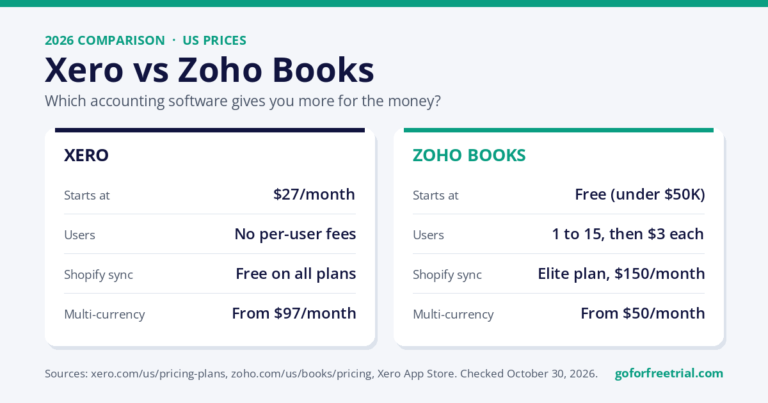
Xero vs Zoho Books compared on 2026 prices, user limits, Shopify sync, multi-currency, inventory, and payroll, with real cost examples and a clear verdict.
A practical 2026 comparison of Xero vs QuickBooks Online covering pricing, features, payroll, ecommerce, reporting, integrations, migration, and best-fit small-business use cases.
Compare the best accounting software with free trials in 2026, including Xero, QuickBooks, FreshBooks, Zoho Books, Sage, and Wave. See features, pricing notes, screenshots, and best-use cases.
Get Xero Accounting Softare
90% Off – Get
For 6 Months