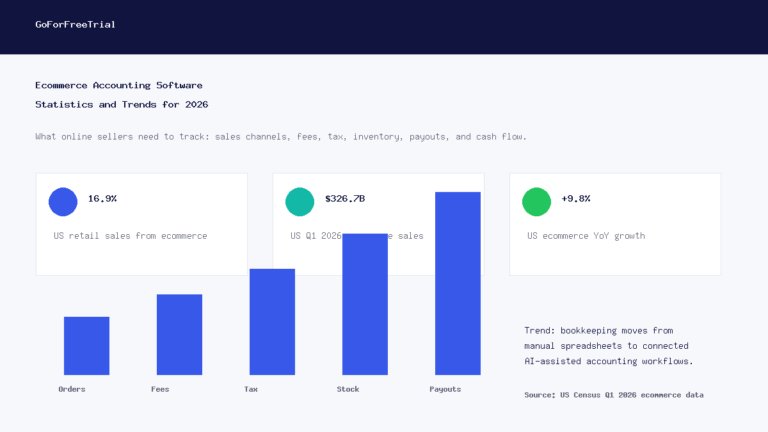
Short answer: Xero is the best ecommerce accounting software for many growing online sellers in 2026, QuickBooks is best when your accountant prefers it, Zoho Books is best for value, and A2X or Link My Books can be the missing connector that keeps marketplace payouts clean.
Ecommerce accounting is different from normal small-business bookkeeping. A store does not just receive one clean payment for one clean invoice.
You may have Shopify payouts, Amazon settlements, PayPal deposits, Stripe fees, refunds, chargebacks, marketplace-collected tax, shipping income, discounts, inventory changes, and cost of goods sold all moving at once.
The best ecommerce accounting software helps you turn that messy activity into clean books. It should show what you sold, what fees you paid, what tax you collected, what inventory moved, and what profit you actually kept.
Affiliate disclosure: GoForFreeTrial may earn a commission if you try Xero through links on this page. We are not affiliated with every tool mentioned, and this guide is written to compare fit, workflow, pricing, and real ecommerce accounting needs.
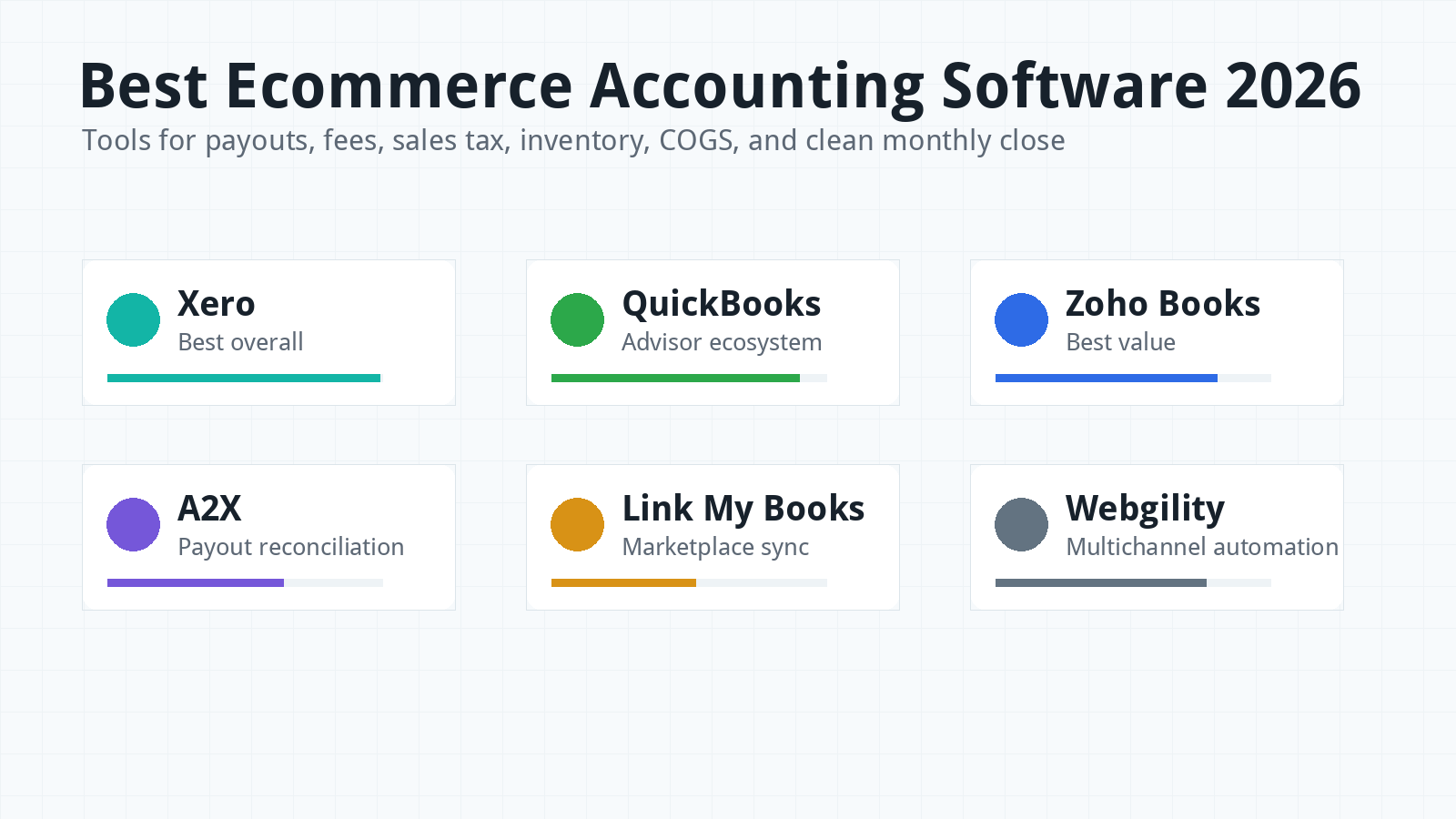
Best Ecommerce Accounting Software 2026: Quick Picks
If you want the shortest shortlist, start with Xero, QuickBooks Online, and Zoho Books. Then decide whether you also need an ecommerce connector such as A2X, Link My Books, Webgility, or Finaloop.
Xero is the best first trial for many ecommerce businesses because it has clean reconciliation, strong integrations, flexible collaboration, and a modern workflow. It pairs well with connector tools for Shopify, Amazon, Etsy, eBay, Walmart, PayPal, and Stripe data.
QuickBooks Online is the safest choice when your accountant already lives in QuickBooks. It has a large US advisor network and many ecommerce integrations.
Zoho Books is the best value option for ecommerce sellers that want accounting, invoicing, inventory, projects, and wider business tools at a lower starting price. It is especially interesting if you already use Zoho apps.
A2X and Link My Books are not full accounting platforms. They are connector tools that summarize ecommerce payouts and push cleaner entries into Xero or QuickBooks.
Webgility is stronger for sellers that want multichannel automation, order syncing, inventory workflows, and more operational control. Finaloop is different because it combines ecommerce accounting software with bookkeeping support.
For a spreadsheet-style comparison, check this published accounting software comparison sheet.
Why Ecommerce Accounting Is Harder Than Normal Bookkeeping
Normal bookkeeping often starts with invoices, bills, bank deposits, and expense categories. Ecommerce bookkeeping starts with sales channels that bundle hundreds or thousands of events into one payout.
A Shopify payout may include product sales, discounts, refunds, shipping, gift cards, card fees, sales tax, and adjustments. Amazon settlements can be even more complicated because fees, reimbursements, refunds, reserves, and marketplace tax may all sit inside the same settlement report.
If you push every order into the accounting software one by one, the books can become bloated and slow. If you record only the bank deposit, you lose detail about fees, refunds, tax, and revenue categories.
The better approach for many sellers is summarized accounting. You keep order-level detail in your ecommerce platform or connector, then post clean summaries into the accounting ledger.
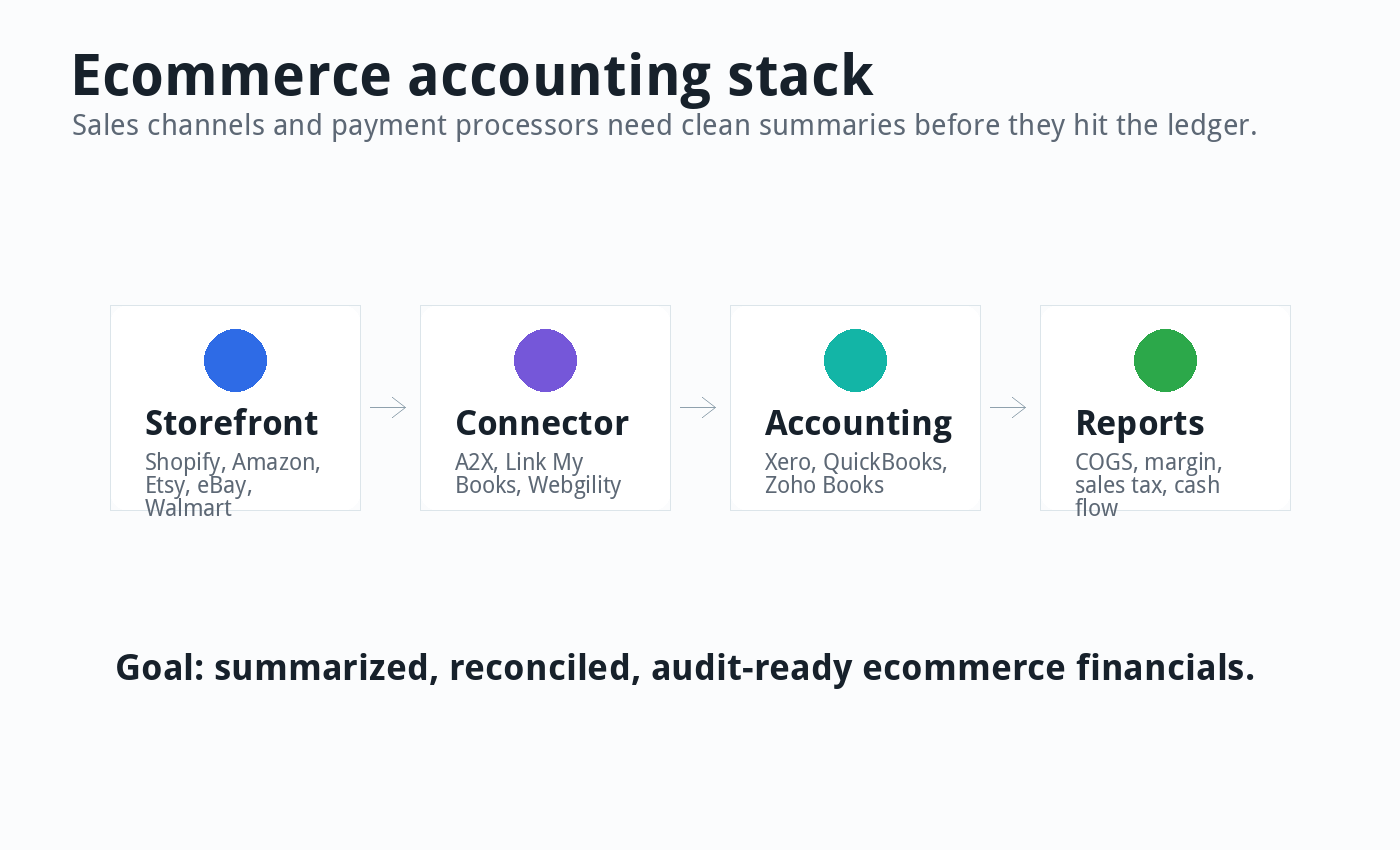
This is why the “best ecommerce accounting software” is often a stack. You may need Xero or QuickBooks as the accounting ledger, A2X or Link My Books as the payout bridge, and a separate inventory or sales tax tool depending on your business.
How I Compared Ecommerce Accounting Tools
I compared these tools based on ecommerce realities, not just general accounting features. A good ecommerce setup must handle more than invoices and expenses.
The main factors were sales channel support, payout reconciliation, payment fee tracking, refund handling, sales tax visibility, inventory and COGS workflow, marketplace support, bank reconciliation, reporting, accountant access, pricing, support, and upgrade path.
I also looked at whether a tool is a ledger, connector, automation layer, or full-service finance system. Those categories matter because comparing Xero directly to A2X is like comparing a bank account to a bridge.
Pricing changes often. Treat all prices and plan details as a June 4, 2026 snapshot, then check each vendor’s live pricing page before you buy.
Best Overall Ecommerce Accounting Software: Xero
Xero is the best overall ecommerce accounting platform to test first in 2026 for many small and growing online sellers. It gives you a clean accounting ledger, strong bank reconciliation, good reporting, and broad app support.
Xero is especially strong when you pair it with an ecommerce connector. A Shopify, Amazon, Etsy, eBay, Walmart, PayPal, or Stripe seller can use connector tools to send summarized sales and fee data into Xero instead of dumping every order into the ledger.
As of June 2026, Xero’s US pricing page lists regular monthly prices of $25 for Early, $55 for Growing, and $90 for Established before temporary promotions. Many ecommerce sellers should compare Growing and Established rather than relying on Early, because Early has invoice and bill limits.
Xero’s biggest ecommerce strengths are reconciliation, collaboration, app integrations, clean reporting, and multi-currency support on higher plans. It also avoids per-user license fees, which can help when a bookkeeper, owner, accountant, and operations manager all need access.
The main downside is that Xero alone will not magically solve ecommerce payout complexity. You still need the right connector, inventory process, and tax workflow.
Read our Xero pricing guide if you want a deeper cost breakdown. You can also compare Xero with QuickBooks in our Xero vs QuickBooks 2026 guide.
Best for Accountant Familiarity: QuickBooks Online
QuickBooks Online is the best ecommerce accounting choice when your accountant or bookkeeper strongly prefers the Intuit ecosystem. That reason alone can matter more than a small price difference.
As of June 2026, QuickBooks Online’s US pricing page lists regular monthly prices of $38 for Simple Start, $75 for Essentials, $115 for Plus, and $275 for Advanced before temporary promotions.
QuickBooks Plus and Advanced are usually more relevant for ecommerce than Simple Start because ecommerce sellers often need inventory, class tracking, location tracking, project-style profitability, stronger reporting, or more user access.
QuickBooks has a wide app ecosystem and is supported by many ecommerce connectors. It can work well with Shopify, Amazon, eBay, Etsy, Walmart, PayPal, Stripe, and POS workflows when configured correctly.
The downside is that QuickBooks can become expensive, and the books can get messy if integrations push too much detail into the ledger. A poorly configured app can create duplicate sales, unmatched deposits, and confusing fee entries.
QuickBooks is a strong choice when your bookkeeper knows how to set up ecommerce summaries properly. It is less ideal if you want the simplest possible workflow and no one on your team understands ecommerce reconciliation.
Best Value: Zoho Books
Zoho Books is the best value option for ecommerce sellers that want more business features without jumping straight into the highest-cost accounting stack. It is especially appealing for smaller stores and Zoho ecosystem users.
As of June 2026, Zoho Books lists a free plan and paid US plans starting at $20 per organization per month on monthly billing. Higher plans add features such as purchase orders, inventory, multi-currency, project profitability, workflow customization, vendor portal, advanced inventory, and analytics.
Zoho Books can work well if your ecommerce operation is not too complex. It becomes more attractive if you also use Zoho Inventory, Zoho CRM, Zoho Expense, or other Zoho apps.
The main downside is that ecommerce integrations and advanced inventory workflows may require careful plan selection. You should test your exact sales channels before assuming Zoho can handle the whole workflow out of the box.
Zoho Books is a good fit for value-focused stores, smaller multichannel sellers, and business owners who like having several business tools under one vendor. Read our Zoho Books review for a broader look.
Best Connector for Clean Payouts: A2X
A2X is not a replacement for Xero or QuickBooks. It sits between your ecommerce channels and your accounting software, then turns complicated settlement data into cleaner accounting entries.
A2X supports channels such as Amazon, Shopify, eBay, Etsy, Walmart, PayPal, and multi-channel setups. Its pricing page lists Amazon, Shopify, Etsy, eBay, and PayPal integrations starting at $29 per month, while Walmart starts higher.
A2X is useful when deposits do not match sales because fees, refunds, reserves, shipping, and tax are mixed together. Instead of guessing, the connector reads settlement data and helps post summaries to Xero or QuickBooks.
The main downside is extra cost. A2X plus Xero or QuickBooks can be more expensive than basic accounting software alone, especially for small sellers.
Still, that cost can be worth it if it prevents hours of spreadsheet work every month. Ecommerce sellers should compare software cost against cleanup cost, not just against the cheapest subscription.
Best Marketplace Connector Alternative: Link My Books
Link My Books is another ecommerce accounting connector for sellers using Xero or QuickBooks. It focuses on payout reconciliation, tax treatment, COGS tracking, channel profitability, benchmarking, and analytics.
It supports channels including Amazon, eBay, Etsy, Shopify, Walmart, TikTok Shop, WooCommerce, and Square. Its pricing page also mentions a 14-day free trial and pricing that scales by order volume and sales channels.
Link My Books is especially interesting for sellers that want clearer performance by channel. Seeing Shopify, Amazon, and Etsy profitability separately can change how you spend on ads, inventory, and discounts.
The downside is similar to A2X: it is another subscription on top of your accounting software. It only makes sense if it saves enough time or improves enough accuracy to justify that cost.
Best Multichannel Automation: Webgility
Webgility is best for ecommerce sellers that need more than simple payout summaries. It supports multichannel automation, ecommerce accounting workflows, inventory-related sync, pricing rules, and higher-volume operations.
As of June 2026, Webgility’s pricing page lists plans for QuickBooks Online, Xero, and QuickBooks Desktop. Annual pricing starts at $69 per month for Pro, then rises through Advanced, Complete, and Complete Enterprise depending on order volume, sales channels, and support level.
Webgility can be a good fit when a seller has multiple channels, many orders, and operational workflows that need more automation. It may be overkill for a small Shopify store with low order volume.
The risk with any automation platform is configuration. If inventory sync, order sync, or payout mapping is wrong, the automation can create problems faster than manual entry would.
Test Webgility with sample payouts, real refunds, marketplace fees, and inventory changes before relying on it for month-end close. A demo is not enough if your actual workflow is messy.
Best Full-Service Ecommerce Finance Option: Finaloop
Finaloop is different from Xero, QuickBooks, A2X, and Link My Books. It combines ecommerce accounting software, integrations, inventory workflows, reporting, month-end close, and finance support into one system.
That makes Finaloop more like an ecommerce finance operating system than a normal bookkeeping app. It can appeal to DTC brands and retail businesses that want software plus expert support.
Finaloop’s pricing page shows pricing by revenue band and service level. It is not the lowest-cost option, but it may replace several disconnected tools and some bookkeeping labor for the right brand.
Finaloop is best for sellers that want a more managed finance workflow. It is not the first place I would send a brand-new store that only needs basic bookkeeping.
Best for Mature Inventory Workflows: Sage
Sage can fit more established ecommerce or product businesses that need deeper accounting, inventory, job costing, audit trails, purchase orders, and controls. It is not the simplest ecommerce accounting choice.
Sage makes more sense when the business has outgrown lightweight cloud accounting and needs stronger back-office structure. That may include wholesale, manufacturing, multi-location inventory, or more formal finance operations.
For smaller ecommerce sellers, Xero, QuickBooks, Zoho Books, and connector tools are usually easier to start with. Sage belongs on the shortlist when accounting complexity justifies the heavier system.
Ecommerce Accounting Software Comparison Table
| Tool | Type | Best For | Main Watchout |
|---|---|---|---|
| Xero | Accounting ledger | Growing ecommerce businesses that want clean workflow | Needs connector for complex marketplaces |
| QuickBooks Online | Accounting ledger | US accountant familiarity and payroll ecosystem | Can get expensive and crowded |
| Zoho Books | Accounting ledger | Value-focused sellers and Zoho users | Plan and integration limits need checking |
| A2X | Ecommerce connector | Clean payout reconciliation for marketplaces | Extra cost on top of accounting software |
| Link My Books | Ecommerce connector | Marketplace accounting and channel profitability | Pricing scales by order volume and channels |
| Webgility | Automation platform | Multichannel sellers with order and inventory workflows | Setup quality matters a lot |
| Finaloop | Software plus service | DTC brands wanting managed ecommerce finance | More expensive than DIY software |
| Sage | Accounting system | Mature inventory and accounting controls | Heavier than most small stores need |
What to Test During a Free Trial
A free trial is only useful if you test real ecommerce messiness. Do not just click around dashboards.
Connect one real sales channel, one real payment processor, and one real bank account if possible. Then compare the software output with your actual payouts.
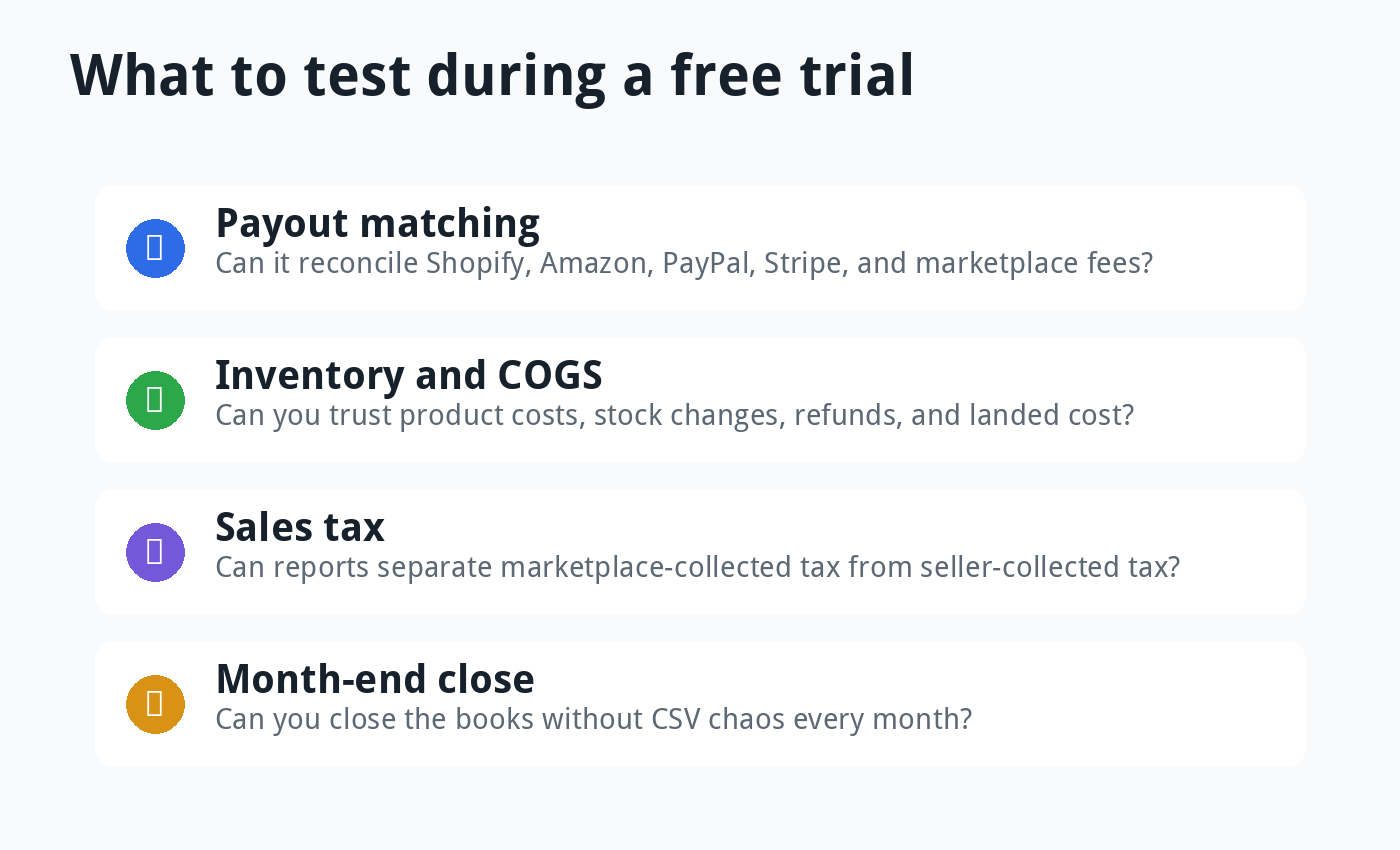
Test refunds, partial refunds, chargebacks, marketplace fees, shipping income, discounts, gift cards, and sales tax. These are the items that usually break a simple setup.
Also test how the tool handles month-end close. The right stack should let you reconcile deposits, explain fee differences, review COGS, and produce reports without rebuilding everything in spreadsheets.
Features That Matter Most for Ecommerce
Payout reconciliation: Your software should explain why a $10,000 sales period created a $9,142 deposit after fees, refunds, tax, shipping, and adjustments.
Marketplace fee tracking: Amazon, Shopify, PayPal, Stripe, Etsy, eBay, and Walmart fees should not disappear into vague expense categories.
Inventory and COGS: Ecommerce profit depends on accurate product cost. If COGS is wrong, your margins are wrong.
Sales tax handling: Your system should distinguish seller-collected tax, marketplace-collected tax, tax liabilities, and jurisdictions where another tool may be needed.
Refunds and chargebacks: Refunds should reduce revenue correctly. Chargebacks should not create mystery differences in the bank feed.
Channel profitability: A seller should know whether Shopify, Amazon, Etsy, wholesale, and retail channels are actually profitable after fees and fulfillment costs.
Accountant access: Ecommerce accounting is specialized. Choose tools your accountant can review, not just tools that look nice in a demo.
Best Accounting Setup by Ecommerce Type
Small Shopify store: Xero or QuickBooks can work, especially if order volume is low. Add A2X or Link My Books when payout reconciliation starts taking too long.
Amazon seller: Xero or QuickBooks plus A2X is a common setup because Amazon settlements are complex. Link My Books is also worth testing.
Etsy or eBay seller: Start with Xero, QuickBooks, or Zoho Books depending on budget and accountant preference. Add a connector if marketplace deposits are hard to match.
Multichannel seller: Compare Xero or QuickBooks with A2X, Link My Books, or Webgility. The connector may matter as much as the accounting platform.
DTC brand with inventory complexity: Consider Xero plus ecommerce connectors and inventory tools, QuickBooks Plus or Advanced, Webgility, Finaloop, or Sage depending on scale.
Fast-growing brand: Do not choose only by monthly software price. Choose the stack that helps you close books accurately and understand cash, margin, inventory, and tax exposure.
Common Ecommerce Accounting Mistakes
The first mistake is recording marketplace deposits as sales. A deposit is not the same thing as gross revenue.
The second mistake is ignoring fees. Payment processing fees, marketplace fees, fulfillment fees, ad fees, and shipping adjustments can quietly destroy margins.
The third mistake is using cash balance as profit. Ecommerce businesses can look cash-rich before inventory bills, tax liabilities, refunds, and ad spend hit.
The fourth mistake is not tracking COGS properly. If product cost is missing or outdated, every profit report becomes suspect.
The fifth mistake is pushing too much detail into the ledger. Thousands of individual orders can make accounting software slow, noisy, and harder to reconcile.
The sixth mistake is waiting until tax season. Ecommerce cleanup is much harder after months of mixed deposits, refunds, and missing fee data.
Pricing Reality: Budget for the Whole Stack
Ecommerce accounting usually costs more than normal bookkeeping software. That is because the sales data is more complex.
Your stack may include accounting software, connector software, inventory software, sales tax software, payment fees, payroll, and accountant support. The base accounting subscription is only one part of the total cost.
A small seller may start with Xero, QuickBooks, or Zoho Books alone. A bigger seller may need Xero plus A2X, inventory software, sales tax automation, and a specialized ecommerce accountant.
That can feel expensive, but bad ecommerce books are expensive too. Wrong margins, missed fees, tax confusion, and inventory errors can cost more than software.
For broader pricing context, read our ecommerce accounting software costs guide.
Final Verdict
For most growing ecommerce businesses in 2026, I would test Xero first. It gives you a clean accounting foundation and pairs well with ecommerce connectors.
If your accountant is QuickBooks-first, test QuickBooks Online before deciding. The best setup is often the one your advisor can maintain correctly.
If price matters most, test Zoho Books. If payout reconciliation is the real pain, test A2X or Link My Books with Xero or QuickBooks.
If you sell across several channels and need automation beyond settlement summaries, test Webgility. If you want software plus ecommerce bookkeeping support, look at Finaloop.
The best ecommerce accounting software is the setup that gives you clean monthly financials, not the one with the most integrations on paper. Good ecommerce books should show revenue, fees, tax, COGS, inventory, cash flow, and profit without spreadsheet chaos.
FAQ
What is the best accounting software for ecommerce businesses?
Xero is the best overall first trial for many ecommerce businesses. QuickBooks is best when accountant familiarity matters most, while Zoho Books is best for value-focused sellers.
Do ecommerce sellers need A2X or Link My Books?
Not always. Small stores may start without them, but sellers with complex Shopify, Amazon, Etsy, eBay, Walmart, PayPal, or Stripe payouts often benefit from a connector.
Is QuickBooks or Xero better for Shopify?
Xero is often cleaner for reconciliation and collaboration, while QuickBooks may be better if your accountant already uses it. For Shopify, the connector setup can matter as much as the accounting platform.
Can I use free bookkeeping software for ecommerce?
You can use free bookkeeping software for a very small ecommerce store, but it usually becomes limiting as orders, refunds, sales tax, fees, inventory, and channels grow.