Updated June 8, 2026: This guide was refreshed for current positioning, clearer internal links, image SEO, and 2026 software trial context.
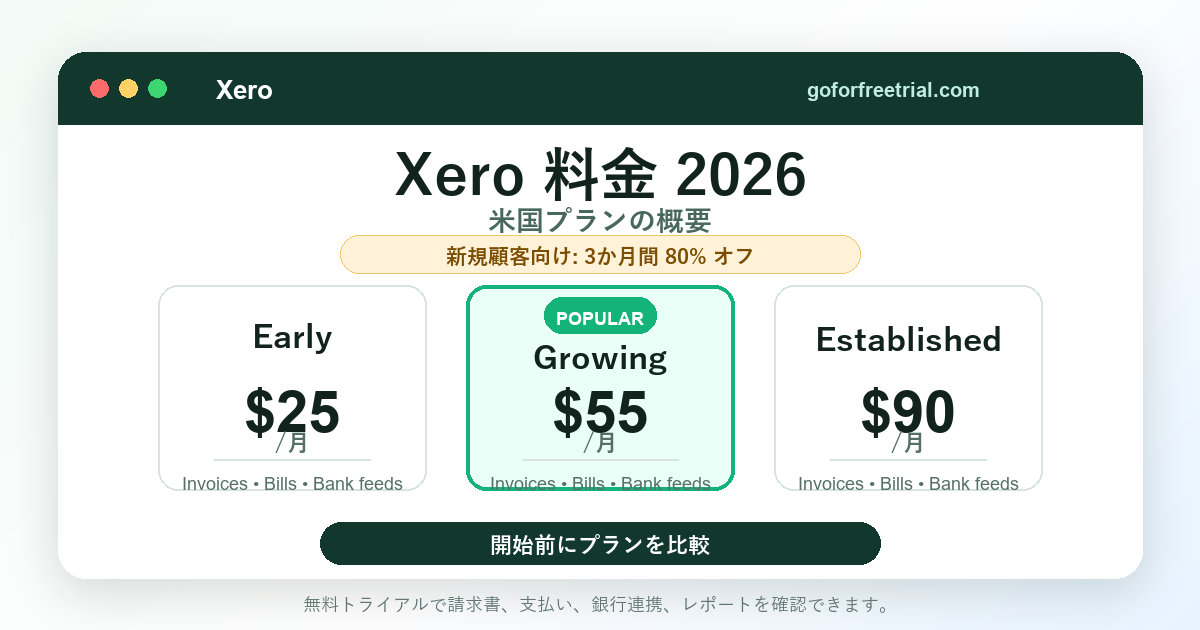
簡単な答え: 米国におけるXeroの価格は、 早期割引は月額25ドル、次に 成長のための月額料金55ドル そして 既存顧客は月額90ドルXeroは現在、新規顧客向けに最初の3か月間80%割引のキャンペーンを実施していますが、割引期間終了後は毎月自動更新となるため、通常価格が最も重要になります。
このガイドでは、Xeroの2026年プラン、無料トライアル、プロモーション価格、隠れたコスト、そして最初の数か月後の実際の年間コストについて説明します。また、フリーランサー、中小企業、eコマース販売者、代理店、および多通貨会計を必要とする企業にとって、どのプランが通常最適かについても解説します。
アフィリエイト開示: GoForFreeTrialは、当サイトのリンクからXeroをお試しいただいた場合、手数料を受け取る可能性があります。当社はXeroと提携していますが、このガイドは読者の皆様に料金を明確に比較していただくことを目的としており、すべての読者に同じプランを勧めるものではありません。
Xeroの料金プラン概要
Xeroの米国における料金体系は、一見すると非常にシンプルです。初期段階、成長段階、確立段階の3つのプランから選択し、必要に応じてオプションサービスを追加できます。
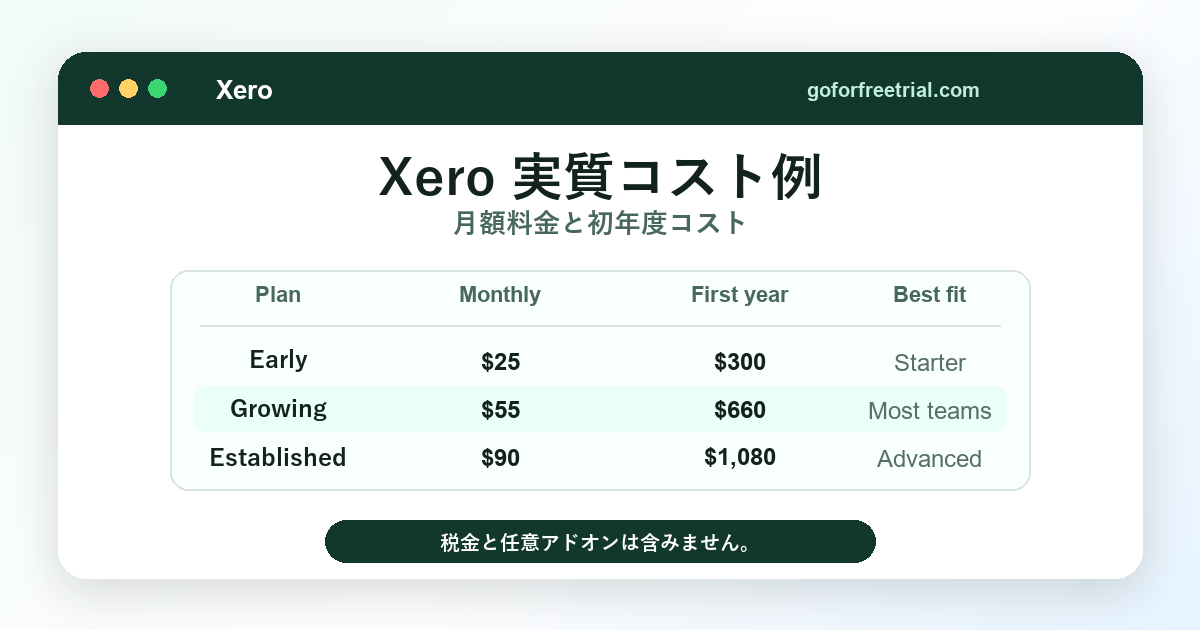
Xeroの公式米国価格ページに掲載されている現在の通常価格は、月額25ドル、55ドル、90ドルです。Xeroによると、価格には適用される税金は含まれておらず、解約するまで毎月自動更新されます。
| Xeroプラン | 通常の月額料金 | 税引き前の年間概算費用 | 最適なフィット感 |
|---|---|---|---|
| 早い | $25/month | 年間300ドル | 請求書や領収書の発行件数が少ない非常に小規模な企業 |
| 成長 | 月額55ドル | 年間660ドル | 無制限の請求書や領収書を必要とするほとんどの中小企業 |
| 設立 | 月額90ドル | 年間1,080ドル | 複数通貨、プロジェクト、経費、およびより詳細なレポートを必要とする企業 |
これらの金額には、決済処理手数料、税金、給与計算ツール、追加アプリ、在庫管理プラスなどのオプションサービスは含まれていません。実際の費用は、これらの費用を含めて基本料金を上回る可能性があります。
多くの小規模企業にとって、最適なプランは最も安いプランではありません。最適なプランとは、特別な工夫をしなくても通常の月々の業務をこなせる、最も安いプランのことです。
Xeroの無料トライアルは2026年に開始されます。
Xeroは通常、新規ユーザーに対し、登録方法や地域に応じて無料トライアルまたは初月限定の特典を提供しています。また、Xeroはプロモーション内容を随時変更するため、支払い情報を入力する前に最新の特典内容を確認してください。
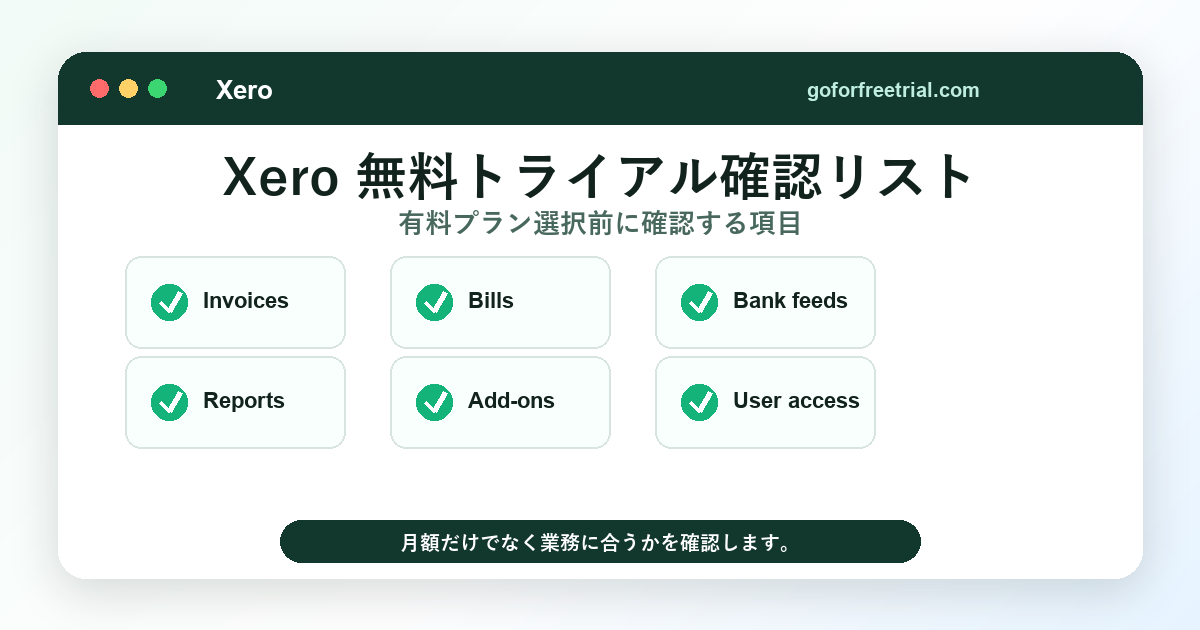
トライアル版を最も安全に利用する方法は、実際の業務で試してみることです。請求書の作成、銀行口座との連携、取引データのインポート、会計士の招待、レポートのテスト、そして実際に必要なアプリ連携機能の確認などを行いましょう。
ここから始められます: GoForFreeTrialでXeroを無料でお試しください登録前にツールをより幅広く比較したい場合は、 会計ソフトウェア比較表.
Xeroの最新プロモーション:80%オフとはどういう意味か
確認時点では、Xeroの米国向け料金ページで、新規顧客向けに最初の3か月間80%割引が宣伝されていました。割引期間中は、アーリープランが月額5ドル、グローイングプランが月額11ドル、エスタブリッシュドプランが月額18ドルとなります。
このオファーを利用すれば、Xeroを短期間、低価格で試用できます。ただし、Xeroの料金が永久に5ドル、11ドル、または18ドルになるという意味ではありません。
キャンペーン期間終了後、解約またはプラン変更を行わない限り、プランは通常の月額料金で自動更新されます。そのため、プランを選択する前に、割引期間と継続料金の両方を計算することをお勧めします。
| Plan | 表示されているプロモーション価格 | 通常価格 | 覚えておくべきこと |
|---|---|---|---|
| 早い | 3ヶ月間、月額5ドル | $25/month | 良いテスト価格だが、請求書と請求限度額は依然として重要だ |
| 成長 | 3ヶ月間、月額11ドル | 月額55ドル | 定期的に請求書を発行している場合は、テストする方が良い場合が多いです。 |
| 設立 | 3ヶ月間、月額18ドル | 月額90ドル | 高度なツールが必要な場合のみ価値があります |
プロモーションには、追加オプション、決済手数料、その他の利用料金が含まれない場合があります。割引がすべての商品に適用されると思い込む前に、必ずオファーの利用規約をお読みください。
Xero早期プラン:どのような人が選ぶべきか?
Xero Early costs $25 per month at the regular US price. This is Xero's entry-level plan and is ideal for companies with very low trading volumes.
A key limitation is the amount of invoices you can send. The initial version allows you to send a maximum of 20 invoices and enter a maximum of 5 invoices. This may seem fine at first, but it will become insufficient as your workload increases.
Early is suitable for individual consultants, side businesses, new service providers, or small businesses that issue only a few invoices per month. It is also useful for those who primarily need to reconcile bank accounts, create basic reports, process sales tax, and manage W-9 or 1099 forms.
For companies that issue invoices daily, receive invoices from numerous suppliers, or sell through multiple sales channels, this plan is not ideal. Once the invoice and billing limits are reached, the time costs increase, and the plan no longer feels cost-effective.
If you know you will be issuing few invoices each month, select "Early Bird." If you already anticipate growth, have multiple customers, or have recurring billing, e-commerce orders, or recurring invoices to suppliers, skip "Early Bird."
Xero Growth Plan: The ideal plan for most small and medium-sized businesses.
Xero Growing costs $55 per month at the standard US price. For many small businesses, this plan allows them to use Xero not just as an entry-level tool, but as a full-fledged accounting system.
The Growing plan removes the biggest limitation of the Early plan. Once your business is fully operational, you'll be able to send and enter invoices without being restricted by the strict limitations that made the Early plan difficult to use.
This plan is typically suitable for consultants, agencies, contractors, online vendors with seamless system integration, small professional offices, and local service businesses. It allows you to smoothly manage your regular monthly accounting without constantly worrying about invoice limits.
The value of the Growing plan depends on your workflow. If Xero can save you several hours each month on creating, tracking, matching, and reporting invoices, then upgrading from the Early plan to the Growing plan is well worth it.
For businesses requiring multi-currency support and project cost tracking, growth alone isn't always enough. If you're issuing invoices to international customers, paying overseas vendors, and managing detailed customer projects, carefully compare Established with other options.
Xero Established Plan: When a high price is justified
Xero Establishedは、通常の米国価格で月額90ドルです。これはXeroの標準プランの中で最も高額なので、選択する前に明確な問題を解決できるかどうかを検討する必要があります。
Establishedを選ぶ大きな理由は、多通貨対応、プロジェクト追跡、経費精算・走行距離管理、高度な分析機能、そしてより詳細な業務パフォーマンス管理ツールです。これらの機能は、成長中のチームにとって非常に重要となるでしょう。
海外顧客に請求を行う企業は、最初から複数通貨に対応できる必要があるかもしれません。サービス会社であれば、どの顧客や案件が収益を上げているかを把握するために、プロジェクト追跡機能が必要になるでしょう。
請求書、領収書、銀行口座照合、および標準的なレポートのみを必要とするオーナーであれば、おそらく現時点ではEstablishedプランは必要ないでしょう。その場合、Growingプランの方が月額料金が安く、十分な価値を提供できる可能性があります。
Don't buy Established just because the promotional price is low for the first three months. Even after the price returns to $90 per month, its features will still be important, so consider purchasing it then.
Actual costs other than the monthly Xero plan
The basic pricing plan is only a part of Xero's total cost. You also need to consider payment processing, payroll, apps, inventory management, onboarding, bookkeeping support, migration time, and more.
Some of these costs can be incurred at will. However, as workflows come to depend on them, some become difficult to avoid.
支払手数料
Xero accepts online invoice payments, but a processing fee may apply. Xero's pricing terms clearly state that processing fees are not included in the monthly fee and may not be eligible for monthly fee discounts.
This becomes a significant issue when customers pay the majority of their invoices by card or online payment. Businesses with a high volume of transactions should estimate processing fees before deciding on an accounting tool based solely on its price.
Salary costs
Xero does not fully include the US-specific payroll features that some buyers might expect in its base plan. Because Xero often integrates with Gusto for payroll, payroll may incur an additional monthly fee.
If you have employees, compare Xero with other payroll services before making a decision. Payroll is one of those areas where actual costs are easily underestimated.
インベントリープラス
On Xero's US pricing page, Inventory Plus is listed as an optional add-on. At the time of checking, it was listed as free for the first month, and then $39 per month thereafter.
That add-on is important for product sales businesses. If you sell physical products and need more powerful inventory management tools, be sure to include that add-on in your budget before signing a contract.
E-commerce Connector
E-commerce sellers often need more than just accounting software. They may need a tool to aggregate payments from Shopify, Amazon, Stripe, PayPal, or other marketplaces and compile that data before importing it into Xero.
These connectors can save you time, but they may also incur monthly fees. For more information on e-commerce, please click here. eコマースビジネスに最適な会計ソフトウェア ガイド。
Support from a bookkeeper or accountant
Xero's standard plan does not charge per-user licensing fees, making it convenient for inviting bookkeepers or accountants. However, if you need support from professionals for tasks such as data organization, migration, tax support, or monthly bookkeeping, there will be additional costs.
Don't treat software subscription fees as the entirety of your accounting budget. Many growing companies also need time, process, and advice.
Xeroの年間コスト例
年間費用は、プロモーション価格よりも明確な見通しを与えてくれます。月額割引は魅力的ですが、企業は通常、会計ソフトウェアを何年も使い続けるものです。
税金、手数料、追加料金を除く、単純な年間計算は以下のとおりです。
| シナリオ | 理想的に計画された | 基本コスト | 追加料金が発生する可能性あり |
|---|---|---|---|
| 数件の請求書を持つ個人フリーランサー | 早い | $300 | 支払い手数料、税務申告支援 |
| 小規模プロジェクトビジネス | 成長 | $660 | 給与計算、支払い手数料、会計士サポート |
| EC販売者 | 成長し、確立した | 660ドルから1,080ドル | コネクタ、在庫、支払い手数料 |
| 国際機関 | 設立 | $1,080 | 給与計算、プロジェクト、アドバイザーのサポート |
| 高度な在庫管理ニーズを持つ製品ビジネス | 成長中または確立済みプラス追加 | 660ドルから1,080ドル(追加料金あり) | Inventory Plus、eコマースアプリ、決済手数料 |
Even the cheapest plan can become expensive if manual work increases. On the other hand, even the most expensive plan can be reasonably priced if it eliminates issues such as spreadsheets, delayed matching, and unclear reporting.
どのXeroプランを選ぶべきか?
First, let's count things like invoices, payment slips, user count, bank account count, currency count, project count, app count, etc.
If you've sent fewer than 20 invoices and entered fewer than 5 invoices, the "Early" setting might be sufficient. If you find these limitations even slightly restrictive, try the "Growth" setting.
If you sell products online, Growing may be a viable option when combined with the right e-commerce connector. Furthermore, if you require multi-currency support, project tracking, and advanced expense management features, implementing Established becomes a more appropriate choice.
If you're still comparing Xero and QuickBooks, please see the details. XeroとQuickBooks 2026の比較For more trial options, please see here. 2026年版おすすめ会計ソフトガイド.
Xero pricing plans for freelancers
Freelancers choose Xero because it feels cleaner than spreadsheets and more sophisticated than basic invoicing apps. The best plan depends on the number of clients and invoices you handle each month.
Sending just a few invoices and concisely summarizing expenses can be an effective way to submit them early. However, be aware of the 20-page limit.
If you issue recurring invoices, deal with multiple customers, or anticipate future growth, it makes sense to expand your plan. If the invoice limit prevents your operations from being hindered, it's worth the extra cost.
Freelancers looking for a low-cost starting point can also compare our options. 最高の無料簿記ソフトガイドFree tools can be used for simple record-keeping, but usually require more manual work.
Xero pricing plans for small and medium-sized businesses
Most active small and medium-sized businesses should try the "Growing" plan first. It costs more than the "Early" plan, but it removes the most annoying sales volume restrictions.
Local service firms, consulting teams, agencies, or contractors typically require reliable invoicing, invoice tracking, reconciliation, reporting, and access to accounting personnel. For many businesses, the "growth phase" better meets these needs than the "early stage."
As businesses become more complex, the benefits of implementing established systems become apparent. Multi-currency, project, expense, and more advanced analytical capabilities become worthwhile when reporting influences hiring, pricing, or cash flow decisions.
During the trial period, there's only one question to answer: Does Xero sufficiently reduce the complexity of your monthly accounting tasks and provide value that justifies the ongoing cost? If the answer is yes, then this software has fulfilled its purpose.
Xero's pricing plans for e-commerce sellers
Eコマースの会計処理は、コスト構造が異なります。ソフトウェアの導入はあくまで出発点に過ぎず、マーケットプレイスへの支払い、手数料、返品処理、在庫管理、売上税などによって帳簿が複雑化する可能性があります。
多くのEC事業者は、店舗規模が非常に小さい場合を除き、Earlyプランを選択することは避けるべきです。請求書と支払限度額が、ECサイトのデータフローの一般的な流れと合致しないためです。
Shopify、Amazon、Stripe、PayPalなどのアプリを利用していて、概要が分かりやすい場合は、「成長中」が実用的な出発点となることが多いでしょう。一方、店舗が海外で販売している場合や、プロジェクト管理、経費管理、複数通貨対応の機能が必要な場合は、「確立済み」の方が適しているかもしれません。
Don't forget the cost of connectors. Tools for sending clean payment statements to Xero may incur an additional charge, but if you have a large order volume, the time saved may outweigh the cost.
Xero vs. QuickBooks price comparison
Both Xero and QuickBooks offer tiered pricing, promotions, and add-ons. Which one is cheaper depends on your payroll, user count, inventory management, app usage, and preferred accounting workflow.
Xero is useful when multiple users need access because it doesn't require per-user licensing fees. QuickBooks, on the other hand, may be more familiar to U.S. accountants and businesses looking for native payroll functionality within the same ecosystem.
Instead of just comparing the lowest monthly fees listed in the advertisements, compare the plans you will actually be using after the campaign ends.
For detailed explanations of each function, Xero vs. QuickBooks Comparison GuideYou can also check official information. QuickBooksの採点ページ Before making a final decision.
Price comparison of Xero, Zoho Books, and FreshBooks
Zoho Books and FreshBooks may appear cheaper than Xero in some cases. However, that doesn't necessarily mean they are superior or inferior.
Zoho Books will be an attractive option for businesses already using Zoho's broad suite of products. FreshBooks, on the other hand, will be an attractive option for service providers looking for simple invoicing and time management.
If you require close collaboration with accountants, accurate bank transaction matching, unlimited users, and a broad app ecosystem, Xero might be a better fit. However, the best choice depends on your workflow.
For a different perspective, please see here. best accounting software guidePlease compare with the official current prices. Zoho Books pricing page そして FreshBooks pricing page.
How to test Xero before buying it at full price
Use the trial period as you would a real accounting month. Don't just click through the dashboard.
Create at least three invoices, enter multiple invoices, connect one bank account, reconcile sample transactions, and create an income statement. If you plan to sell online, connect or test your e-commerce app before fully deploying it.
If you have an accountant or bookkeeper, have them participate during the trial period. Their opinion will help prevent you from choosing a plan that looks good at first glance, which will require revisions later on.
If you need to take photos of receipts, approve invoices, or manage cash away from your desk, try using a mobile device. Software only saves you time if it matches your actual work style.
How to reduce Xero costs without choosing the wrong plan
Xeroのコストを削減する最も簡単な方法は、最初から適切なプランを選択することです。当たり前のことのように聞こえますが、多くの企業は必要最低限のプランしか購入せず時間を無駄にしたり、キャンペーンで最上位プランが安く見えるために必要以上のプランを購入したりしています。
まず、実際の月間業務量でプランをテストしてください。早期導入によって請求書の発行が遅れたり、作業をスプレッドシートに分割したりする必要が生じる場合は、コスト削減にはつながりません。
第二に、本当に必要だと確信できるまでは、アドオンは避けるべきです。コネクタ、在庫管理ツール、レポートアプリなどは、価格に見合う価値があるかもしれませんが、それは実際にボトルネックを解消できる場合に限ります。
Thirdly, please review your plan after the campaign ends. If you tried Established for multiple currencies or projects but didn't end up using those tools, we recommend downgrading before your monthly fee reverts to the regular rate.
Fourthly, organize your chart of accounts early. A well-organized chart of accounts reduces bookkeeping time, and bookkeeping time, while not listed on Xero's pricing page, is part of the actual cost.
Finally, review the overall system configuration quarterly. While a combination of Xero, payroll tools, and e-commerce connectors may be the optimal configuration, it's important to understand how each tool contributes to your business.
Common pricing mistakes with Xero
The first mistake is choosing an early bird plan simply because it has the lowest regular price. While early bird plans are convenient, they are not suitable for many active businesses due to the invoices and payment limits.
2つ目の間違いは、Xeroをプロモーション価格で判断することです。3ヶ月間の割引はどのプランも安く見えるかもしれませんが、長期的な予算を立てる際には通常価格を使用すべきです。
3つ目の間違いは、追加機能を軽視することです。決済手数料、給与計算、eコマース接続機能、在庫管理ツール、簿記支援などは、基本料金よりも重要になる場合があります。
4つ目の間違いは、会計士に相談する時期が遅すぎることです。きちんと準備を整えてから数ヶ月間データが乱雑になった後に整理するよりも、最初からきちんと準備を整えておく方が費用はかかりません。
2026年において、Xeroは価格に見合う価値があるのか?
Xero is worth the price if it offers benefits such as saving time, improved cash flow visibility, and providing accurate records to your accountant. However, if you only need basic bookkeeping functions and don't utilize its other features, it's not worth the price.
For small businesses, it's worth considering an early-stage implementation. For active small businesses, an implementation during the growth phase would be the most realistic plan. If advanced features solve actual problems, a post-establishment implementation can be beneficial.
If you're unsure, start with a free trial and try it out with your usual workflow. You can cancel anytime if it's not right for you, and you can also compare it to other tools before paying the full amount.
よくある質問
2026年におけるXeroの料金はいくらですか?
In the US, Xero's standard monthly fees are $25 for the Early Plan, $55 for the Growing Plan, and $90 for the Established Plan. These fees do not include taxes, payment processing fees, or optional additional features.
Xeroには無料トライアルはありますか?
Xero typically offers free trials or first-month free/free start campaigns depending on the registration method and country. You can check the current Xero offers below. Xero free trial link.
Which Xero plan is best suited for small and medium-sized businesses?
The Growth Phase is ideal for active small businesses, as it eliminates the stringent invoicing and billing limits found in the initial phase. The Establishment Phase is suitable for companies that require multi-currency, project, expense, and advanced analytics capabilities.
Is it too early to introduce Xero?
If you send up to 20 invoices per month and input up to 5 invoices per month, the Xero Early plan should be sufficient. For businesses with a larger volume or scale of invoices, the Growing plan will likely feel more restrictive.
Xeroはユーザー数に応じて課金されますか?
Xero offers free per-user licensing in its standard business plan. This means that teams wishing to invite owners, staff, accountants, and other professionals can use Xero without having to pay individual licensing fees for each user.
What is the real cost of Xero?
Actual costs include not only the monthly plan fee, but also taxes, payment processing fees, payroll tools, inventory management add-ons, e-commerce connectivity, and optional professional bookkeeping support. A realistic budget requires including all of these costs.
情報源を確認済み
I verified the pricing and feature details with official information. Xero米国価格ページ, Xeroの機能ページ, QuickBooksの採点ページ, Zoho Books pricing page、 そして FreshBooks pricing pagePrices are subject to change, so please be sure to check the final total amount before subscribing.
Hands-On Review Checklist To Verify
| Workflow | What to check in trial | Why it matters |
|---|---|---|
| Invoices | Create an invoice, add payment terms, and preview reminders. | Shows whether daily billing will be fast enough. |
| Bank feeds | Connect a test bank feed or review import options. | Reconciliation is one of the biggest time savers. |
| レポート | Open profit and loss, balance sheet, and cash flow reports. | Your accountant needs clean reports at month end. |
| Upgrade limits | Compare the trial plan with the plan you would actually pay for. | Discounted first months can hide the real renewal cost. |
Author And Review Notes
Reviewed by Janak Uparkoti, GoForFreeTrial editor. Janak researches SaaS free trials, accounting software pricing, ecommerce bookkeeping workflows, and affiliate software deals for small-business readers.
See our review methodology for how we separate hands-on testing, official-source research, screenshot-style visuals, and affiliate recommendations.