
Short answer: the best free bookkeeping software for small business in 2026 is Wave for simple cloud bookkeeping, Zoho Books for the strongest free accounting plan, ZipBooks for easy invoicing, GnuCash for open-source desktop accounting, Manager.io for offline control, and Akaunting for self-hosted bookkeeping.
Free bookkeeping software can be a smart starting point. It helps you track income, expenses, invoices, customers, vendors, and reports before you commit to paid accounting software.
But “free” can mean several different things. Some tools are free forever, some are free only for one user, some are free but manual, and some are paid tools with temporary free trials.
ข้อเปิดเผยข้อมูลพันธมิตร: GoForFreeTrial may earn a commission if you try Xero through links on this page. Xero is not free bookkeeping software, so I include it only as a paid upgrade option for businesses that outgrow free tools.
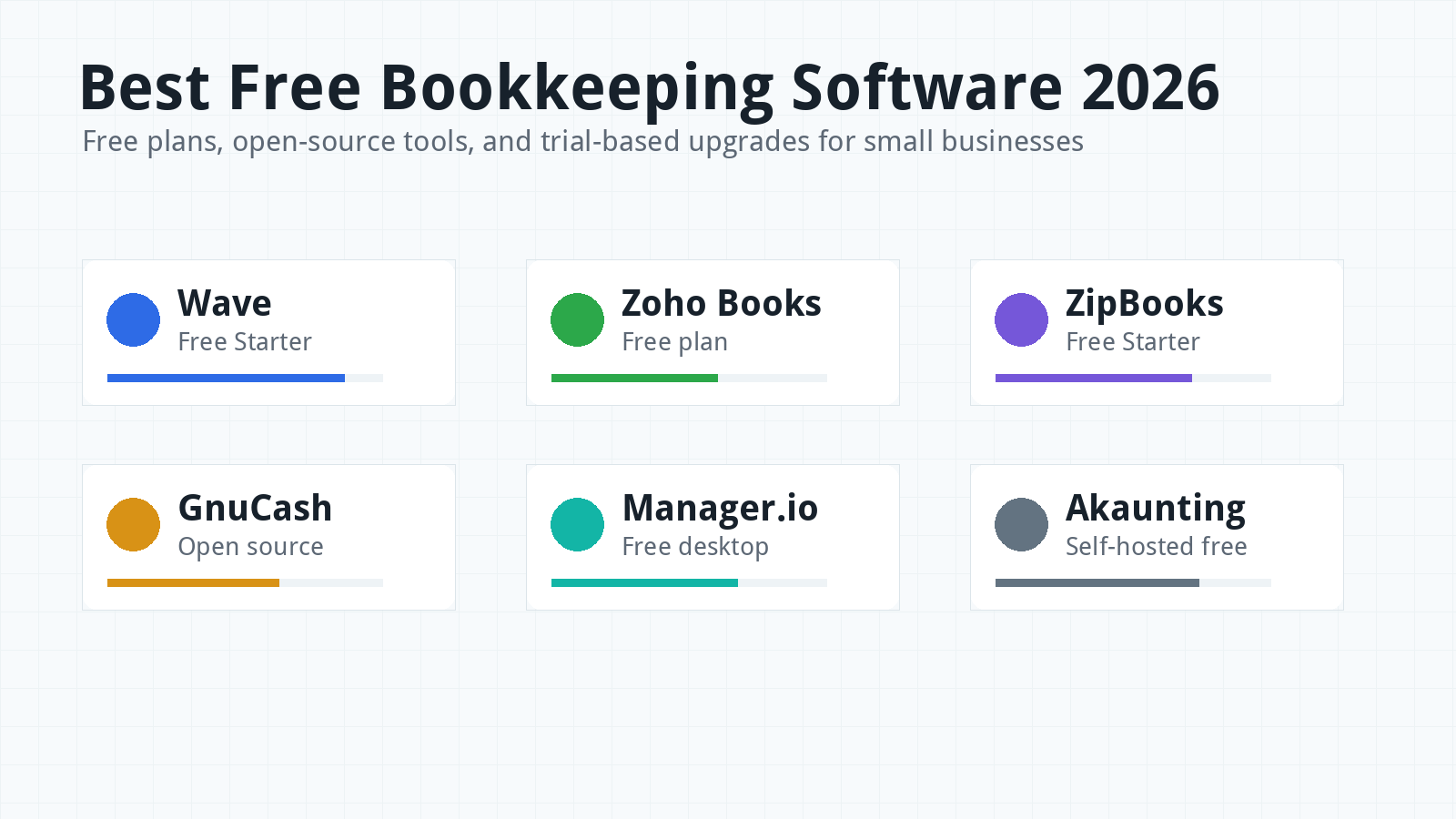
Best Free Bookkeeping Software 2026: Quick Picks
If you want the quickest answer, start with Wave or Zoho Books. They are the easiest free cloud options for many small businesses.
Wave is best if you want basic invoicing and bookkeeping without paying upfront. Zoho Books is best if your business qualifies for the free plan and you want a more complete accounting platform.
ZipBooks is worth checking if you want simple free invoicing and basic reports. GnuCash and Manager.io are better if you prefer desktop software and do not mind a more hands-on setup.
Akaunting is interesting if you want a free open-source system and can handle self-hosting or technical setup. It is less beginner-friendly than Wave or Zoho Books, but it gives more control.
If you already know you need bank automation, payroll, ecommerce integrations, strong accountant workflows, or advanced reports, free software may not be enough. In that case, compare paid tools like Xero, QuickBooks, FreshBooks, and Zoho’s paid plans.
Want a wider comparison? You can also check this published accounting software comparison sheet.
Free Bookkeeping Software vs Free Trial
Free bookkeeping software means you can keep using the product without paying for the core plan. A free trial means you can test a paid product for a limited time.
This difference matters. A free plan may save money, but it often comes with limits on users, bank feeds, automation, support, clients, invoices, or reports.
A free trial can feel less attractive because it eventually ends. But it may give you access to better automation, integrations, payroll options, and accountant workflows during the test period.
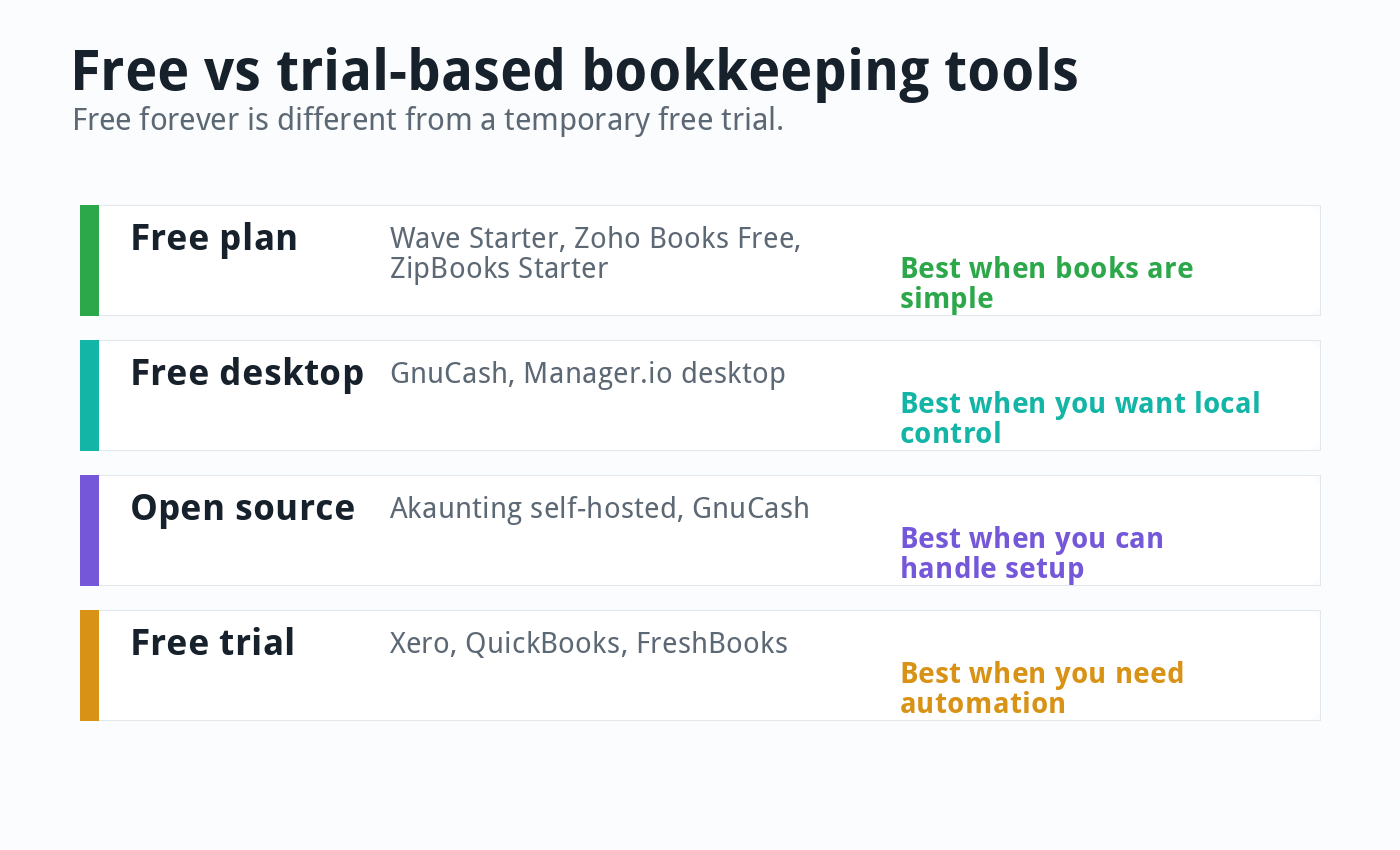
For a brand-new business, a free plan can be enough. For a growing business, a trial of a paid accounting platform may teach you more about the workflow you will need later.
How I Compared Free Bookkeeping Tools
I compared these tools by real small-business needs, not by which product has the most marketing claims. The main question was simple: can this tool help a small business keep cleaner books without paying upfront?
The key factors were free-plan limits, invoicing, expense tracking, bank reconciliation, reports, accountant access, receipt handling, payment options, payroll path, export options, support, ease of use, and upgrade path.
I also looked at whether the tool is cloud-based, desktop-based, or self-hosted. That matters because free desktop software may give you privacy and control, but it may not fit a team that wants remote access.
Pricing and plan limits change often. Treat this guide as a June 4, 2026 snapshot, then check the vendor’s live page before you sign up.
Best Overall Free Cloud Option: Wave
Wave is one of the best free bookkeeping options for very small businesses that want simple cloud software. It is especially useful for invoicing, customer tracking, and basic bookkeeping records.
Wave’s free Starter plan is the main reason it belongs near the top of this list. It gives small businesses a no-cost way to start tracking income and sending invoices.
Wave is strongest for freelancers, solo service providers, consultants, and very small businesses with simple books. It is less ideal for businesses that need strong automation, complex reporting, multiple users, inventory, or deeper accountant workflows.
As of 2026, Wave also offers a Pro plan. Wave’s pricing page lists Pro at $19 per month on monthly billing, with annual billing also available.
The Pro plan adds features that many growing businesses eventually want, such as bank transaction auto-import, auto-merge and categorization, unlimited receipt capture, and payment-related benefits. That means Wave can start free, but the better workflow may eventually cost money.
Wave’s biggest advantage is simplicity. Its biggest weakness is that it can feel too basic once the business has payroll, ecommerce sales, detailed tax needs, or multiple people working in the books.
Best Free Accounting Plan: Zoho Books
Zoho Books has one of the strongest free accounting plans available to eligible small businesses. It is more structured than Wave and can grow into a full paid accounting system.
Zoho’s US pricing page lists a Free plan at $0. It includes core features such as invoices, quotes, expenses, journals, vendors, mileage tracking, online payments, customer portal, recurring invoices, bank reconciliation, W-9 management, 1099 contractor tracking, and 50+ reports.
The free plan includes one user plus one accountant. Zoho also states that the free plan is available as long as the business stays below its stated annual revenue threshold.
Zoho Books is a good fit if you want a real accounting system and you expect to upgrade later. Paid plans start at $20 per organization per month on monthly billing as of June 2026.
The main downside is plan complexity. Zoho has many tiers, limits, add-ons, and feature differences, so you need to check the pricing table carefully before building your workflow around it.
Zoho Books makes the most sense for small businesses that like the Zoho ecosystem. If you already use Zoho CRM, Zoho Expense, Zoho Inventory, or Zoho Projects, Books can fit naturally beside them.
Read our Zoho Books review if you want more detail before you test it.
Best Simple Free Invoicing: ZipBooks
ZipBooks is a useful free option for small businesses that care most about invoices, quotes, customers, and basic bookkeeping. Its Starter plan begins at free, according to its pricing page.
ZipBooks is easier to understand than many open-source tools. It can be a good starting point if you want a clean online interface and do not want to download desktop software.
The tradeoff is depth. Free invoicing tools usually work well at the beginning, then feel limited when you need stronger reporting, bank automation, team access, recurring workflows, or accountant collaboration.
ZipBooks is best for freelancers, side businesses, and service providers that want a simple way to send invoices and track basic money activity. It is not my first pick for ecommerce, payroll, or inventory-heavy businesses.
Best Open-Source Desktop Option: GnuCash
GnuCash is a free, open-source accounting program for personal and small-business finance. It is available for major desktop operating systems and uses double-entry bookkeeping principles.
GnuCash is not as polished as modern cloud accounting software, but it is powerful for people who want control and do not mind learning accounting basics. It can handle accounts, income, expenses, reports, invoices, and small-business financial tracking.
The biggest advantage is that it is truly free and open source. You are not depending on a cloud subscription just to keep your records.
The biggest disadvantage is usability. GnuCash can feel technical, and it is not the best fit if you want a mobile-first cloud workflow with easy accountant invitations and automatic bank feeds.
GnuCash is best for owners who are comfortable with accounting concepts or willing to learn. It is less ideal for teams that need easy collaboration.
Best Free Desktop Control: Manager.io
Manager.io is another strong option for small businesses that want free desktop accounting software. Its desktop edition is free for Windows, Mac, and Linux.
Manager.io can be appealing if you want local data control and do not want a monthly subscription. It is more business-focused than a simple spreadsheet and can handle many accounting tasks.
The tradeoff is that desktop software asks you to manage your own setup, backups, and workflow. If your laptop fails and you have no backup, free software can become expensive very quickly.
Manager.io is best for solo owners, local businesses, and bookkeeping users who want desktop control. It is less ideal if your accountant, bookkeeper, and team all need cloud access.
Best Self-Hosted Free Option: Akaunting
Akaunting is a free, open-source accounting platform for small businesses and freelancers. Its self-hosted Standard plan is free, according to Akaunting’s website.
Akaunting can work for businesses that want a web-based interface but also want more control than a typical SaaS product. It supports invoicing, expense tracking, accounting, and money management basics.
The catch is setup. Self-hosted software is not the same as signing into a polished cloud app and getting started in five minutes.
You may need to manage hosting, updates, security, backups, and add-ons. That can be fine for a technical founder, but it may be too much for a non-technical business owner.
Akaunting is best for people who value open-source control and can handle setup. It is not the easiest free bookkeeping tool for beginners.
Free Trial Upgrade Options: Xero, QuickBooks, and FreshBooks
Xero, QuickBooks, and FreshBooks are not free bookkeeping software in the same way Wave Starter, Zoho Books Free, GnuCash, or Manager.io are free. They are paid accounting tools that often provide trials or promotions.
They still belong in the conversation because many businesses outgrow free tools quickly. A free trial can help you decide whether a paid product will save enough time to justify the subscription.
Xero is the best upgrade path if you want clean bank reconciliation, collaboration, reporting, and a modern accounting workflow. It is especially strong for growing service businesses and ecommerce sellers.
QuickBooks is the best upgrade path if your accountant already prefers it, or if payroll and the US advisor ecosystem matter most. FreshBooks is the best upgrade path for service businesses that send a lot of invoices and estimates.
For a bigger paid-software comparison, read our Best Accounting Software 2026 guide. You can also read our Xero vs QuickBooks comparison if those are your final two options.
Free Bookkeeping Software Comparison Table
| Software | Free Type | Best For | Main Limit |
|---|---|---|---|
| Wave | Free Starter cloud plan | Simple invoicing and bookkeeping | Automation and advanced workflow move to Pro |
| Zoho Books | Free cloud plan for eligible businesses | Micro businesses that want real accounting | Revenue and plan limits apply |
| ZipBooks | Free Starter plan | Simple online invoicing | Basic reporting and limited depth |
| GnuCash | Free open-source desktop software | Owners comfortable with accounting basics | Less polished cloud collaboration |
| Manager.io | Free desktop edition | Local bookkeeping control | Backups and collaboration need planning |
| Akaunting | Free self-hosted open-source plan | Technical users who want control | Setup, hosting, and maintenance |
| Xero | Free trial or promotion, then paid | Growing businesses ready to upgrade | Not free forever |
When Free Bookkeeping Software Is Enough
Free bookkeeping software is enough when your business is simple. That usually means few transactions, no employees, no complex inventory, no multi-state sales tax, and no heavy ecommerce workflow.
It can also be enough when you mainly need invoices, basic expense tracking, customer records, simple reports, and year-end numbers for your tax preparer. Many solo businesses can start this way.
Free tools are also useful for learning. They help owners understand income, expenses, categories, cash flow, and reports before paying for a more advanced system.
The key is discipline. Free software does not help if you ignore it for ten months and then try to fix the books in April.
When Free Bookkeeping Software Is Not Enough
Free bookkeeping software becomes risky when the business gets more complex. Complexity usually shows up before owners expect it.
You may need to upgrade when you add employees, pay contractors, collect sales tax, sell across multiple channels, import bank transactions every day, track inventory, or give your accountant regular access.
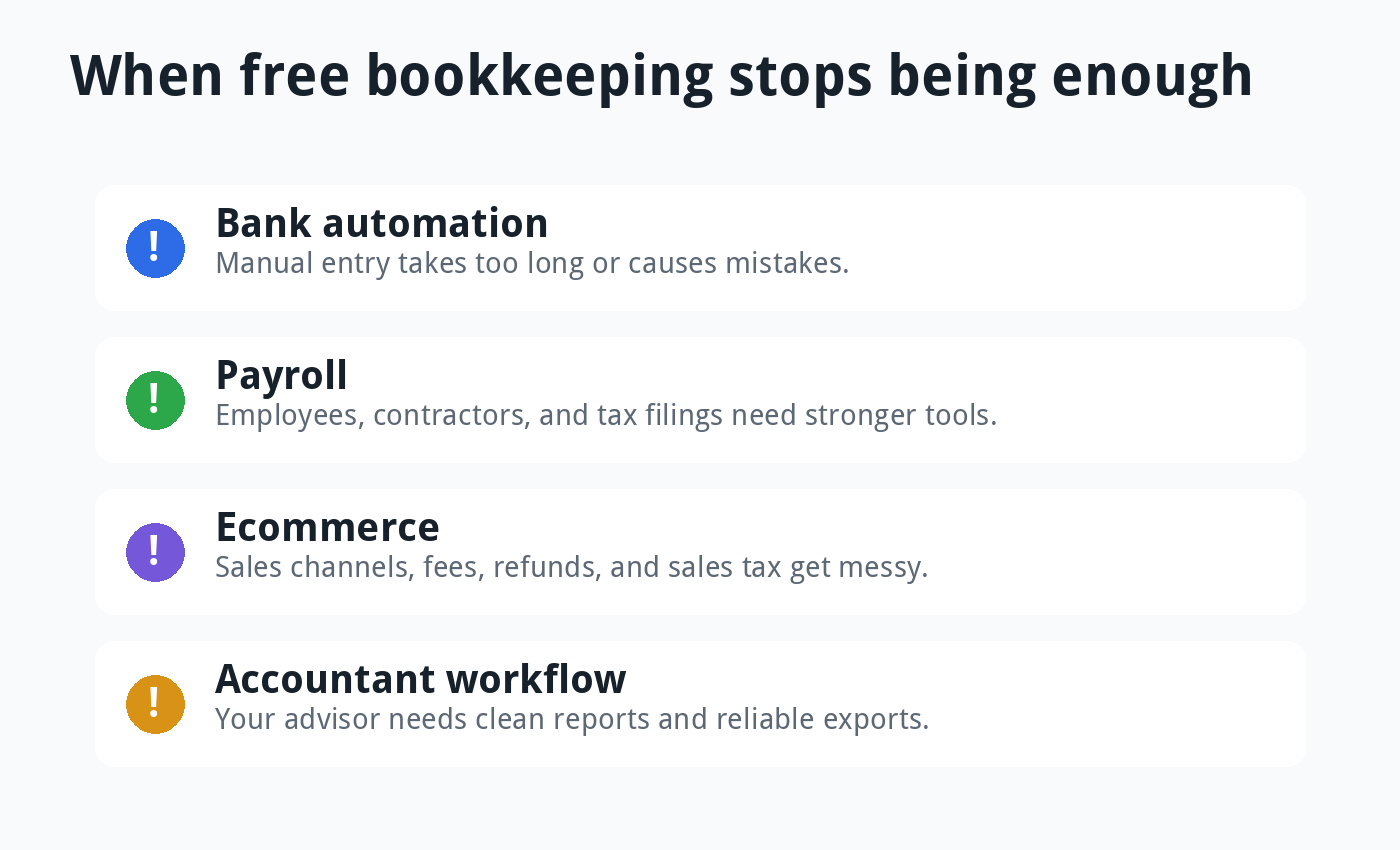
You should also upgrade when manual entry takes too long. A paid tool that saves three hours every month may be cheaper than a free tool that wastes your weekends.
Free software can also become expensive if it causes errors. Bad books can lead to missed deductions, wrong tax reports, unpaid invoices, duplicate expenses, and confusing cash flow.
Features to Test Before Choosing
Invoicing: Create a test invoice, add your logo, send it to yourself, and check the payment options. If invoicing feels clumsy on day one, it will not feel better after fifty invoices.
Expense tracking: Enter a few real expenses and attach receipts. Check whether the free plan supports enough receipt capture for your monthly volume.
Bank reconciliation: This is where free tools often differ from paid tools. Manual entry is fine for a few transactions, but bank feeds can save time once activity grows.
Reports: Run a profit and loss report, balance sheet, customer report, and tax summary. If the reports are too basic for your accountant, you may outgrow the tool quickly.
Exports: Make sure you can export your data. A free tool should not trap your records if you later move to Xero, QuickBooks, Zoho Books, or another system.
Support: Free plans often have limited support. That may be fine for simple needs, but it matters when something breaks near tax season.
Best Free Bookkeeping Software by Business Type
Freelancers: Wave, ZipBooks, and FreshBooks trial are the easiest places to start. Choose based on invoices, payment options, and client limits.
Micro businesses: Zoho Books Free is one of the strongest options if you qualify. It gives more accounting structure than many basic free tools.
Offline-first businesses: GnuCash and Manager.io are worth testing. They work better when you want local control instead of a cloud subscription.
Technical founders: Akaunting is worth a look if you can handle hosting and maintenance. It gives control, but it asks for more responsibility.
Ecommerce sellers: Free bookkeeping software is often not enough. Read our guide to the best accounting software for ecommerce businesses before choosing.
Growing teams: Test Xero, QuickBooks, or Zoho paid plans. Free tools usually become limiting when several people need access and clean monthly reports.
Common Mistakes With Free Bookkeeping Software
The first mistake is choosing a tool only because it is free. Free is useful, but it is not useful if the tool cannot produce the reports your business needs.
The second mistake is ignoring backups. Desktop and self-hosted tools need a backup habit, or you risk losing the books.
The third mistake is waiting too long to reconcile. Reconciliation is easier every week than every quarter.
The fourth mistake is mixing personal and business transactions. Even the best free software cannot fix a messy bank account without extra work.
The fifth mistake is not asking your accountant. If your accountant cannot work with your exports, you may save money on software but spend more on cleanup.
Free Bookkeeping Reviews: Pros and Cons
Wave Pros and Cons
Wave’s biggest advantage is that it is easy to start. A solo business can create invoices and track simple bookkeeping records without learning a heavy accounting system.
The downside is that the free Starter plan is not the full Wave experience. If you want stronger automation, bank imports, receipt capture, and better workflow features, the Pro plan becomes more attractive.
Zoho Books Pros and Cons
Zoho Books gives eligible micro businesses a surprisingly complete free plan. It has more accounting structure than many basic free invoicing tools.
The downside is that Zoho’s pricing table has many tiers and limits. You should check revenue limits, user limits, invoice limits, expense limits, add-ons, and feature availability before relying on the free plan long term.
ZipBooks Pros and Cons
ZipBooks is simple and friendly for basic invoicing. It can be a good fit when you want a clean online tool and do not need deep accounting features.
The weakness is that simple tools often stay simple. Once you need better reports, automation, collaboration, or complex accounting workflows, you may need to upgrade or switch.
GnuCash Pros and Cons
GnuCash is powerful because it follows real double-entry accounting principles and costs nothing. It is a serious tool, not just a lightweight invoice app.
The tradeoff is learning curve. Owners who want a polished cloud dashboard may find it old-fashioned, while owners who like control may appreciate exactly that.
Manager.io Pros and Cons
Manager.io is practical for local bookkeeping and gives small businesses a free desktop route. It can work well when one person manages the books from one main machine.
The risk is operational. You need a backup plan, a device plan, and a clear process for sharing reports with your accountant.
How to Move From Free to Paid Without Making a Mess
Before you move from free bookkeeping software to a paid platform, export everything important. Save your chart of accounts, customer list, vendor list, unpaid invoices, unpaid bills, profit and loss, balance sheet, general ledger, and transaction history.
Choose a clean switch date. The first day of a month, quarter, or fiscal year usually makes opening balances easier to verify.
Do not import messy data just because the new software allows it. Clean duplicates, old vendors, unused accounts, and uncategorized transactions first.
After the move, reconcile the first month carefully. If the opening balances are wrong, the new software will look wrong even if the tool itself is good.
Simple Monthly Bookkeeping Routine
Free software works best when you use it regularly. A simple monthly routine can prevent most cleanup problems.
Once a week, add new income, enter expenses, upload receipts, and mark invoices as paid. Once a month, reconcile accounts and review reports.
At month end, check unpaid invoices, unpaid bills, profit and loss, balance sheet, and cash balance. Send those reports to your accountant if they help you stay accountable.
This routine matters more than the logo on the software. Clean books come from consistent habits, not just better tools.
Final Verdict
Wave is the best free cloud bookkeeping tool for many simple small businesses. It is easy to start, practical for invoicing, and good enough for basic records.
Zoho Books is the best free accounting plan if your business qualifies and you want a stronger long-term upgrade path. It offers more structure than most free tools.
ZipBooks is best for simple free invoicing. GnuCash and Manager.io are best for desktop control, while Akaunting is best for technical users who want open-source flexibility.
If your business is growing, free software may only be a temporary bridge. Once bank automation, payroll, ecommerce, and accountant workflows matter, test a paid tool like Xero before the books become messy.
FAQ
What is the best free bookkeeping software for small business?
Wave is the best free cloud option for simple bookkeeping. Zoho Books is the best free accounting plan for eligible micro businesses, while GnuCash and Manager.io are strong free desktop options.
Is free bookkeeping software safe?
Free bookkeeping software can be safe if you choose a reputable tool, use strong passwords, protect your device, and keep backups. For desktop tools, backups are especially important.
Can free bookkeeping software handle payroll?
Most free bookkeeping tools are not enough for serious payroll. If you have employees or contractors, compare payroll add-ons, partner payroll tools, or paid accounting platforms.
When should I upgrade from free bookkeeping software?
Upgrade when manual work takes too long, reports feel limited, your accountant needs better access, or you add payroll, ecommerce, inventory, or more complex tax needs.
